S/MIME certificates safeguard email by providing digital signatures and encryption. However, ensuring their smooth upkeep often presents subtle challenges. Unlike website TLS certificates, S/MIME keys are managed within email clients, where key handling and client behavior can affect issuance, renewal, or replacement.
This case study examines how a desktop email environment created unexpected friction during the reissue of an S/MIME certificate. By detailing the investigation and resolution, it shows how client software and certificate workflows combine to influence routine certificate management.
Client Snapshot
- Organization: YourSky.blue
- Location: Valais, Switzerland
- Industry: Software development and DevSecOps solutions
- Use case: Secure business email communication using S/MIME certificates
- Email client environment: Thunderbird desktop client
Key Takeaways
- Email clients may control private keys internally, which can limit certificate reissue workflows.
- S/MIME certificates follow a different lifecycle than TLS certificates used for websites.
- Environmental or client-specific constraints can prevent certificate reissues even when a valid CSR is submitted.
- Resetting a certificate order can sometimes be the fastest way to restore a working configuration.
- Clear communication between the client and certificate provider helps resolve certificate issues quickly.
Email Security in a DevSecOps Environment
YourSky.blue is a Switzerland-based organization that provides services and products designed to help organizations monitor software dependencies, detect vulnerabilities, and improve the security of their software supply chains.
With decades of combined experience in software engineering and DevSecOps, the team works with organizations that depend on reliable and secure digital infrastructure.
YourSky.blue relies on secure email communication as part of its daily operations. To protect outgoing messages and verify sender identity, the company uses S/MIME certificates for digital signing and encryption.
S/MIME certificates allow recipients to confirm that a message was sent by the stated sender and that its content has not been altered in transit.
For organizations exchanging sensitive or business-critical information via email, this additional layer of trust is a crucial part of their communication workflow.
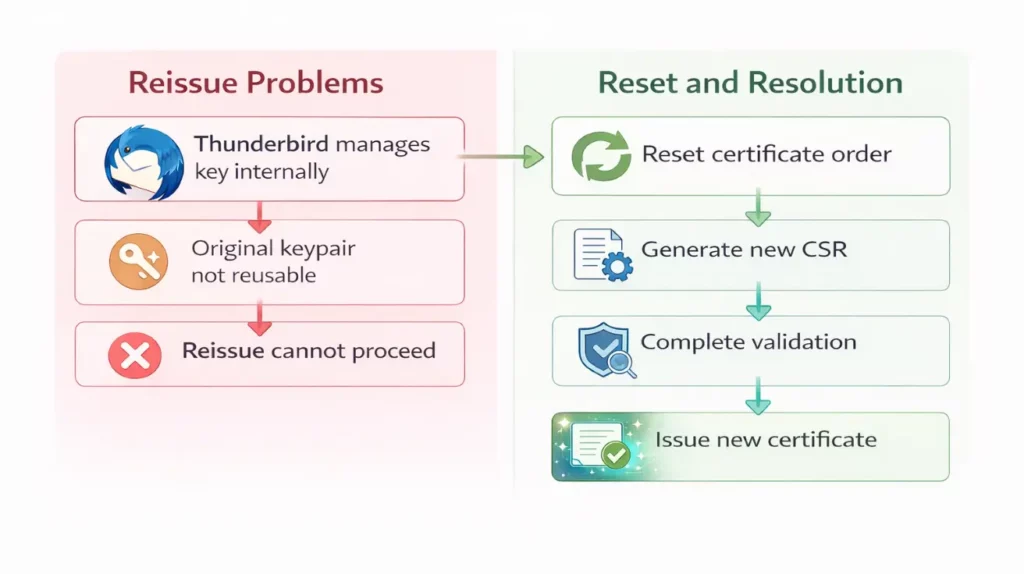
In this case, the certificate was deployed in a desktop email environment using the Thunderbird email client. Like many desktop clients, Thunderbird manages the cryptographic keys associated with installed certificates internally.
This setup works well for everyday use but also means that certificate management actions, such as renewal or reissue, depend on how the client handles those keys.
Where the S/MIME Reissue Process Broke Down
On January 14, the client requested a reissue of an S/MIME certificate used for secure email communication and included a Certificate Signing Request (CSR) in the support ticket
At first glance, the request looked routine. Reissuing a certificate normally involves submitting a new CSR and completing validation through the certificate authority. However, several issues quickly interrupted the process.
During the discussion, the client noted that the Thunderbird email client does not expose the private key associated with the installed certificate. Because of this limitation, the original keypair could not be reused and a new CSR had to be generated.
Factors Preventing the Reissue
SSL Dragon’s support team identified two conditions that prevented the certificate from being reissued within the existing order:
- the original keypair could not be reused
- the parameters required specific alignment with the client’s internal key handling
As a result, the certificate could not be reissued in its current state. The support team determined that the certificate order would need to be reset before a new S/MIME certificate could be issued correctly.
Resetting the Certificate Order and Issuing a New S/MIME Certificate
Rather than attempting further modifications within the existing order, the support team canceled the active certificate and initiated a fresh configuration process.
This approach ensured that the new certificate would be issued with the correct S/MIME parameters and would ensure full compatibility with the technical requirements uncovered during the investigation.
Canceling the Existing Certificate Order
The first step was to cancel the active certificate order associated with the account. By closing the existing order, the support team cleared the incorrect certificate state that had prevented the reissue from proceeding.
A new S/MIME certificate was then added to the client’s account so the configuration process could start again from a clean state.
Creating a New Certificate Request
With the new order in place, the client was asked to submit the configuration form and generate a new certificate request. After the request was submitted, the client provided the Sectigo order number generated during the configuration process so the SSL Dragon team could verify and authorize the request.
Once the order was confirmed, the certificate authority began the standard S/MIME validation procedure.
Certificate Authority Validation
After the configuration request was approved, the certificate authority sent validation instructions to the client by email. These instructions allowed the client to complete the final verification step required for certificate issuance.
With validation completed, the certificate authority proceeded with issuing the new S/MIME certificate.
Final Issuance
Shortly after validation, the certificate authority confirmed that the configuration request had been approved. The new S/MIME certificate was successfully issued and made available through the certificate authority portal, allowing the client to complete the deployment in their email environment.
Resetting the certificate order and rebuilding the request with the correct parameters restored the intended S/MIME configuration and resolved the issue.
Resolution Timeline
From the moment the issue was identified, the resolution moved quickly. The technical constraints and key limitations were confirmed during the same support cycle.
After determining that the existing certificate order could not be reused, the support team reset the order and initiated a new S/MIME certificate request.
The certificate authority approved the configuration the following day, and the new S/MIME certificate was issued shortly afterward, bringing the total resolution time to approximately 24 hours.
Lessons from the Incident
While the issue in this case was resolved quickly, it highlights several practical aspects of managing S/MIME certificates in real-world environments.
Email encryption certificates are closely tied to the software that handles them, and small configuration details can influence how easily they can be maintained or replaced.
Looking beyond the specific incident, a few broader operational lessons emerge for teams responsible for deploying and maintaining S/MIME certificates.
1. Treat Private Keys as an Operational Dependency
S/MIME deployment looks simple until you realize the certificate lifecycle is anchored to the private key. If key access is unclear, every later action becomes slower: replacement, migration, and recovery all turn into “figure out what the tool allows” first.
The practical takeaway is to decide early who holds the key and where it lives. That single decision determines whether future certificate work is a quick refresh or a rebuild.
Operational takeaway
- Document where the key is generated and stored (client, OS store, HSM, separate key tool).
- Keep a clear export policy for situations where export is allowed and appropriate.
- Avoid treating the email client as the only source of truth for certificate assets.
2. Ensure the Certificate Matches Its Intended Use
S/MIME and website TLS may share familiar terms, but they behave differently in day-to-day handling. Confusion usually arises when the workflow being followed does not match the certificate’s intended use.
The safest approach is to validate the purpose upfront and align the steps, screens, and configuration path around that purpose, before anyone spends time pushing forms through the wrong flow.
Operational takeaway
- Confirm the certificate’s purpose at the start (email signing/encryption vs website security).
- Align the workflow to that purpose, including validation expectations and where the certificate is managed.
3. Know When to Start Fresh
Some certificate problems are worth diagnosing in place. Others are not. When the current state becomes uncertain, the most efficient outcome often comes from moving to a clean, known-good path that restores a working baseline.
That approach reduces back-and-forth, lowers the risk of compounding mistakes, and gets the deployment back into a predictable shape.
Operational takeaway
- If the setup becomes confusing, stop and restart the process instead of trying to fix it piece by piece.
- Choose the option that fixes the problem fastest, even if it means starting again instead of patching the existing setup.
4. Don’t Treat Certificates as a One-Time Setup
S/MIME certificates shouldn’t be treated as a one-time setup. Like any other security component, they need to be managed over time. Teams that plan ahead for renewals and replacements avoid rushed fixes later.
Operational takeaway
- Keep track of when certificates expire and who is responsible for renewing them.
- Save notes about how the certificate was installed so the process can be repeated easily if needed.
Improve Email Security with S/MIME Certificates
Email carries approvals, contracts, financial details, and everyday decisions that keep organizations moving. S/MIME certificates protect that communication by adding a verified digital signature and enabling message encryption.
Recipients can confirm who sent the message and trust that its contents arrived exactly as they were written.If your organization depends on reliable email communication, S/MIME certificates provide a straightforward way to strengthen trust between senders and recipients.
SSL Dragon offers a wide range of S/MIME certificates for individuals, teams, and businesses. Browse our selection to find the option that fits your email environment and security needs.
Bugün SSL Dragon’dan sipariş vererek SSL Sertifikalarında %10 indirimden yararlanın!
Hızlı düzenleme, güçlü şifreleme, %99,99 tarayıcı güvenilirliği, özel destek ve 25 günlük para iade garantisi. Kupon kodu: SAVE10