D4B Solutions discovered that code signing certificates require a brand new USB token every cycle, regardless of whether the old one still works. RevRTB learned that paying for a renewal doesn’t extend an active certificate; it triggers a fresh issuance that has to be installed separately.

A German IT company ran into the 200-day lifespan cap that limits every public certificate, even on a two-year subscription. Here’s how each situation unfolded and what the underlying rule means for anyone managing certificates at scale.
Case 1: Code Signing Renewal and Hardware Constraints
D4B Solutions is a Spanish firm with two decades of experience implementing Microsoft Dynamics and ERP systems, where code signing certificates verify that delivered software hasn’t been tampered with after release.
When the team moved to renew an expiring certificate, a routine ticket exposed how strict CA hardware rules can disrupt what should be a five-minute task.
When D4B Solutions began replacing an expiring code signing certificate, the task seemed straightforward. But the process paused when the client provided an order number tied to their old certificate. The renewal could only proceed once a new configuration flow was completed, generating a fresh Sectigo order number.
Hardware and Duration Discrepancies
A common misconception surfaced regarding the security hardware. The client expected to reuse the USB token from their previous certificate, a logical assumption for most renewals.
However, code signing regulations are stricter than standard SSL rules. CAs require a new, dedicated hardware device for each certificate cycle; once a token is provisioned, it cannot be reused for a subsequent issuance.
Further complications arose during the configuration form submission. While the client had purchased a one-year certificate, the form was mistakenly submitted for a two-year term. This mismatch halted the authorization process until the duration was corrected and a final, valid order number was generated.
Finalizing the Deployment
With the configuration approved, the final step was hardware. Code signing certificates can’t be installed like standard SSL files. They have to be loaded onto a physical USB token shipped from the certificate authority, and that token is non-negotiable for every new issuance cycle. D4B Solutions paid the token and expedited shipping fee, the certificate authority dispatched the device, and the deployment completed once the hardware arrived.
Resolution Timeline
- November 4: The client initiated the request as the current certificate neared expiration. Support quickly clarified that the old order number was invalid and explained that a new USB token was mandatory.
- November 5–6: After some difficulty locating the correct details, support guided the client through a fresh configuration. A new hurdle appeared when the submitted form duration didn’t match the purchased term.
- November 7: The client corrected the term and provided the final order number. Support confirmed approval and issued the final payment request for the hardware and expedited shipping to complete the process.
Case 2: The Renewal Paradox: Why Certificates Don’t Update in Place
RevRTB runs an advertising network reaching 100 million monthly users across 800 direct publishers, where a single certificate lapse means browser warnings, dropped traffic, and broken campaigns.
When the team paid for a renewal and watched the expiration date sit unchanged, what looked like a failed transaction turned into a lesson about how SSL renewals actually work.
RevRTB’s case centered on a common misunderstanding: the belief that paying for a renewal automatically extends the expiration date of an active certificate.
After completing a payment, the client noticed the existing certificate still showed the original expiration date. This created the impression that the transaction had failed or that they were being charged for a service that hadn’t been delivered.
Issuance vs. Extension
Support clarified that SSL renewals do not function like subscription extensions. A renewal actually triggers the creation of a completely new certificate. This new file must be configured, validated, and installed before the updated validity period appears in the browser.
The confusion stemmed from expecting the live certificate to update in real-time rather than treating the renewal as a fresh deployment cycle.
Managing Accidental Duplicates
While waiting for clarification, the client made an additional payment to “recreate” the service, resulting in a duplicate purchase. To resolve the immediate issue, support provided the already-issued certificate files directly.
This helped the client realize they were simply looking at the old service record instead of the newly available replacement.
Turning a Mistake into a Solution
The final hurdle was what to do with the accidental extra purchase. Later that month, the client asked if the spare certificate could be applied to a different expiring domain.
Support facilitated this transition by adding a new Wildcard certificate to the account, even advising that the existing CSR could be reused to simplify the setup. This effectively turned a billing error into a proactive solution for another part of their infrastructure.
Resolution Timeline
- December 9: The client reported that their payment hadn’t changed the service expiration date. Support explained the “purchase-to-installation” workflow required for renewals.
- December 12: Believing the first attempt failed, the client made a second payment. Support stepped in to confirm the first renewal was already approved and delivered the necessary files to clear up the confusion.
- December 20: With the primary issue settled, the client requested to move the extra credit to a different domain. Support finalized the setup for the new domain, completing the transition.
Case 3: Complex Multi-Domain Management and Lifespan Rules
An IT company (name withheld at client request) provides consulting and managed services across Germany, supporting client environments where SSL certificates protect dozens of platforms and automated workflows.
When the team rolled out a Multi-Domain Wildcard product to consolidate coverage, three separate issues surfaced before issuance: a malformed CSR, validation requirements that kept expanding as new domains were added, and a certificate lifespan that didn’t match the subscription term.
The situation was the most dense of the three. Following a move to a Multi-Domain Wildcard product, the setup involved a mix of standard hostnames and wildcard entries. While the purchase was uneventful, the technical configuration quickly revealed how small details can stall a large-scale deployment.
Technical Friction and CSR Errors
The first hurdles were purely technical. The client’s initial Certificate Signing Request was rejected because it accidentally included the private key and duplicated data.
Even after fixing that, a second rejection occurred because the “Locality” field contained parentheses, a character often disallowed by certificate authority systems. Support eventually guided the client through a specialized tool to generate a clean, compatible request.
The Validation Ripple Effect
Because the scope covered multiple brands and wildcard domains, validation was a multi-step process. Each time a new domain such as a wildcard for a secondary brand was added to the request, it triggered an additional DNS validation requirement.
With a hard expiration date looming for their old systems, the client had to move quickly to update DNS CNAME records and wait for propagation to avoid a total service blackout.
The Multi-Year Subscription Trap
Once the certificate was finally issued, a new point of confusion emerged: the expiration date. Although the client had purchased a two-year subscription, the certificate itself showed an expiration date just 13 months away.
Support had to explain a critical industry rule: public SSL certificates are capped at a maximum lifespan of 200 days. To use the full two years of a subscription, owners must “reissue” the certificate annually rather than receiving one long-term file.
Resolution Timeline
- Early March: The client purchased the multi-domain certificate and sought confirmation on the setup. Support flagged technical errors in the CSR, specifically regarding invalid characters in the location field.
- March 10: With the previous certificate set to expire the next day, the pace accelerated. The client provided a corrected CSR, and we generated DNS validation records for five separate entries
- March 11: On the day of the old certificate’s expiration, the client questioned the shortened validity period. Our staff clarified the industry-wide lifespan caps and explained how to claim the second year of the subscription through the reissue process.
Lessons from the Incidents
While these cases involved different products, they share a common reality: SSL and code signing setups are dictated by industry regulations that aren’t obvious when people buy the certificates. As a result, most of the confusion arises from a gap between user expectations and certificate authority requirements.
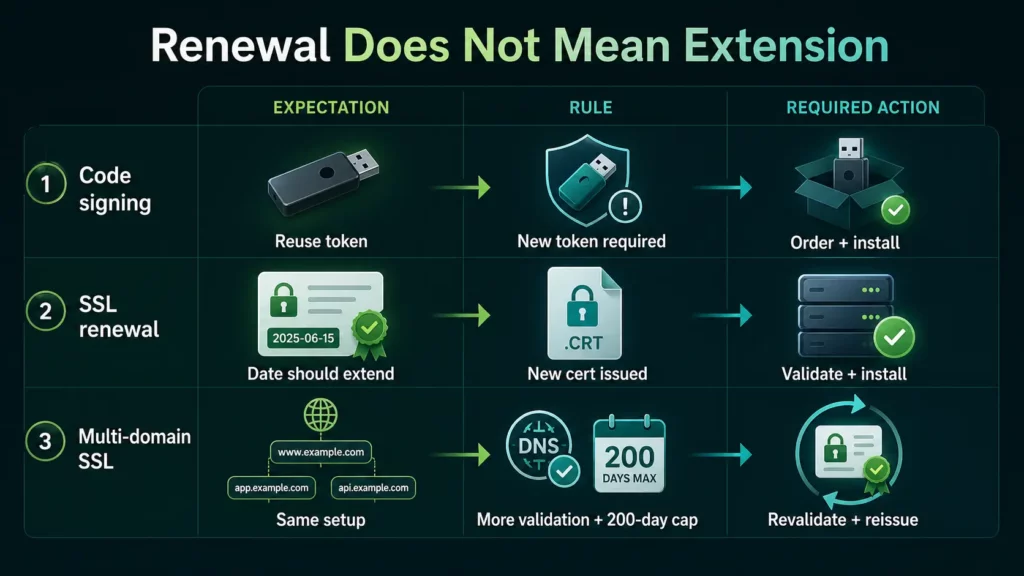
1. Renewal is a Replacement, Not an Extension
SSL renewal does not automatically update an active installation. As seen with RevRTB, payment alone doesn’t extend a deadline; the new certificate must still be configured and installed. Similarly, D4B Solutions found that a renewal often requires entirely new authorization steps and hardware.
Takeaway: Treat renewals and replacements as fresh deployments. Always verify if a new installation is required before assuming your environment is secure.
2. Code Signing Requires Fresh Hardware
Code signing follows much stricter hardware standards than standard SSL. D4B Solutions’ attempt to reuse an existing USB token failed because CAs like Sectigo mandate new, dedicated hardware for each certificate cycle.
Takeaway: Factor in the cost and shipping time for new hardware tokens during every renewal cycle. Never assume legacy hardware remains compatible with new certificates.
3. Changes to the Domain List Restart Validation
The third case shows how adding domains mid-process can slow down a rollout. If you add a new website or a wildcard entry after you’ve already started, the CA must verify the new additions.
Takeaway: Finalize your domain and SAN list before starting. Any change to the scope after configuration begins will likely reset the validation clock and delay issuance.
4. Subscription Term vs. Certificate Lifespan
A multi-year purchase does not result in a multi-year certificate. Due to global security caps, certificates are limited to 200 days. The remaining time on a multi-year subscription is claimed through annual reissues.
Takeaway: Distinguish between your billing term and the certificate’s expiration date. Plan for a mid-subscription reissue to avoid service gaps.
Pro Tip: To eliminate the manual work of reissuing and installing certificates every year, consider switching to an ACME-automated certificate, which handles renewals and validation in the background, ensuring your coverage never stops.
5. Industry Rules Are Moving Faster Than Buyer Expectations
The 200-day lifespan cap that surprised the German IT firm isn’t a quirk of one certificate authority. It’s the result of an industry-wide push to shorten certificate validity, and the limit will keep dropping.
The CA/Browser Forum has already approved a phased reduction that will bring public SSL certificates to 47 days by 2029. Buyers who plan around today’s rules are planning around a moving target.
Operational takeaway:
- Don’t assume a multi-year subscription means a multi-year certificate. The billing term and the certificate’s actual validity are governed by separate rules.
- Build reissue cycles into your operational calendar, not just expiration dates.
- Where possible, automate certificate lifecycle management with ACME so future lifespan reductions don’t require manual intervention.
Strengthen Your Security with Expert Guidance
SSL and code signing certificates do more than just secure traffic. They are governed by strict industry rules on hardware, validation, and lifespan. Understanding these requirements early is the only way to avoid delays and manage renewals with confidence.
SSL Dragon simplifies your security by offering ACME-automated certificates that handle renewals and validation entirely without your intervention. Whether you’re overseeing a complex multi-domain network or a routine replacement, our hands-on support ensures you choose the right product for a hands-off SSL management.
आज ऑर्डर करते समय एसएसएल प्रमाणपत्रों पर 10% की बचत करें!
तेजी से जारी करना, मजबूत एन्क्रिप्शन, 99.99% ब्राउज़र ट्रस्ट, समर्पित समर्थन और 25 दिन की मनी-बैक गारंटी। कूपन कोड: SAVE10