Two independent clients reported SSL failures affecting Android users, despite their certificates being valid and correctly installed. Desktop browsers showed no errors, while specific mobile devices rejected the connections as untrusted.
Case Study Summary
- Problem: New CA chains were not trusted by older Android devices.
- Impact: Mobile users saw SSL errors despite valid certificates.
- Root cause: Android trust stores lag behind CA chain migrations.
- Resolution: Reissue using legacy or cross-signed chains, or migrate to a CA with better mobile compatibility.
- Key insight: SSL trust depends on client platforms, not only certificate validity.
An SSL certificate can be technically valid but still fail in production. Certificate validity only confirms that it was issued and is cryptographically sound. It doesn’t ensure universal trust across all devices.
This is exactly what happens during CA chain migrations. Certificate Authorities rotate roots and intermediates for security, compliance, and long-term sustainability.
But client platforms, especially mobile operating systems, update their trust stores much more slowly and inconsistently. The result is a fracture between modern certificate infrastructure and legacy device trust.
In this case study, we examine two real incidents where CA chain changes caused valid SSL certificates to fail on Android devices. We show how these failures surfaced in production, why standard diagnostics did not immediately reveal the cause, and how different resolution paths restored mobile compatibility in each case.
Xamisoft: When a Server Upgrade Broke Android Trust
Xamisoft develops language-learning applications used across desktop and mobile platforms. Their infrastructure had been running without SSL issues on Windows Server 2019. Desktop browsers and Android devices worked normally, and certificate deployment followed a standard IIS setup. The problem appeared only after a routine upgrade.
The Problem
They migrated their environment from Windows Server 2019 to Windows Server 2025 and reinstalled the SSL certificate using the same method that had worked before. From a server perspective, everything was correct.
The certificate was installed, the root and intermediate certificates were present, and desktop browsers showed no warnings. Nothing suggested a broken SSL configuration.Then Android users started reporting failures. On older Android versions, especially Android 6, the site displayed the error: “This certificate isn’t from a trusted authority.”
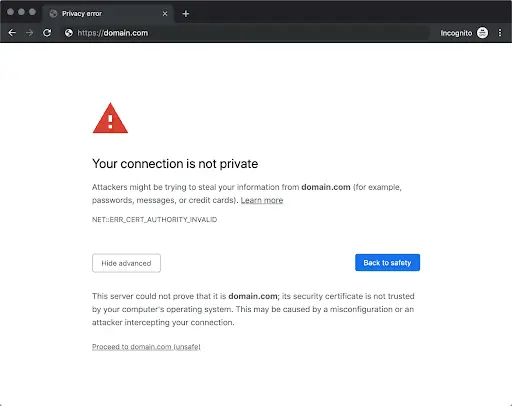
In some cases, similar errors appeared even on newer Android builds. That made the situation harder to interpret. At first glance, it seemed to be a misconfigured server or a missing certificate file.
From the client’s point of view, the situation made no sense:
- The same certificate had no issues on Windows Server 2019.
- It was now failing on Windows Server 2025.
- Desktop browsers still worked.
- Only mobile users were blocked.
Root Cause Analysis
This was the classic “everything is valid, yet users are locked out” scenario. At this point, two technical dimensions started to surface.
1. CA Chain Itself
On Windows Server 2019, the certificate had been issued under the older Sectigo RSA Domain Validation Secure Server CA hierarchy. This chain is widely trusted, including by older versions.
On Windows Server 2025, the same certificate was now chaining to: Sectigo Public Server Authentication CA DV R36.
This was part of Sectigo’s newer trust hierarchy. It was valid and trusted by modern systems, but some Android trust stores did not yet include it. For those devices, the certificate chain simply had no trusted anchor.
2. Certificate Chain Delivery
Windows Server 2019 fills missing intermediate certificates using the system store. IIS could retrieve intermediates behind the scenes and present a complete chain to clients, even if the administrator had not explicitly installed every component.Windows Server 2025 changed that behavior. It required the full chain to be explicitly configured. If any intermediate certificate was missing or incorrectly ordered, some clients would fail validation even if browsers could recover the chain through AIA (Authority Information Access) fetching.
This meant Xamisoft was dealing with two overlapping problems:
- Some Android devices did not trust the new Sectigo hierarchy.
- Some clients were not receiving the full chain correctly from the server.
Either issue alone can break SSL. Together, they obscure the real cause.
This explained why:
- Desktop browsers still worked.
- SSL testing tools showed mostly green results.
- Android devices failed unpredictably, depending on version and vendor build.
Our Diagnosis
First, we clarified that Android devices never use the server’s trust store. Installing root certificates on Windows does nothing for Android. The trust decision is made entirely on the device.
Second, we explained that Windows Server 2025 required explicit chain completeness. The server needed to present:
- The server certificate
- The correct intermediate certificates
- In the correct order
Relying on implicit retrieval was no longer viable.
The Resolution
Instead of trying to force IIS to handle this reliably, Xamisoft implemented a structural fix. They placed Nginx in front of IIS as a proxy and configured Nginx to serve the complete certificate chain explicitly.
This achieved two things:
- The full chain was delivered consistently to every client.
- Android devices that still trusted the older parts of the hierarchy could validate correctly.
After the change, SSL errors disappeared and Android 6 devices could access the site again. No change to the certificate itself was required.
This case highlighted that SSL failures are often not caused by one mistake, but emerge from interactions between CA chain evolution, platform trust stores, server software behavior, and Certificate delivery mechanics.Xamisoft’s fix repaired the delivery path between modern CA infrastructure and legacy client trust.
Coppernic: Android 6 Failed After a Certificate Reissue
Coppernic is a French technology company that designs and develops professional mobile hardware and software solutions for identification, access control, and data collection systems.
The Problem
The issue appeared during a routine certificate replacement only on legacy Android devices. Coppernic was in the process of switching from an existing SSL certificate to a newly ordered one.
The installation itself went as expected. Desktop browsers accepted the certificate without warnings. No server-side misconfiguration was visible. Still, Android 6.0.1 terminals could no longer establish a trusted connection.
The certificate was valid, properly installed, and issued by a legitimate Certificate Authority, yet those devices rejected it. The previous certificate had worked. Nothing else in the infrastructure had changed.
Root Cause Analysis
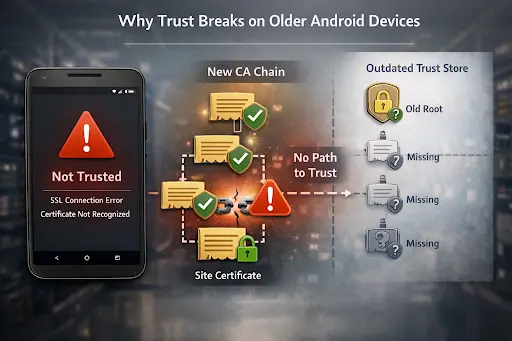
The only difference was the chain. The new certificate was issued under Sectigo’s updated hierarchy, using the R46 intermediate. This chain is part of Sectigo’s root migration process. It is compliant and trusted by modern platforms, but many older Android trust stores do not contain the anchors required to validate it.
Coppernic identified the situation precisely:
“It seems that the new CA certificate (R46) is not embedded.”
They attempted to restore compatibility by adding the USERTrust certificate, but that did not help. The Android devices still rejected the chain. The problem was not missing files on the server, but the absence of a compatible trust path on the devices themselves.
At that point, the question shifted from installation to compatibility.
Our Diagnosis
Our support team confirmed that the behavior matched Sectigo’s CA chain migration. Starting in mid-2025, new certificates were issued under updated hierarchies by default, including the R46 chain. While valid and trusted by modern platforms, that trust path was not present in many older Android trust stores.
We also clarified that adding certificates such as USERTrust would not affect Android devices. Android validates trust exclusively against its internal store. If the device does not recognize the issuing path, no server-side change can override the failure.
The Resolution
The practical solution was to reissue the certificate using a cross-signed CA.
After Coppernic contacted Sectigo, the certificate was reissued under a cross-signed chain that preserved a path to an older, still-trusted root. No infrastructure changes were required. Only the trust path was adjusted.
Once the reissued certificate was deployed:
- Android 6.0.1 devices connected normally.
- Desktop platforms continued to trust the certificate.
- The incompatibility disappeared immediately.
This case is important because it isolates the problem to a single variable. There was no server migration or chain delivery inconsistency. Both certificates were valid, but only one was usable in production.
Coppernic’s experience shows how quickly compatibility can collapse when a Certificate Authority moves its default issuance forward. A newer trust path is not automatically a broader one. In environments that still depend on legacy Android fleets, it can be narrower and more fragile.
How Devices Decide Whether to Trust a Certificate
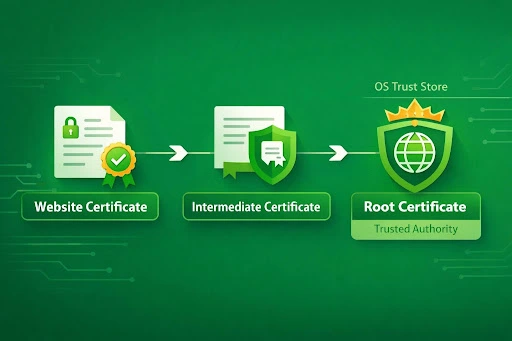
When a device checks an SSL certificate, it builds a trust path from the site certificate through one or more intermediates to a root certificate already present in its trust store. If the device cannot complete that path using certificates it trusts, the connection fails, even if the certificate itself is valid.
Android is fragmented by design. Manufacturers ship different versions, update schedules vary, and many devices stop receiving system updates long before they’re replaced. A phone can remain active for years after its last security or trust store update. From a certificate perspective, that device becomes a time capsule.
Trust stores live inside the operating system. If the OS is not updated, neither is the trust store. That means a device can continue to rely on certificate roots and trust paths that were current years ago, but no longer align with how modern Certificate Authorities issue chains.
Why These Issues Are Hard to Diagnose
Standard SSL diagnostics confirm that the certificate is valid, the chain is complete, and the server is serving it properly. What they do not validate is whether every client device in the ecosystem can trust that chain.
In our cases, all conventional checks passed. SSL testing tools returned green results, server configuration was correct, and desktop browsers worked without errors. From an infrastructure point of view, nothing was broken.
The failure occurred outside the scope of traditional diagnostics. Only specific device classes (older Android versions with outdated trust stores) were affected. Because most validation workflows do not include device-level trust compatibility testing, the problem remained invisible until real users encountered it.This creates a diagnostic blind spot: a certificate can be valid, correctly installed, and fully compliant, while still throwing errors for unsuspecting users.
How We Diagnosed the Problem
We identified the issue through pattern recognition.
When a valid certificate works on desktop platforms but fails on specific mobile environments, it points away from server configuration and toward trust store compatibility. This is not obvious unless you have prior exposure to CA migrations and platform-level trust behavior.
The appearance of Android-specific failures alongside a newly introduced CA chain immediately narrowed the scope of investigation. The problem was no longer “why is SSL broken,” but “which trust stores no longer accept this trust path.”
This requires separating two concepts that are often mixed up:
- certificate validity (cryptographic correctness)
- device trust (platform acceptance)
Recognizing that difference allowed us to diagnose the issue quickly and accurately.
The Resolution Paths We Offered
Once we confirmed the trust compatibility issue, fixing it became a matter of strategy rather than repair. Each option represented a different balance between short-term stability and long-term alignment with the trust ecosystem.
- Reissue using the legacy chain: This immediately restored compatibility with older Android devices. It was the fastest way to remove user-facing errors and stabilize production traffic.
- Accept partial compatibility: Some environments choose to prioritize modern platforms and accept that older devices will encounter SSL errors. This simplifies infrastructure, but limits audience reach.
- Switch to a different Certificate Authority: Migrating to another CA can provide longer-term mobile compatibility and reduce dependency on transitional trust chains.
Plan phased migration: Even when using a legacy chain temporarily, long-term planning is required. The underlying trust model will continue to evolve, and website admins must address compatibility structurally.
Why Reissuing the Cert is Not a Permanent Fix
Reissuing with a legacy or cross-signed chain postpones the compatibility problem; it does not remove it. These chains exist to bridge transitions, not to replace modern trust paths.
As Certificate Authorities continue modernizing their hierarchies, older intermediates and compatibility paths will be retired. When that happens, the same failure patterns will return if systems remain dependent on them.
Reissuing is therefore a stabilizer, not a solution. It buys time. Long-term stability requires alignment with how trust ecosystems evolve, not resistance to them.
That is the structural lesson behind both case studies.
Final Thoughts: Why “Valid” Certificates Still Fail in 2026
This case shows how SSL/TLS works in practice in 2026. Certificate Authorities move fast. They rotate chains, modernize trust paths, and respond to new security requirements. Devices do not. On smartphones, many users remain anchored to trust models that are years behind the current CA infrastructure.
Because of that, “valid” no longer automatically means “usable.”
Organisations shouldn’t treat SSL as a one-time setup. It has to be managed as a compatibility layer between:
- Certificate Authorities
- Operating systems
- Device lifecycles
- User environments
That means:
- Knowing what devices your users actually run, not just what browsers you test in.
- Testing certificates against real mobile platforms, including older Android versions.
- Tracking CA announcements and chain migrations as operational risks, not background noise.
- Avoiding dependency on a single trust path or a single CA whenever possible.
Flexibility becomes a security property. And this is where support becomes a stability layer, not just a helpdesk function.
At SSL Dragon, our support team translates ecosystem shifts into actionable decisions:
- recognizing trust compatibility problems
- separating platform behavior from server errors
- choosing mitigation strategies
- protecting mobile user access
We bridge the gap between standards and production reality. If you’re seeing unexpected SSL issues on mobile or want to verify how your certificate behaves live, run your domain through our SSL Checker to see exactly what your users’ devices see.
Economisește 10% la certificatele SSL în momentul plasării comenzii!
Eliberare rapidă, criptare puternică, încredere în browser de 99,99%, suport dedicat și garanție de returnare a banilor în 25 de zile. Codul cuponului: SAVE10