Saat Anda memesan sertifikat SSL/TLS, Certificate Authority tidak akan langsung menyerahkannya begitu saja. Mereka memerlukan bukti bahwa Anda benar-benar mengendalikan domain yang ingin diamankan. Di sinilah Domain Control Validation (DCV) berperan. Ini adalah proses verifikasi yang mengonfirmasi kepemilikan domain sebelum sertifikat diterbitkan.
Ini bukan sekadar formalitas birokrasi. DCV mencegah penyerang mendapatkan sertifikat valid untuk domain yang bukan milik mereka, yang dapat sepenuhnya merusak model kepercayaan yang menjaga keamanan HTTPS. CA/Browser Forum, badan industri yang menetapkan persyaratan dasar untuk penerbitan sertifikat, mewajibkan metode DCV tertentu yang harus diikuti oleh semua Certificate Authority.
Dalam panduan ini, kami akan menjelaskan apa itu DCV, mengeksplorasi berbagai metode validasi yang tersedia, dan membantu Anda memilih pendekatan yang tepat untuk infrastruktur Anda.
Daftar Isi
- Apa itu Domain Control Validation (DCV)?
- Metode Validasi Domain Berbasis Email
- Metode DCV Berbasis DNS
- Metode Validasi Berbasis File HTTP/HTTPS
- Skenario Validasi Khusus
- Memilih Metode DCV yang Tepat untuk Kebutuhan Anda
- Masalah Umum DCV dan Solusi Cepatnya
Hemat 10% untuk Sertifikat SSL saat memesan dari SSL Dragon hari ini!
Penerbitan yang cepat, enkripsi yang kuat, kepercayaan peramban 99,99%, dukungan khusus, dan jaminan uang kembali 25 hari. Kode kupon: SAVE10

Apa itu DCV (Domain Control Validation)?
Domain Control Validation (DCV) adalah proses yang digunakan Certificate Authority untuk memverifikasi kepemilikan domain sebelum menerbitkan sertifikat SSL/TLS. Proses ini mengonfirmasi kendali dengan mengharuskan pemohon merespons melalui email, mengunggah file ke domain, atau mengonfigurasi rekaman DNS untuk membuktikan otoritas atas domain tersebut.
Prosesnya bekerja seperti ini: CA menghasilkan tantangan unik (biasanya string alfanumerik acak), dan Anda menunjukkan kendali dengan merespons melalui infrastruktur domain Anda. Ini bisa melalui rekaman DNS, server web Anda, atau alamat email administratif. Setelah tervalidasi, CA mengetahui bahwa mereka menerbitkan sertifikat kepada pemilik domain yang sah, bukan seseorang yang mencoba menyamar sebagai situs Anda.
Standar Industri dan Kepatuhan
Persyaratan dasar dari CA/Browser Forum menentukan secara pasti bagaimana DCV harus dilakukan. Ini bukan sekadar saran, melainkan aturan ketat yang harus diikuti oleh CA atau berisiko kehilangan status kepercayaan mereka di browser.
Standar yang berlaku saat ini meliputi:
- Validasi harus menggunakan salah satu metode DCV yang disetujui (dibahas di bawah)
- Multi-Perspective Issuance Corroboration (MPIC) mengharuskan validasi dari berbagai perspektif jaringan untuk mencegah serangan yang bersifat lokal
- Validasi dapat digunakan kembali selama 397 hari untuk sertifikat Organization Validated (OV) dan Extended Validation (EV)
- Sertifikat Domain Validated (DV) tidak dapat menggunakan kembali validasi, Anda harus melakukan validasi setiap kali memperpanjang
Ada hal penting: persyaratan ini semakin diperketat. Industri sedang mengurangi masa berlaku maksimum sertifikat dan periode validasi.
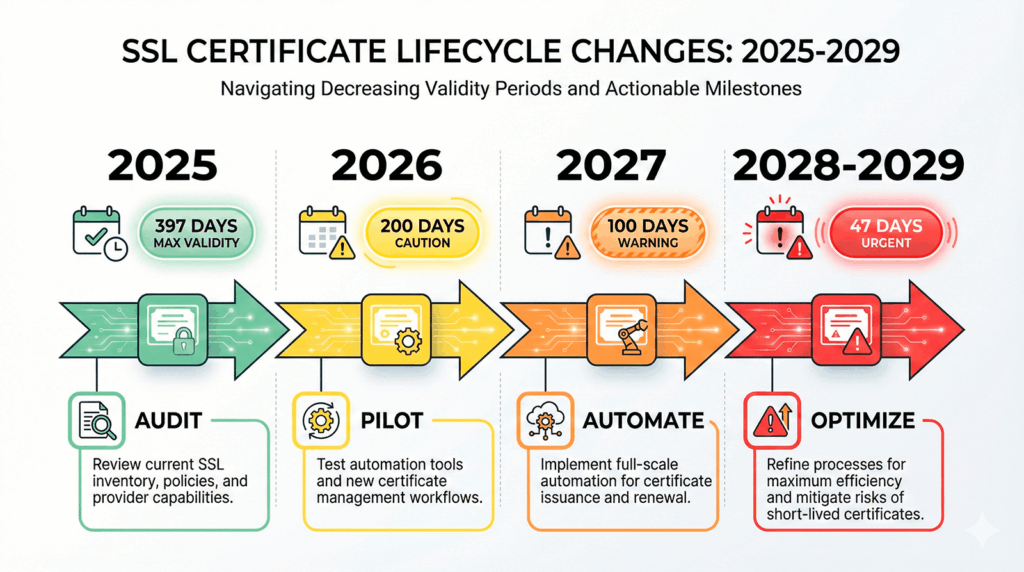
CA/Browser Forum telah menetapkan garis waktu yang jelas untuk masa berlaku sertifikat: kini dibatasi hingga 200 hari mulai 15 Maret 2026, dengan pengurangan lebih lanjut menjadi 100 hari mulai 15 Maret 2027, dan 47 hari mulai 15 Maret 2029.
Pengetatan ini juga memengaruhi siklus validasi, sehingga membuat revalidasi rutin dan otomatisasi sertifikat SSL semakin diperlukan.
Metode Validasi Domain Berbasis Email
1. Verifikasi Email Terkonstruksi
Validasi email adalah metode DCV yang paling umum karena sederhana dan tidak memerlukan perubahan teknis pada infrastruktur Anda. CA mengirimkan email berisi tautan atau kode validasi ke alamat tertentu di domain Anda.
CA akan mencoba alamat email generik berikut:
Anda tidak perlu menyiapkan semuanya, cukup satu alamat yang berfungsi dari daftar tersebut. CA memeriksa rekaman MX domain Anda untuk memastikan email dapat dikirim, kemudian mengirim permintaan validasi.
Ketika email tiba, Anda akan mengklik tautan verifikasi atau menyalin kode kembali ke platform pemesanan sertifikat. Prosesnya biasanya hanya memakan waktu beberapa menit jika email Anda dikonfigurasi dengan benar.
Metode ini bekerja dengan baik jika:
- Anda memiliki infrastruktur email yang sudah mapan untuk domain Anda
- Anda memesan sertifikat sesekali, bukan dalam skala besar
- Anda menginginkan proses validasi paling sederhana tanpa perubahan DNS atau server web
Kekurangannya? Anda tidak bisa mengotomatiskannya dengan mudah, dan jika email Anda bermasalah atau alamatnya tidak dipantau, validasi Anda akan gagal.
2. Email ke Kontak TXT DNS
Variasi ini menggabungkan email dengan DNS. Alih-alih menggunakan alamat generik, Anda mempublikasikan alamat email tertentu dalam rekaman TXT DNS di _validation-contactemail.yourdomain.com. CA membaca rekaman ini dan mengirim validasi ke alamat tersebut.
Mengapa menggunakan pendekatan ini?
- Dapat digunakan kembali: Setelah dikonfigurasi, tetap berlaku selama periode validasi penuh
- Kendali terpusat: Anda menentukan dengan tepat email mana yang menerima permintaan validasi
- Ramah untuk tim: Arahkan ke daftar distribusi, bukan ke kotak masuk pribadi seseorang
Berikut pengaturan praktisnya:
_validation-contactemail.yourdomain.com. IN TXT "mailto:[email protected]"
Cukup buat rekaman TXT DNS ini dengan email kontak pilihan Anda, dan CA akan menggunakannya secara otomatis. Ini sangat berguna untuk organisasi yang mengelola banyak sertifikat. Anda dapat menstandardisasi validasi di seluruh domain melalui satu kotak masuk yang dipantau.
Metode DCV Berbasis DNS
1. Validasi Rekaman TXT DNS
Validasi rekaman TXT DNS populer karena fleksibilitas dan potensi otomatisasinya. Saat Anda memesan sertifikat, CA menyediakan nama host dan token validasi tertentu yang Anda tambahkan sebagai rekaman TXT ke DNS domain Anda.
Proses dasarnya:
- CA menyediakan nama host (biasanya _dvsauth.yourdomain.com) dan token saat pemesanan sertifikat
- Anda membuat rekaman TXT dengan token tersebut sebagai nilainya
- CA melakukan kueri ke DNS Anda untuk memastikan rekaman tersebut ada
- Setelah terverifikasi, mereka menerbitkan sertifikat
Rekamannya biasanya terlihat seperti ini:
_dvsauth.yourdomain.com. IN TXT "ab1c2d3e4f5g6h7i8j9k0l1m2n3o4p5q"
Validasi TXT DNS ideal untuk:
- Otomatisasi – API DNS membuat ini dapat diskripkan melalui klien ACME atau alat khusus
- Lingkungan tanpa server web – Anda hanya memerlukan akses DNS
- Sertifikat wildcard – kami akan membahas persyaratan ini di bagian Skenario Khusus
Satu hal yang perlu diperhatikan: waktu propagasi DNS. Jika nameserver Anda memiliki nilai TTL tinggi atau propagasi lambat, validasi mungkin memerlukan waktu lebih lama. Sebagian besar CA akan mencoba ulang selama 24 jam, tetapi sebaiknya atur nilai TTL yang lebih rendah sebelum menambahkan rekaman validasi.
2. Metode Rekaman CNAME DNS
Validasi CNAME menggunakan jenis rekaman yang berbeda tetapi mencapai tujuan yang sama. Alih-alih menyimpan token validasi secara langsung, Anda membuat CNAME yang mengarah ke target validasi yang dikendalikan oleh CA.
Contoh konfigurasi:
_dnsauth.yourdomain.com. IN CNAME random-token.dcv.digicert.com.
Perbedaan utamanya: CNAME mengarah ke rekaman yang dikendalikan oleh CA, yang berarti mereka dapat memperbarui target validasi tanpa Anda perlu mengubah DNS. Beberapa CA juga mengizinkan ini untuk prevalidasi domain, Anda menyiapkan CNAME sekali, dan mereka dapat melakukan validasi kapan pun Anda memesan sertifikat.
Validasi CNAME bekerja dengan baik saat:
- Penyedia DNS Anda membuat CNAME lebih mudah dikelola dibandingkan rekaman TXT
- Anda menginginkan kemampuan prevalidasi domain untuk sertifikat OV/EV
- Anda bekerja dengan CA yang mendukung alur validasi berbasis CNAME
Tidak semua CA menawarkan validasi CNAME, jadi periksa dengan penyedia Anda. Namun jika tersedia, ini adalah pilihan yang solid bagi tim yang lebih menyukai jenis rekaman DNS ini.
Hemat 10% untuk Sertifikat SSL saat memesan dari SSL Dragon hari ini!
Penerbitan yang cepat, enkripsi yang kuat, kepercayaan peramban 99,99%, dukungan khusus, dan jaminan uang kembali 25 hari. Kode kupon: SAVE10
Metode Validasi Berbasis File HTTP/HTTPS
1. Demonstrasi Praktis HTTP
Validasi berbasis file mengharuskan Anda menempatkan file tertentu di server web Anda pada jalur yang ditentukan. CA kemudian mengakses file ini melalui HTTP atau HTTPS untuk memastikan Anda mengendalikan server yang menjadi hosting domain tersebut.
Jalur standarnya adalah: http://yourdomain.com/.well-known/pki-validation/fileauth.txt
CA menyediakan nama file yang tepat beserta isinya. Anda membuat file ini di server Anda, memastikan dapat diakses, dan CA melakukan validasi dengan mengambilnya.
Poin implementasi penting:
- File harus dapat diakses pada port 80 (HTTP) atau port 443 (HTTPS)
- Direktori .well-known adalah lokasi standar yang ditetapkan dalam RFC 8615
- Ini diperlukan untuk validasi alamat IP. Jika Anda mendapatkan sertifikat untuk alamat IPv4 atau IPv6, validasi HTTP biasanya menjadi satu-satunya pilihan Anda
Validasi berbasis file cukup mudah jika Anda memiliki akses langsung ke server web. Ini kurang ideal jika Anda menggunakan layanan hosting dengan akses sistem file yang terbatas atau CDN yang mungkin melakukan cache atau mengganggu permintaan validasi.
Tips pemecahan masalah:
- Pastikan pengalihan (redirect) tidak mengganggu. CA harus dapat mencapai URL validasi yang tepat
- Periksa apakah firewall mengizinkan akses HTTP/HTTPS
- Nonaktifkan caching untuk direktori validasi
- Pastikan izin file mengizinkan akses baca publik
2. Integrasi Tantangan ACME
Protokol ACME (Automated Certificate Management Environment) menggunakan tantangan HTTP-01 dan DNS-01 untuk DCV otomatis. Jika Anda menggunakan Let’s Encrypt atau CA lain yang kompatibel dengan ACME, klien ACME Anda menangani seluruh proses validasi secara otomatis.
Tantangan HTTP-01: Menempatkan file validasi di /.well-known/acme-challenge/ (mirip dengan validasi HTTP standar)
Tantangan DNS-01: Membuat rekaman TXT di _acme-challenge.yourdomain.com
Klien Anda (seperti Certbot, acme.sh, atau alat terintegrasi di platform seperti cPanel) menangani validasi dan perpanjangan sertifikat tanpa intervensi manual. ACME telah menjadi standar untuk manajemen sertifikat otomatis, khususnya bagi organisasi yang mengelola inventaris sertifikat dalam jumlah besar.
Skenario Validasi Khusus
1. Validasi Sertifikat Multi-Domain dan SAN
Jika Anda memesan sertifikat multi-domain (juga disebut sertifikat SAN atau UCC), Anda harus memvalidasi setiap domain secara terpisah. Satu pemeriksaan DCV saja tidak mencakup semua domain pada sertifikat tersebut.
Contoh: Sertifikat untuk example.com, www.example.com, dan shop.example.com memerlukan tiga validasi terpisah, meskipun ketiganya merupakan domain yang saling terkait.
Kabar baiknya? Anda dapat menggabungkan berbagai metode validasi. Gunakan validasi email untuk satu domain dan validasi DNS untuk domain lainnya jika itu sesuai dengan infrastruktur Anda. Platform CA akan melacak status validasi untuk setiap domain dan hanya menerbitkan sertifikat setelah semua domain terverifikasi.
2. Validasi Domain Wildcard
Sertifikat wildcard (mencakup *.example.com) memerlukan metode validasi berbasis DNS. Sebagian besar CA tidak menerima validasi email atau HTTP untuk wildcard karena pertimbangan keamanan.
Mengapa validasi DNS untuk wildcard?
Sertifikat wildcard mengamankan subdomain tanpa batas. Validasi berbasis file hanya dapat membuktikan kendali atas satu subdomain pada satu waktu, dan validasi email tidak menunjukkan kendali atas seluruh kemungkinan subdomain. Validasi DNS membuktikan bahwa Anda mengendalikan seluruh infrastruktur DNS domain tersebut, yang sesuai untuk sertifikat yang melindungi semua subdomain.
Jika Anda memerlukan sertifikat wildcard, rencanakan untuk menggunakan validasi TXT atau CNAME DNS. Ini biasanya menjadi satu-satunya pilihan Anda.
3. Pertimbangan Validasi Subdomain
Anda dapat melakukan validasi pada tingkat subdomain atau domain induk, tergantung pada metode validasi yang digunakan. Untuk validasi HTTP, file harus dapat diakses pada subdomain tertentu yang sedang Anda validasi. Untuk validasi DNS, Anda membuat rekaman pada tingkat subdomain yang sesuai.
Satu perbedaan penting: Memvalidasi domain induk (example.com) tidak secara otomatis memvalidasi subdomain (blog.example.com) untuk sebagian besar metode validasi. Setiap subdomain memerlukan validasinya sendiri kecuali Anda menggunakan sertifikat wildcard.
Memilih Metode DCV yang Tepat untuk Kebutuhan Anda
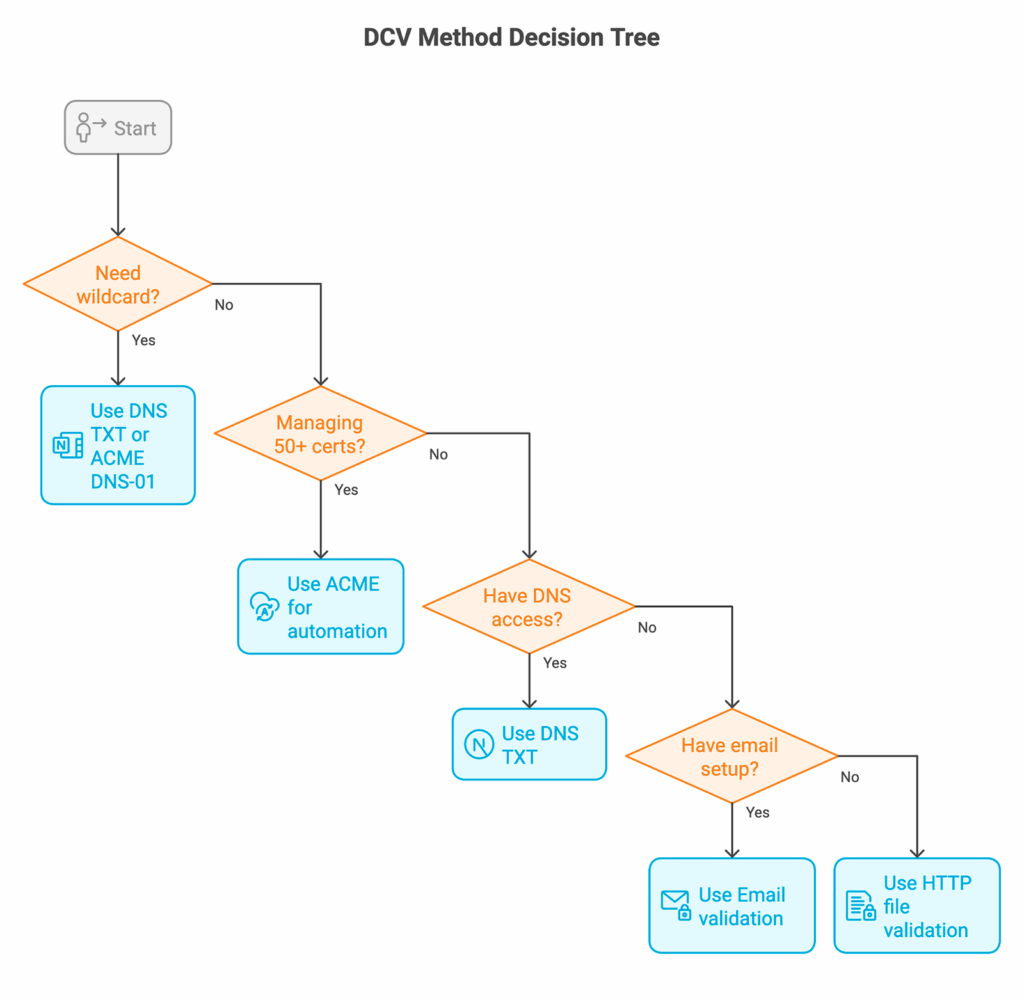
Sesuaikan metode dengan infrastruktur Anda:
Bandingkan Semua Metode DCV Sekilas
| Metode Validasi | Waktu Penyelesaian | Kemampuan Otomatisasi | Keahlian Teknis | Dukungan Wildcard | Dapat Digunakan Kembali (OV/EV) | Paling Cocok Untuk |
|---|---|---|---|---|---|---|
| Email (Generik) | 5-30 menit | ❌ Rendah | ⭐ Minimal | ✅ Ya | ❌ Tidak | Sertifikat sekali pakai, penerapan kecil |
| Email (TXT DNS) | 15-60 menit | ❌ Rendah | ⭐⭐ Rendah-Sedang | ✅ Ya | ✅ Ya (397 hari) | Tim dengan banyak sertifikat, email yang sudah mapan |
| Rekaman TXT DNS | 10-60 menit | ✅ Tinggi | ⭐⭐⭐ Sedang | ✅ Ya | ✅ Ya (397 hari) | Otomatisasi, wildcard, penerapan skala besar |
| CNAME DNS | 15-60 menit | ✅ Tinggi | ⭐⭐⭐ Sedang | ✅ Ya | ✅ Ya (397 hari) | Prevalidasi domain, token yang dikelola CA |
| File HTTP | 5-20 menit | ⚠️ Sedang | ⭐⭐ Rendah-Sedang | ❌ Tidak | ❌ Tidak | Akses langsung ke server, alamat IP |
| ACME (HTTP-01) | 2-10 menit | ✅ Sangat Tinggi | ⭐⭐⭐⭐ Sedang-Tinggi | ❌ Tidak | Tidak berlaku (perpanjangan otomatis) | Otomatisasi penuh, Let’s Encrypt |
| ACME (DNS-01) | 2-10 menit | ✅ Sangat Tinggi | ⭐⭐⭐⭐ Sedang-Tinggi | ✅ Ya | Tidak berlaku (perpanjangan otomatis) | Otomatisasi penuh dengan wildcard |
Pemilihan Metode Berdasarkan Skenario
Gunakan validasi email jika:
- Anda memiliki pesanan sertifikat yang sederhana dan sesekali
- Alamat email admin generik dipantau secara aktif
- Anda tidak memerlukan otomatisasi
Gunakan validasi TXT/CNAME DNS jika:
- Anda memerlukan sertifikat wildcard
- Anda mengelola banyak sertifikat
- Anda tidak memiliki akses ke server web
- Anda menginginkan kemampuan otomatisasi
Gunakan validasi file HTTP jika:
- Anda memiliki akses langsung ke server web
- Anda memvalidasi alamat IP
- Perubahan DNS sulit dilakukan di organisasi Anda
Masalah Umum DCV dan Solusi Cepatnya
Kegagalan validasi memang bisa terjadi. Berikut adalah kesalahan yang paling sering Anda temui dan cara mengatasinya dengan cepat.
Validasi File HTTP: “404 Not Found”
Kesalahan: “The system queried for a temporary file at http://example.com/.well-known/pki-validation/[filename].txt, but the web server responded with the following error: 404 (Not Found).”
Solusi cepat:
- Buat struktur direktori secara manual: /public_html/.well-known/pki-validation/
- Atur izin: direktori ke 755, file ke 644
- Periksa aturan .htaccess yang mungkin memblokir jalur /.well-known/
- Jika domain baru saja ditambahkan, tunggu 24-48 jam untuk propagasi
- Uji aksesibilitas: curl -v http://yourdomain.com/.well-known/pki-validation/test.txt
Penyebab umum: Jalur file validasi tidak ada atau tidak dapat diakses secara publik.
Validasi HTTP: “Forbids DCV HTTP Redirections”
Kesalahan: “cPanel (powered by Sectigo) forbids DCV HTTP redirections.”
Solusi cepat:
- Nonaktifkan sementara pengalihan ke HTTPS selama proses validasi
- Kecualikan jalur /.well-known/* dari aturan pengalihan
- Periksa .htaccess, aturan halaman Cloudflare, atau konfigurasi server untuk pengalihan
- Jika menggunakan CDN, nonaktifkan sementara atau tambahkan pengecualian
Penyebab umum: Situs Anda mengalihkan HTTP ke HTTPS atau mengalihkan ke domain lain, sehingga memblokir upaya validasi CA.
Validasi DNS: “No TXT Record That Matches”
Kesalahan: “The DNS query to ‘_dvsauth.example.com’ for the DCV challenge returned no ‘TXT’ record that matches the value ‘[expected-value]’.”
Solusi cepat:
- Tunggu 1-24 jam untuk propagasi DNS (tergantung TTL)
- Verifikasi nama host dan nilai yang tepat: dig _dvsauth.example.com TXT +short
- Periksa kesalahan salin-tempel pada token validasi
- Jika menggunakan DNS terdelegasi (rekaman NS), tambahkan rekaman TXT pada penyedia yang benar
- Turunkan TTL menjadi 300 detik (5 menit) sebelum menambahkan rekaman validasi
Penyebab umum: DNS belum melakukan propagasi, atau rekaman tersebut mengandung kesalahan ketik.
Validasi DNS: Rekaman CAA Memblokir Penerbitan
Kesalahan: “Certificate authority encountered a multiple perspective CAA check error.”
Solusi cepat:
- Periksa rekaman CAA yang sudah ada: dig example.com CAA
- Tambahkan CA Anda ke daftar penerbit yang diizinkan: example.com. CAA 0 issue “digicert.com”
- Verifikasi bahwa rekaman CAA teresolusi secara global menggunakan alat ping.pe
- Jika tidak ada rekaman CAA, Anda tidak perlu menambahkannya (ketiadaan rekaman mengizinkan semua CA)
Penyebab umum: Rekaman CAA membatasi CA mana yang dapat menerbitkan sertifikat untuk domain Anda.
Validasi Email: Email Tidak Diterima
Solusi cepat:
- Periksa folder spam/junk terlebih dahulu
- Pastikan alamat-alamat berikut ada dan menerima email: admin@, administrator@, webmaster@, hostmaster@, postmaster@
- Periksa rekaman MX: dig example.com MX
- Masukkan domain pengirim email CA ke daftar putih (whitelist) di filter spam Anda
- Minta pengiriman ulang email melalui panel kontrol CA
Penyebab umum: Email validasi terjebak oleh filter spam, atau alamat admin tidak ada.
Khusus Platform: Kegagalan AutoSSL cPanel
Kesalahan: “Local HTTP DCV error: An internal error occurred.”
Solusi cepat:
- Periksa log WHM > Manage AutoSSL untuk detailnya
- Tunggu 30 menit lalu coba lagi (seringkali teratasi secara otomatis)
- Beralih antara penyedia Sectigo dan Let’s Encrypt
- Kosongkan antrean AutoSSL: WHM > Manage AutoSSL > Clear pending queue
Perintah Diagnostik Cepat
Sebelum menghubungi dukungan, jalankan pemeriksaan berikut:
# Verify DNS propagation
dig yourdomain.com +short
dig _dvsauth.yourdomain.com TXT +short

# Test HTTP file accessibility
curl -v http://yourdomain.com/.well-known/pki-validation/test.txt

# Check CAA and MX records
dig yourdomain.com CAA
dig yourdomain.com MX
Sederhanakan Manajemen Sertifikat SSL Anda dengan SSL Dragon
Melakukan validasi kendali domain dengan benar sangat penting untuk kelancaran penerapan sertifikat. SSL Dragon menawarkan sertifikat dari Certificate Authority tepercaya dengan semua metode validasi yang Anda butuhkan, baik Anda lebih memilih verifikasi berbasis email, DNS, atau HTTP.
Tim kami membantu Anda memahami persyaratan DCV untuk sertifikat Domain Validated, Organization Validated, dan Extended Validation. Kami akan memandu Anda melalui metode validasi yang sesuai dengan infrastruktur Anda dan menjawab pertanyaan saat masalah validasi muncul.
Berhenti bergelut dengan validasi sertifikat. Jelajahi pilihan sertifikat SSL kami!
Hemat 10% untuk Sertifikat SSL saat memesan hari ini!
Penerbitan cepat, enkripsi kuat, kepercayaan peramban 99,99%, dukungan khusus, dan jaminan uang kembali 25 hari. Kode kupon: SAVE10