Secure several primary domains and all their first-level subdomains under one certificate. Multi-domain wildcard SSL certificates start from $150/yr, with DV options issued in minutes and OV options in 1–2 business days.










What a Multi-Domain Wildcard SSL Certificate Is
A multi-domain wildcard SSL certificate combines two products into one: a multi-domain (SAN) certificate and a wildcard certificate. Instead of buying both separately or running multiple certificates across your infrastructure, you cover several distinct domains and the subdomains under each from a single issued certificate.
The mechanics rest on the SAN field. SAN, or Subject Alternative Name, is an X.509 extension that lists every domain a single certificate covers. Inside that field, entries can be regular domain names, wildcard entries, or a mix of both.
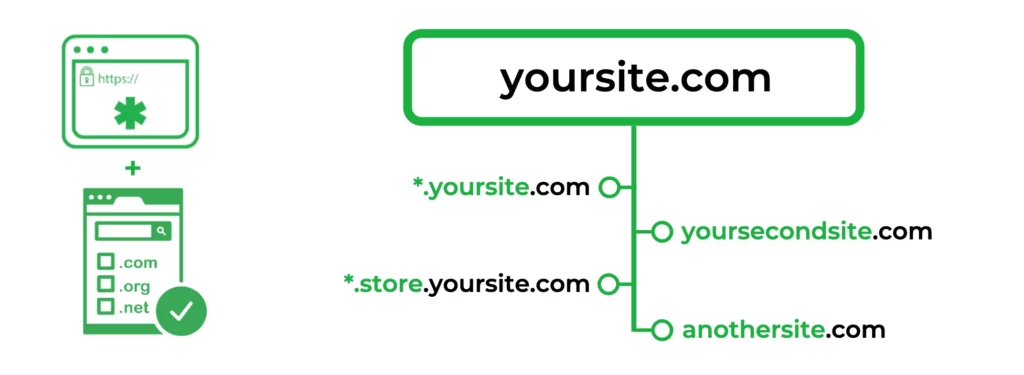
A typical configuration looks like this:
- example.com
- *.example.com
- *.brand.net
That single certificate now secures the bare example.com, every first-level subdomain under it (shop.example.com, blog.example.com, and so on), and every first-level subdomain under brand.net.
Most products in this category support up to 250 SANs in total, though some brands cap lower by default and others go higher. Note that the wildcard character * covers exactly one subdomain level.
Multi-Domain Wildcard vs Wildcard vs Multi-Domain SAN
| Feature | Wildcard SSL | Multi-Domain (SAN) SSL | Multi-Domain Wildcard SSL |
|---|---|---|---|
| Secures multiple primary domains | No | Yes | Yes |
| Secures unlimited first-level subdomains | Yes (one domain) | No | Yes (per domain) |
| Validation levels available | DV, OV | DV, OV, EV | DV, OV |
| Typical SAN capacity | 1 base + wildcard | Up to 250 | Up to 250 (varies by brand) |
| Best for | One domain with many subdomains | Several distinct domains | Several domains, each with subdomains |
| SSL Dragon starting price | Wildcard SSL from $56.33/yr | Multi-Domain SSL from $21.66/yr | From $150/yr |
Picking between the three comes down to your domain shape:
- Run one website with many subdomains? A wildcard handles it.
- Have several separate websites with no subdomain structure to worry about? A multi-domain (SAN) certificate is cheaper and simpler.
- Once you have several websites and subdomains under each, the multi-domain wildcard is the only product that covers both patterns in one certificate, which is why buyers with portfolios of brands or hosted client domains end up here.
Validation Levels: DV and OV (and Why EV Is Not Available)
Multi-domain wildcard certificates are issued at two validation levels: Domain Validation and Organization Validation. Each verifies something different about the requester before the certificate is issued.
- DV only verifies that the applicant controls the listed domains.
Validation runs through one of three methods (email, DNS record, or HTTP file check) and certificates are issued in minutes. Personal sites and dev/test environments fit here, alongside internal tools and SaaS platforms where speed matters more than displayed organization identity. - OV verifies the requesting business through official records:
Business registration, registered address, and a callback to a verified phone number. Issuance takes 1–2 business days. The verified business name appears in the certificate details, where buyers and security teams (and procurement reviewers, in larger deals) can see it. E-commerce sites, regulated industries, and any property where the certificate’s identity claim has commercial value benefit from the OV check.
Extended Validation is not offered for any multi-domain wildcard product, anywhere.
The CA/Browser Forum’s Baseline Requirements prohibit wildcard SAN entries on EV certificates, and the rule applies to any certificate that includes even one wildcard entry. This has been the case since EV was first defined and has not changed. Pages claiming an “EV multi-domain wildcard” exists are wrong. If you need EV for one specific domain, buy that as a separate EV single-domain certificate alongside your multi-domain wildcard.
One last point worth stating directly: encryption strength is identical across DV, OV, and EV. All three negotiate the same 256-bit symmetric encryption during the TLS handshake. Validation level changes what the CA verifies about the requester, not what gets encrypted on the wire.
The 47-Day Certificate Lifespan and What It Means for Multi-Domain Buyers
On April 11, 2025, the CA/Browser Forum approved Ballot SC-081v3, a phased schedule that compresses the maximum lifespan of every public TLS certificate down to 47 days. The schedule has three phases:
- Phase 1 — already in effect since March 15, 2026: maximum public TLS certificate validity is now 200 days.
- Phase 2 — March 15, 2027: the cap drops to 100 days.
- Phase 3 — March 15, 2029: the cap drops to 47 days.
The rule applies to all public TLS certificates, every validation level (DV, OV, EV), and every product type: wildcard, multi-domain, and multi-domain wildcard included.
Multi-domain wildcard buyers feel the change harder than single-cert buyers. A renewal here is heavier because you re-prove control of each domain in the SAN list, not just one. As the validity ceiling drops, that operational cost compounds. By 2029, you’ll be running that renewal cycle roughly every 6–7 weeks. Anyone planning multi-year operations on a portfolio of domains should be thinking about automation now, not in 2029.
If you’re ready to automate, start with our ACME page. One honest caveat: not every multi-domain wildcard product on the market is equally automation-friendly. DV products with simple domain control checks automate cleanly; OV products that require organization re-validation cycles add friction that ACME alone won’t remove.
Common Use Cases
SSL Dragon carries EV certificates from four Certificate Authorities.
- Multi-brand corporate portfolios
A company that owns several brand domains plus subdomains under each (brandA.com, *.brandA.com, brandB.net, *.brandB.net) can replace four or more separate certificate purchases with one issued certificate. - SaaS platforms with tenant subdomains
When every customer gets a custom subdomain like customer1.app.com and customer2.app.com, wildcard coverage on the app domain handles unlimited tenants. The remaining SAN slots cover the marketing site, status page, and API on different domains. - Hosting providers and agencies
Managing client domains across many brands, all served from shared infrastructure, fits this product cleanly. One certificate, one renewal cycle, one private key to rotate. - Microsoft Exchange and Communications environments
Multi-domain wildcards function as Unified Communications Certificates (UCC), which is what Exchange requires when it needs multiple service hostnames — autodiscover, mail, webmail, and others — represented on the same certificate.
Multi-Domain Wildcard SSL Certificates We Carry
Five products from four certificate authorities, split across DV and OV. The cards above show validation and issuance time alongside default SAN count and price for each. Below is what’s not on the cards: SAN expansion limits, what’s included, and why you’d pick one over another.

Sectigo PositiveSSL Multi-Domain Wildcard
Default packaging covers 4 SANs and scales up to 250 at checkout. Encryption is 256-bit on a 2048-bit RSA key, with ECC available. Free site seal, unlimited reissues, and unlimited server licensing ship in the box. Comodo CA rebranded to Sectigo in 2018: same root certificates, same trust, different name on the badge.
GoGetSSL Multi-Domain Wildcard SSL
At the lowest price point on this page, GoGetSSL covers 3 SANs by default with expansion to 250. Inclusions: a site seal, free reissues, plus server licensing. The CA was one of the first to ship a true product in this category, and this offering remains the cheapest entry point for buyers who don’t need verified organization identity.

GeoTrust True BusinessID Multi-Domain Wildcard
Default 3 SANs, expandable to 250, with the verified business name listed in certificate details. The product carries a substantial warranty backed by DigiCert, which owns GeoTrust. The real differentiator is GeoTrust’s FLEX feature: it lets you mix wildcard SAN entries and standard SAN entries on the same certificate, which is useful when not every domain you’re covering needs subdomain protection.

Thawte SSL Webserver Multi-Domain Wildcard
Sits at the same OV tier as GeoTrust, with 3 SANs by default and expansion to 250. It ships with a dynamic site seal localized into 18 languages, unlimited server licensing, plus unlimited free reissues. Picking between Thawte and GeoTrust at this tier usually comes down to which trust seal your audience recognizes. Thawte has stronger brand recognition in some regulated markets, GeoTrust in others.
Things to Know Before You Buy
- All listed domains are public on the certificate. Anyone who clicks the padlock and inspects the certificate details can read every domain in the SAN list. If you don’t want two of your brands publicly associated with each other, use separate certificates instead.
- A wildcard SAN doesn’t automatically cover the bare domain. A SAN entry of *.example.com covers mail.example.com and shop.example.com, but it does not cover example.com itself. Add the bare domain as its own SAN if you need it.
- Standard wildcards cover one subdomain level. *.example.com covers mail.example.com but not dev.mail.example.com. To secure deeper levels, add the deeper wildcard as a separate SAN entry such as *.mail.example.com.
- Reissues are free, but the expiration date carries over. Adding or removing a SAN mid-cycle doesn’t reset the clock; the new certificate inherits the original expiration date. For DV products, no re-validation is required to modify SANs; for OV products, the existing organization validation can typically be reused if the change happens within the validity window.
Frequently Asked Questions
How many domains can a multi-domain wildcard SSL certificate secure?
Most products on this page support up to 250 total SANs (1 primary domain + 249 additional). Default packages start at 3 or 4 SANs included; you add more individually at checkout. A few Sectigo OV multi-domain wildcards support higher caps; check the specific product page for the exact ceiling.
Copy Link
Can I add or remove domains after the certificate is issued?
Yes, free and unlimited via reissue. The expiration date stays the same; reissuing does not extend validity. For DV, you only need to prove control of any newly added domains; for OV, organization validation can usually be reused within the certificate’s lifetime, so reissues complete faster after the first one.
Copy Link
What’s the difference between a multi-domain wildcard and a UCC certificate?
Functionally none, in most cases. UCC (Unified Communications Certificate) is the older naming used in Microsoft Exchange and Communications Server contexts. A multi-domain wildcard works as a UCC and supports the same FQDN flexibility Exchange requires for its autodiscover, mail, and webmail hostnames.
Copy Link
Why isn’t there an EV multi-domain wildcard option?
Covered in the validation section above. Short version: the CA/Browser Forum’s Baseline Requirements prohibit wildcard SAN entries on Extended Validation certificates. This is industry-wide, not an SSL Dragon limitation. Buyers who need EV identity on one specific hostname typically run two certificates side by side — an EV single-domain on the flagship hostname, and the multi-domain wildcard on the rest of the portfolio.
Copy Link
Can I install one multi-domain wildcard certificate on multiple servers?
Yes. Every product on this page includes unlimited server licensing. Note that “unlimited” refers to the right to install, not to security best practice. Distributing the same private key across many servers increases blast radius if any one server is compromised. Use private key rotation policies appropriate to your deployment scale.
Copy Link
What happens to my certificate when the 47-day lifespan rule takes full effect in 2029?
Existing certificates remain valid until their issued expiration date. New certificates issued after each phase deadline must comply with the new ceiling: 200 days now, 100 days from March 2027, 47 days from March 2029. At 47 days, automation becomes a practical requirement; see our ACME page for setup guidance.
Copy Link
How do I generate a CSR for a multi-domain wildcard certificate?
Use our free CSR Generator tool or generate it on your server with OpenSSL. The Common Name (CN) must be a non-wildcard domain; list any wildcard entries (*.domain.com) in the SAN field instead, never in the CN.
Copy Link
Don’t know what you need?
Use our SSL Wizard to select your options, and we’ll help you find the right SSL certificate.
Don’t know what you need?

Our Clients & Key Figures