Code signing leverages public key infrastructure (PKI) to serve as your software’s digital passport. Through digital signatures, it creates cryptographic proof of authenticity and integrity. It authenticates you as the publisher and ensures code integrity by proving your code hasn’t been tampered with since you released it.

When users download your software, they’re trusting you with their system security. Break that trust once, and you’re done.
Table of Contents
- Protect Private Keys with Hardware Security Modules
- Implement Strict Access Controls for Code Signing Keys
- Time-Stamp Your Code During the Signing Process
- Separate Test-Signing from Release-Signing Environments
- Implement Code Authentication and Integrity Verification Before Signing
- Perform Virus Scanning on Code Before Signing
- Rotate Keys and Use Multiple Certificates
- Take Certificate Revocation Seriously
- Leverage Extended Validation Code Signing Certificates
- Automate and Centralize Code Signing Management
- Secure Your Software Supply Chain with SSL Dragon
The stakes got real after the SolarWinds breach exposed critical software supply chain vulnerabilities, showing how compromised signing keys can weaponize legitimate software updates and compromise thousands of organizations. Now more than ever, following code signing best practices isn’t optional—it’s fundamental to protecting your users and your reputation.
Protecting the software supply chain has become a top priority for organizations of all sizes. These guidelines will help you implement security measures that matter, whether you’re a solo developer or managing enterprise DevOps pipelines. Whether you’re signing Windows executables, macOS applications, Linux packages, or mobile apps for iOS and Android, these principles apply across all platforms.
Protect Private Keys with Hardware Security Modules
Your private key is everything in code signing. Compromise it, and attackers can sign malware with your identity. Your certificate gets revoked, your customers lose trust, and your brand takes a hit you might not recover from.
Why Private Key Security Is Critical
Think of your private key as the master key to your software’s credibility—it generates the digital signatures that prove your identity. If someone steals it, they can distribute malicious code that looks like it came from you. You’ll need to revoke your certificate, re-sign everything you’ve ever released, and hope your customers notice the difference before installing infected software.
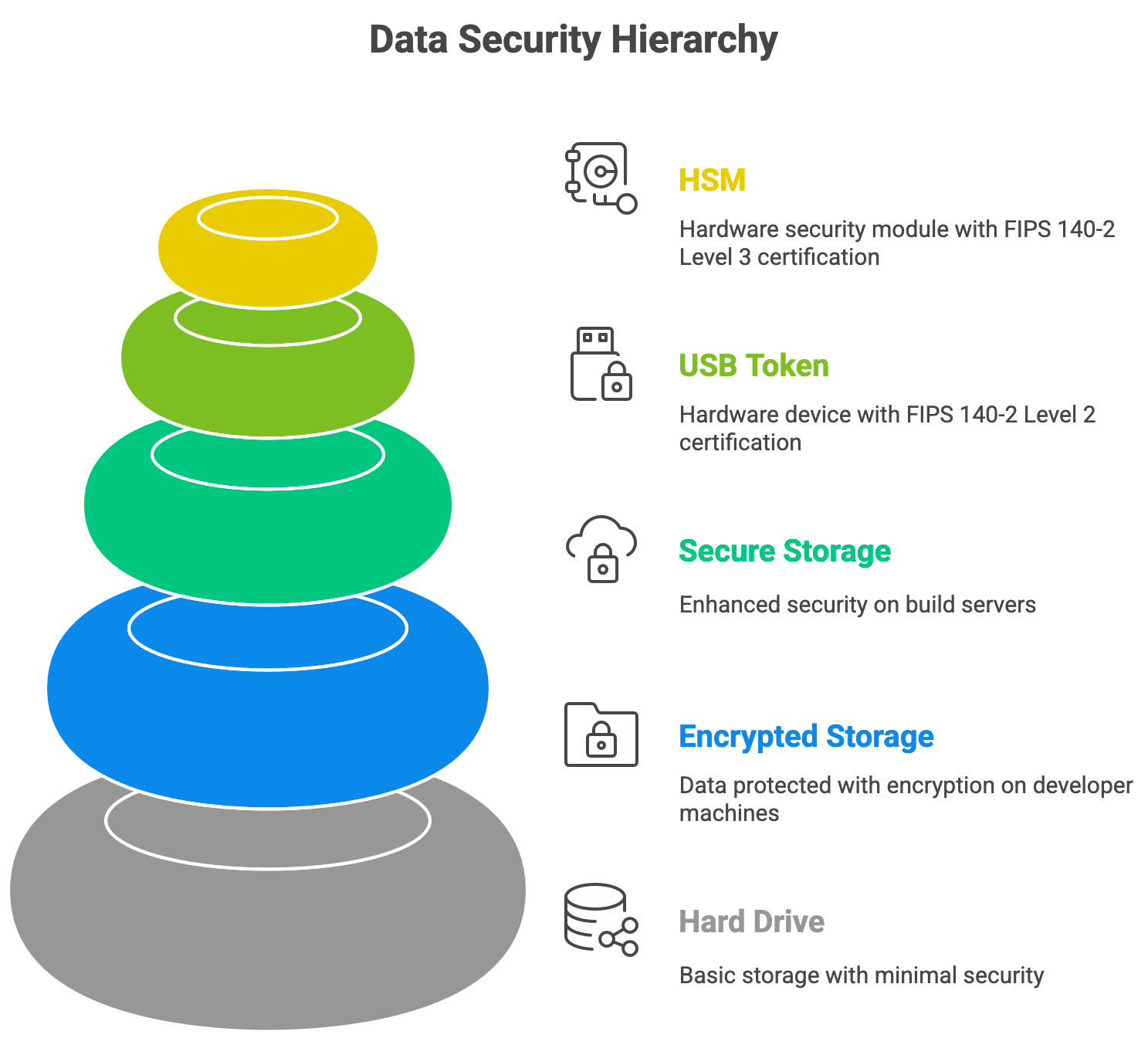
The traditional approach of storing keys on hard drives or build servers is asking for trouble. Developer machines get compromised. Build servers get breached. Even encrypted storage on regular hardware leaves keys vulnerable to extraction.
FIPS 140-2 Certified Hardware Solutions
Hardware Security Modules (HSMs) solve this problem by storing private keys in tamper-resistant hardware. As the cornerstone of your PKI infrastructure, HSMs provide the security foundation that certificate-based trust requires. These devices generate and use keys internally without ever exposing them to your system. Try to physically tamper with an HSM, and it destroys the keys.
FIPS 140-2 certification matters here. Level 2 requires physical tamper-evidence, while Level 3 adds active tamper-response that zeroes out keys when someone tries to break in. For most organizations, Level 2 provides solid protection. These hardware solutions integrate seamlessly with Windows, macOS, and Linux development environments, protecting your keys regardless of your build platform. Government and high-security applications should consider Level 3.
USB tokens offer a portable HSM alternative. They’re FIPS-certified cryptographic hardware you can carry with you, adding physical security through possession. Major certificate authorities support both HSM and USB token implementations for code signing certificates.
However, CA policies differ, and you need to plan around them. DigiCert and GoGetSSL issue code signing certificates for 1 year only, and you can use either a CA-provided HSM or your own hardware.
Sectigo (Comodo) offers multi-year certificates up to 3 years, but with stricter rules. If you choose a 2- or 3-year certificate, you must use your own HSM. CA-provided hardware is only available for 1-year orders.
Want to sign code? You need the token. No token, no signing—even if someone compromises your entire network.
Implement Strict Access Controls for Code Signing Keys
Not everyone on your team needs access to production signing keys. In fact, most people shouldn’t have it.
The principle is simple: fewer people with access means fewer attack vectors. Set up role-based access control (RBAC) that limits signing permissions to specific roles. Your QA team doesn’t need production signing access. Your junior developers probably don’t either.
Create approval workflows that require multiple sign-offs for production releases. One person submits code for signing, another approves it, and only then does the actual signing happen. This separation of duties catches mistakes and prevents insider threats.
Keep comprehensive audit logs. Record who signed what, when they signed it, and from which system. The CA Security Council’s Code Signing Best Practices whitepaper emphasizes that detailed logging is essential for incident response and forensic investigation. When something goes wrong—and eventually something always does—you need to know exactly what happened.
Physical security matters too:
- Don’t leave USB tokens sitting on desks.
- Don’t store HSM access credentials in plain text files.
- Don’t write PIN codes on sticky notes.
These sound obvious, but they’re common problems that undermine otherwise solid security.
Time-Stamp Your Code During the Signing Process
Here’s a problem: code signing certificates expire, usually after one to three years. Without time-stamping, your signature becomes invalid when your certificate expires. Users start seeing warning messages about untrusted software, even though nothing changed about your code.
Time-stamping fixes this by adding a trusted timestamp from a certificate authority’s time-stamp server during the signing process. This timestamp proves you signed the code while your certificate was still valid. The signature stays trusted even after your certificate expires or gets revoked.
Think of it as a notary stamp with a date. The notary might retire or close shop, but their stamp on your document from 2020 still proves the document existed and was verified in 2020.
The technical process is straightforward. During signing, your tool contacts a time-stamp server run by your certificate authority. The server returns a signed timestamp that gets embedded in your code’s signature. When users verify your signature on any platform—Windows, macOS, Linux, iOS, or Android—they check both your signing certificate and the timestamp. This verification process maintains code integrity over time, even as certificates expire and security standards evolve.
This saves money too. Without time-stamping, you’d need to re-sign all your distributed software every time you renew your certificate. With time-stamping, old releases stay trusted indefinitely.
Save 10% on SSL Certificates when ordering from SSL Dragon today!
Fast issuance, strong encryption, 99.99% browser trust, dedicated support, and 25-day money-back guarantee. Coupon code: SAVE10

Separate Test-Signing from Release-Signing Environments
Your test environment shouldn’t use the same signing keys as production. Ever.
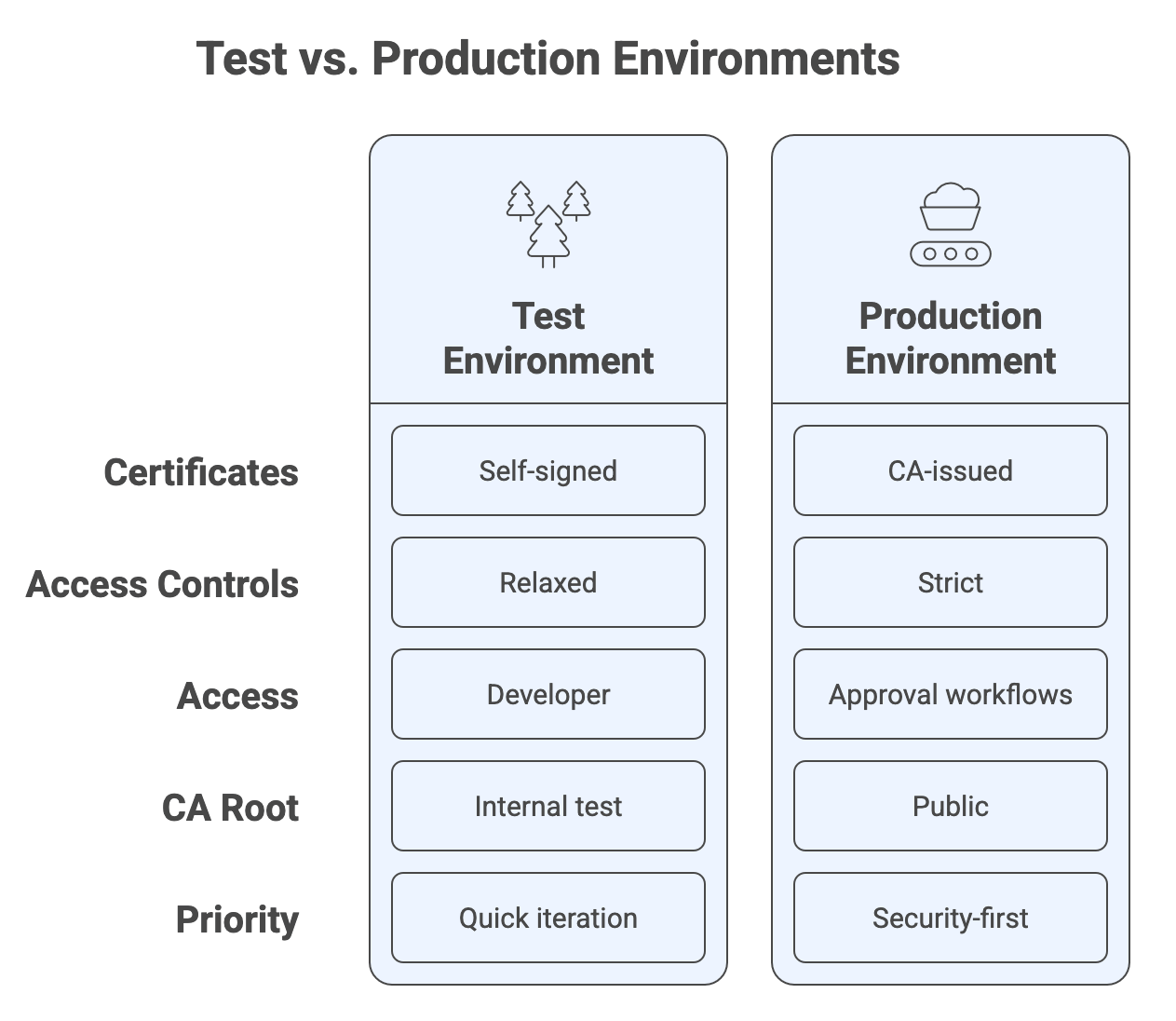
Test certificates should either be self-signed or issued by an internal test certificate authority that chains to a different root than your production certificates. This architectural separation prevents test-signed code from being mistaken for release-ready software.
Set up separate signing infrastructure for each environment. Your test signing can be more accessible and less restrictive—developers need to iterate quickly. But production signing should be locked down tight with all the security measures we’ve discussed.
Mark test packages clearly. Include “TEST” or “BETA” in file names. Use different product identifiers. Make it impossible to accidentally distribute test-signed code to customers.
The access controls should differ dramatically too. Developers might have direct access to test signing. Production signing should require approval workflows and possibly different credentials entirely.
Implement Code Authentication and Integrity Verification Before Signing
Code signing provides code authentication—confirming who published the software. It doesn’t confirm the software is safe.
This distinction matters because you’re ultimately responsible for everything you sign, even if you didn’t write all of it. Signing code you haven’t verified is like co-signing a loan without checking the borrower’s finances.
Implement submission and approval processes before anything gets signed. Have someone review what’s being signed. Compare the code on your build server against your source code repository. Make sure they match exactly.
The SolarWinds breach taught us that attackers can inject malicious code into build pipelines. This attack highlighted the importance of software supply chain security—every component, dependency, and build step represents a potential attack vector. If you sign without verifying, you’re trusting every part of your infrastructure and every piece of code from external sources. That’s not a bet you want to make.
Set up automated checks where possible. Verify digital signatures on code that developers check into your repository. Run static analysis tools. Create checksums of approved builds and verify them before signing.
Log everything. When someone submits code for signing, record what was submitted, who submitted it, who approved it, and what got signed. These audit trails become crucial when investigating incidents.
Perform Virus Scanning on Code Before Signing
Code signing proves you published the software. Users trust you not to publish malware, but code signing certificates don’t verify security.
This matters when you incorporate code from external sources—open source libraries, third-party components, contractor contributions. You’re signing it all under your name.
Scan everything before signing. Use multiple antivirus engines if possible. Check for known malware signatures, suspicious patterns, and potential vulnerabilities. This applies whether you’re preparing Windows executables, macOS applications, Linux packages, or mobile applications for iOS and Android.
Catching an inadvertent malicious insertion before signing protects your users and your reputation. Finding it after you’ve distributed signed malware means certificate revocation, customer notification, and damage control.
The scanning adds minimal time to your build process but provides essential protection for code integrity and authenticity. Make it mandatory, not optional.
Rotate Keys and Use Multiple Certificates
Don’t put all your eggs in one basket. Using a single code signing certificate for everything creates a single point of failure.
Consider using different certificates for different product lines or major releases. If you discover a security flaw in how one certificate was managed, you only need to revoke that specific certificate. Your other products stay trusted.
Rotating keys regularly limits exposure too. If someone compromised your key six months ago but you’ve since rotated to a new certificate, they can’t sign current code as you. The damage is contained to older releases.
Some organizations assign unique certificates to different DevOps teams or release branches. This distributes risk and makes compromise investigation easier. When something goes wrong, you know exactly which certificate was involved and which releases are affected.
Set up a rotation schedule that balances security with operational overhead. Annual or biannual rotation works for many organizations. High-security environments might rotate quarterly.
Take Certificate Revocation Seriously
Certificate revocation is the nuclear option, but sometimes it’s necessary.
Revoke immediately if your private key gets compromised. Don’t wait to assess the damage. Don’t hope nobody noticed. Revoke, notify your certificate authority, and start containment.
Revocation affects all code signed with that certificate. Users will see warnings. Automated systems might block installation. This is why time-stamping is critical—it limits the damage to code signed after the timestamp but before revocation.
Track your certificates carefully within your PKI infrastructure. Know where they are, who has access, when they expire, and what code they’ve signed. Certificate lifecycle management becomes crucial as you scale up.
Report compromises to your certificate authority according to their procedures. They’ll help with revocation and might have guidance on notification requirements.
Having a revocation plan before you need it makes the process less chaotic. Document the steps, assign responsibilities, and practice the procedure.
Leverage Extended Validation Code Signing Certificates
Extended Validation (EV) code signing certificates are X.509 digital certificates that provide higher assurance than standard certificates. The certificate authority performs more rigorous identity verification before issuing them.
EV certificates require hardware storage that meets FIPS 140-2 Level 2 or higher standards. You can’t get an EV certificate and store it on your hard drive. This mandatory hardware protection reduces key compromise risk.
Most EV certificates come on USB tokens with PIN protection. You need both the physical token and the PIN to sign code. This two-factor approach makes unauthorized signing harder.
Research from Georgia Tech’s Cyber Forensics Innovation Lab found that EV-signed executables resisted 99.99% of phishing attacks tested, compared to 90% for standard signatures. Operating systems including Windows, macOS, and mobile platforms like iOS and Android recognize EV signatures and display enhanced trust indicators to users. The enhanced trust indicators and rigorous vetting make a measurable difference.
Choose EV certificates when you need maximum trust—flagship products, widely distributed software, or applications handling sensitive data. The extra cost and management overhead pay off in enhanced credibility and security.
Automate and Centralize Code Signing Management
Manual certificate management doesn’t scale in DevOps environments where multiple teams ship code continuously.
Certificate lifecycle management (CLM) solutions centralize control while integrating with CI/CD pipelines. Platforms like Sectigo Certificate Manager and AppViewX CERT+ provide enterprise-grade CLM capabilities designed specifically for code signing workflows. Developers get self-service access to generate digital signatures without direct key access. Security teams maintain visibility and enforce policies across all signing activities.
These platforms track certificate inventory, expiration dates, and usage patterns. Centralized management becomes essential for software supply chain security, especially when multiple teams and contractors contribute to your codebase. They automate renewals and make auditing straightforward. When you need to know what was signed with which certificate, the information is there.
Integration with build systems means developers don’t need to think about certificate details. They submit code, the pipeline handles signing automatically using the appropriate certificate, and the signed artifact comes out the other end.
Pre-defined workflows enforce your security policies. Code can’t get signed without approval. Test certificates can’t be used for production. Developers in one business unit can’t access another unit’s signing keys.
The centralization simplifies security without making life harder for developers. That’s the balance you need—strong security that works with your development process, not against it.
Secure Your Software Supply Chain with SSL Dragon
SSL Dragon provides code signing certificates from leading certificate authorities including DigiCert and Sectigo. Whether you need standard code signing for internal applications or EV certificates for widely distributed software, we’ll help you choose the right solution.
Our team understands the security challenges software developers face. We can guide you through certificate selection, implementation, and management to ensure your code signing infrastructure follows industry best practices.
Explore SSL Dragon’s code signing certificates or contact our team to discuss which solution best fits your software development and security requirements. Protect your software supply chain—your users are counting on it.
Save 10% on SSL Certificates when ordering from SSL Dragon today!
Fast issuance, strong encryption, 99.99% browser trust, dedicated support, and 25-day money-back guarantee. Coupon code: SAVE10