Every time you see that padlock icon in your browser’s address bar, a certificate authority is working behind the scenes. These organizations are the invisible guardians of internet security, verifying identities and enabling the encrypted connections we depend on daily.
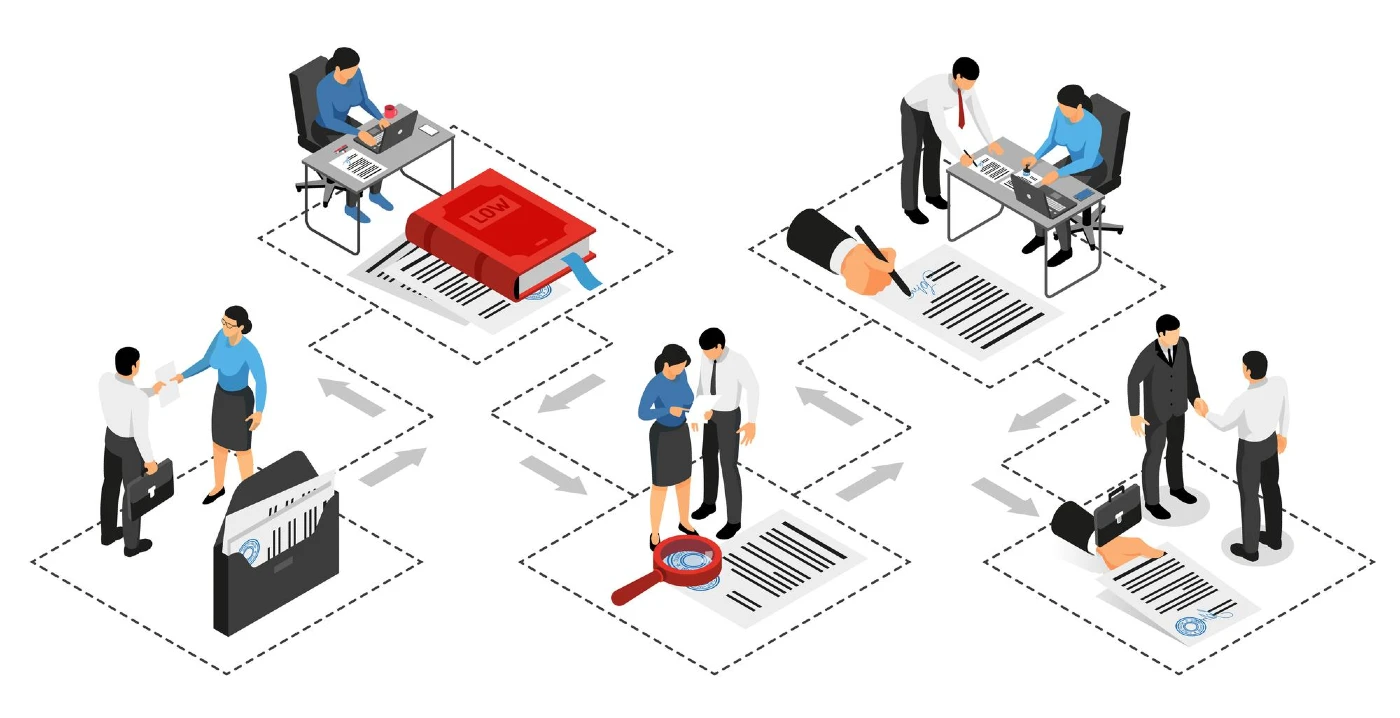
But what exactly is a certificate authority, and why does it matter? Let’s explore how these entities establish trust across the internet and keep your data secure.
Table of Contents
- What is a Certificate Authority?
- Why Certificate Authorities Are Essential for Web Security
- How Certificate Authorities Validate and Issue Certificates
- Understanding SSL/TLS Certificate Validation Levels
- Types of Digital Certificates Issued by Certificate Authorities
- How Certificate Chains Establish Trust
- Choosing the Right Certificate Authority
- Secure Your Website with Trusted SSL Certificates from SSL Dragon
Save 10% on SSL Certificates when ordering from SSL Dragon today!
Fast issuance, strong encryption, 99.99% browser trust, dedicated support, and 25-day money-back guarantee. Coupon code: SAVE10

What is a Certificate Authority?
A certificate authority (CA) is a trusted third-party organization that validates identities and issues digital certificates. Think of it like a passport agency—just as a government verifies your identity before issuing a passport, a CA confirms who you are (or what your website is) before granting a digital certificate.
The CA’s job is to bind cryptographic keys to verified entities. When DigiCert or Sectigo issues a certificate to a business, they’re essentially saying, “We’ve checked this organization’s credentials, and they are who they claim to be.”
Digital certificates serve three critical purposes:
- Authentication – They prove that a website, company, or individual is legitimate. When you visit https://yourbank.com, the certificate confirms you’re actually connected to your bank, not an imposter.
- Encryption – Certificates enable secure, encrypted connections between your browser and websites. This scrambles your data so hackers can’t read it during transmission.
- Integrity – They ensure data hasn’t been tampered with during transfer. If someone tries to modify the information, the certificate validation fails.
Without certificate authorities, there would be no reliable way to verify identities online. Anyone could claim to be your bank, and you’d have no way to confirm it.
Why Certificate Authorities Are Essential for Web Security
Certificate authorities form the backbone of web security infrastructure and are essential for establishing digital trust. They’re the reason you can shop online, check your bank balance, or share sensitive information without constant fear of interception.
Building Trust in Online Transactions
When you enter your credit card details on an e-commerce site, you’re trusting that site with valuable information. But how do you know the site is legitimate? The certificate authority has already done that verification for you.
CAs thoroughly vet websites before issuing certificates. For business websites, this can include verifying company registration documents, confirming physical addresses, and validating domain ownership. This vetting process creates a trust anchor that browsers and users can rely on.
Financial institutions, healthcare providers, and government agencies all depend on certificates issued by trusted CAs. Without them, secure online banking, telemedicine, and digital government services wouldn’t be possible.
The Risks Without Certificate Authorities
Visit a site without a valid certificate, and modern browsers like Chrome, Firefox, and Safari will hit you with a warning: “Your connection is not private.” Most users (rightfully) abandon the site immediately.
But the risks go deeper than lost traffic. Without CAs:
- Phishing attacks become trivial – Criminals can easily impersonate legitimate sites
- Man-in-the-middle attacks succeed – Hackers can intercept and read your data
- No encryption – Your information travels across the internet in plain text
- Zero accountability – Bad actors can operate anonymously without consequence
Browser trust indicators exist because certificate authorities do the heavy lifting of verification. That green padlock or HTTPS prefix signals that a CA has validated the site and enabled encryption.
How Certificate Authorities Validate and Issue Certificates
Getting a certificate isn’t as simple as filling out a form. The certificate issuance process involves multiple steps designed to ensure only legitimate entities receive certificates.
First, you generate a Certificate Signing Request (CSR) on your server. This creates a pair of cryptographic keys—a public key that will be shared with everyone, and a private key that stays secure on your server. You can produce that request on the server with OpenSSL, or use a free CSR generator to fill in the fields from a form.
The CSR contains information about your organization: domain name, company details, location, and that public key. You submit this to a CA like DigiCert, Sectigo, or Geotrust.
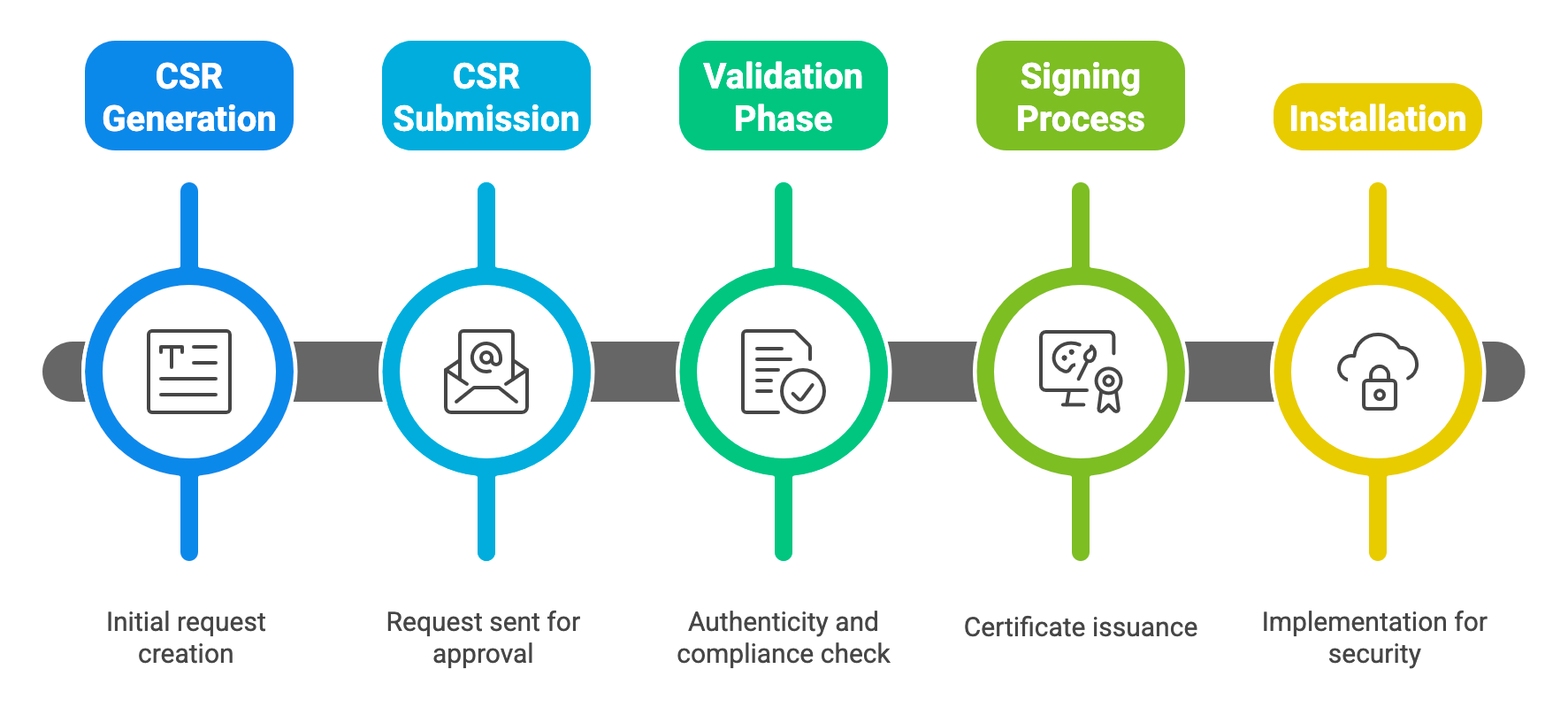
Here’s where validation happens. The CA verifies your information using methods appropriate to the certificate type you’re requesting:
- Domain validation – They confirm you control the domain, usually by asking you to add a specific DNS record or respond to an email sent to an admin address
- Organization validation – They verify your business exists by checking registration documents and calling your listed phone number
- Extended validation – They conduct extensive background checks on your company, verifying legal existence, physical location, and operational status
Once satisfied with their verification, the CA uses its own private key to digitally sign your certificate. This signature is what makes the certificate trustworthy—it’s the CA’s stamp of approval.
You then install the signed certificate on your server, and browsers start trusting your site. The entire process can take minutes for domain validation or several days for extended validation.
Understanding SSL/TLS Certificate Validation Levels
Not all certificates are created equal. CAs offer different validation levels, each suited to different security needs and use cases.
Domain Validation (DV) Certificates
DV certificates are the quick and basic option. The CA only confirms that you control the domain—nothing more. Validation happens automatically in minutes through email verification or DNS record checks.
Best for: Blogs, personal websites, landing pages, and internal applications where users don’t need assurance about the organization behind the site.
Limitations: DV certificates don’t verify business identity. A scammer could get a DV certificate for “definitely-not-fake-bank.com” as easily as you can for your legitimate site.
Organization Validation (OV) Certificates
OV certificates step up the verification game. The CA confirms not just domain ownership, but also that your organization is real and legally registered. They’ll verify business registration, address, and phone number.
The certificate displays your company name, giving visitors more confidence. Browser clicking on the padlock can see your verified organization details.
Best for: Business websites, corporate portals, SaaS applications, and any commercial site where customer trust matters.
Validation time: Typically 1-3 business days, since human verification is involved.
Extended Validation (EV) Certificates
EV certificates represent the gold standard of validation. CAs conduct rigorous checks following strict guidelines set by the CA/Browser Forum. They verify:
- Legal existence and status of your business
- Physical address and operational presence
- Exclusive control over the domain
- Authority of the certificate requester
EV certificates used to trigger the green address bar in browsers, though most browsers have phased this out. They still provide the highest level of organizational vetting and are often required for compliance with standards like PCI DSS for e-commerce sites and HIPAA for healthcare applications handling sensitive patient data.
Best for: E-commerce sites, banking and financial institutions, healthcare portals, and any site handling highly sensitive user data.
Validation time: 3-7 business days due to thorough vetting requirements.
Types of Digital Certificates Issued by Certificate Authorities
SSL/TLS certificates for websites get the most attention, but certificate authorities issue several other types of digital certificates.
SSL/TLS Certificates secure website connections and come in various configurations: single domain, wildcard (covering all subdomains), and multi-domain certificates covering multiple domains with one certificate.
Code Signing Certificates let software developers digitally sign their applications, proving the code hasn’t been tampered with since signing. Operating systems and browsers trust signed code more readily than unsigned code.
S/MIME Certificates enable encrypted email communication. When you send an S/MIME-secured email, only the recipient can decrypt and read it. These certificates also prove the sender’s identity, preventing email spoofing.
Document Signing Certificates digitally sign PDFs and other documents, providing proof of authenticity and preventing tampering. They’re essential for legal documents, contracts, and official records.
Client Authentication Certificates verify users rather than servers. Companies use them for secure VPN access, network authentication, and restricting access to sensitive systems.
Each certificate type serves a specific security need, but all rely on the certificate authority’s trusted validation and proper certificate lifecycle management.
Save 10% on SSL Certificates when ordering from SSL Dragon today!
Fast issuance, strong encryption, 99.99% browser trust, dedicated support, and 25-day money-back guarantee. Coupon code: SAVE10
How Certificate Chains Establish Trust
Certificate authorities don’t just slap their signature on your certificate and call it a day. Trust flows through a carefully constructed hierarchy called a certificate chain.
At the top sits the root certificate—the CA’s most trusted and closely guarded credential. Root certificates are stored in secure hardware security modules (HSMs) and rarely used directly. Operating systems from Microsoft, Apple, and others, along with browsers, come with a pre-installed list of trusted root certificates.
Below root certificates are intermediate certificates. When a CA signs your certificate, they typically use an intermediate certificate rather than the root. This adds a layer of security—if an intermediate certificate is compromised, the CA can revoke it without affecting their root’s trust status.
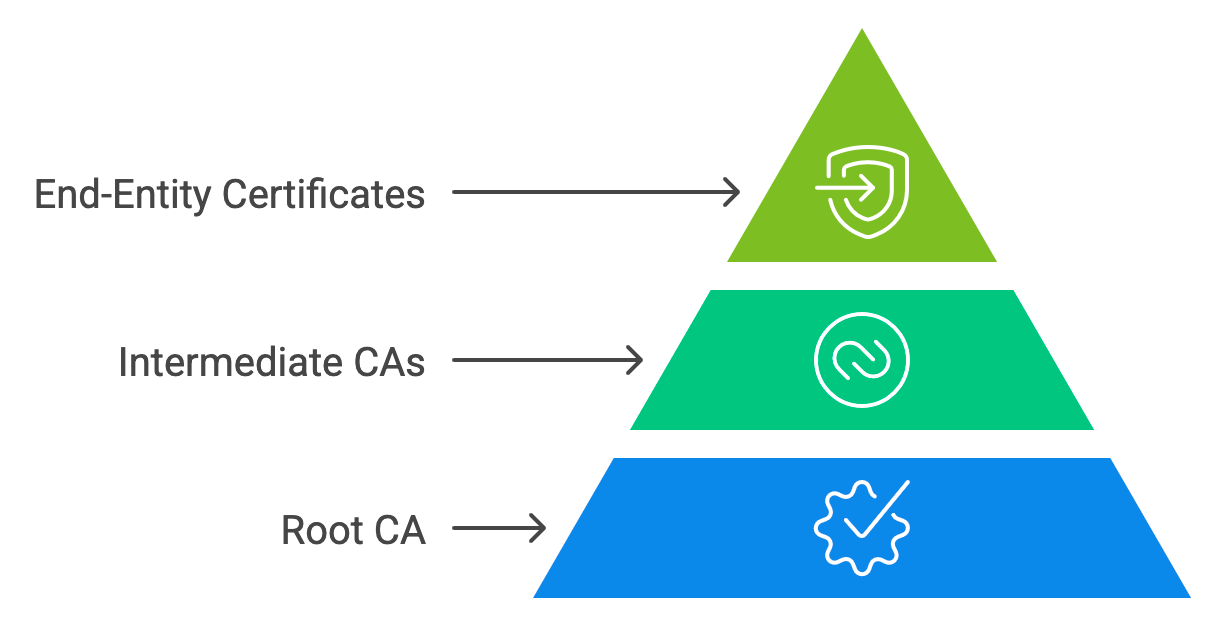
Your end-entity certificate (the one on your server) sits at the bottom of this chain. When someone visits your site, their browser checks:
- Is your certificate signed by a trusted intermediate certificate?
- Is that intermediate certificate signed by a trusted root certificate?
- Is the root certificate in the browser’s trust store?
If all three checks pass, the browser displays the padlock and establishes an encrypted connection. If any link in the chain breaks, the connection fails.
This chain of trust model is what makes the entire PKI (Public Key Infrastructure) system work. Break one link, and trust collapses. But maintain all links properly, and you have a robust security foundation.
Choosing the Right Certificate Authority
Not all certificate authorities are equal. Picking the right one affects your site’s security, user trust, and operational hassle.
- Reputation matters. Stick with established CAs like DigiCert, Sectigo, Entrust, GlobalSign, or SSL.com. These organizations have proven track records and have passed rigorous audits. Lesser-known CAs might offer cheaper certificates, but browser trust issues can arise if they’re not widely recognized.
- Browser compatibility is non-negotiable. Your CA’s root certificates must be trusted by all major browsers—Chrome, Firefox, Safari, and Edge—plus common operating systems. Most established CAs have 99%+ browser recognition, but always verify.
- Check compliance standards. Reputable CAs follow CA/Browser Forum baseline requirements and undergo regular WebTrust audits. These third-party audits verify that CAs maintain proper security controls and issuance procedures.
- Consider support quality. When certificate issues arise—and they will—you need responsive support. Look for CAs offering 24/7 availability, knowledgeable staff, and multiple contact channels.
- Evaluate certificate management tools. SSL Certificates are now limited to 200 days as of March 15, 2026, with further reductions to 100 days from March 15, 2027, and 47 days starting March 15, 2029. If you manage multiple certificates, manual tracking quickly becomes impractical. You should rely on ACME-based Certificate-as-a-Service (CaaS), which handles domain validation, issuance, and renewal automatically, keeping your infrastructure aligned with these shorter cycles.
- Price isn’t everything, but it matters. Domain validation certificates cost less than extended validation. Compare pricing across validation levels, and watch for hidden renewal rate increases. Some resellers offer better prices than buying directly from CAs.
Secure Your Website with Trusted SSL Certificates from SSL Dragon
Understanding certificate authorities is one thing—getting the right certificate is another. SSL Dragon simplifies the process by offering competitively priced SSL/TLS certificates from industry-leading CAs including DigiCert, Sectigo, and other trusted providers.
Whether you need a domain validation certificate for a blog, an organization validation certificate for your business site, or an extended validation certificate for e-commerce, we’ve got options. We also offer access to enterprise solutions like DigiCert One for organizations requiring advanced certificate lifecycle management and automated deployment.
Our certificates provide:
- Fast issuance – DV certificates in minutes, OV and EV within days
- 99.9% browser compatibility – Trusted by all major browsers and devices
- Expert support – Real humans available 24/7 to help with installation and troubleshooting
- Flexible options – Single domain, wildcard, multi-domain, and code signing certificates
- Competitive pricing – Get enterprise-grade security without enterprise costs
- Enterprise solutions – Access to DigiCert One and Trust Lifecycle Manager for scalable certificate management
Don’t leave your website’s security to chance. Secure your website today with SSL Dragon’s trusted SSL certificates and give your visitors the confidence they deserve.
Save 10% on SSL Certificates when ordering from SSL Dragon today!
Fast issuance, strong encryption, 99.99% browser trust, dedicated support, and 25-day money-back guarantee. Coupon code: SAVE10