



The PR_END_OF_FILE_ERROR is one of the least descriptive messages Firefox can show you. The page simply fails, the wording gives no hint about which side of the connection gave up, and most of the advice you will find online sends you into Firefox’s settings when the problem is often somewhere else entirely.
In this guide, we’ll explain what the error actually means at the protocol level, how to find out where the connection is being cut, and how to fix it both as a Firefox user and as the owner of the server on the other end.
Quick answer:
PR_END_OF_FILE_ERROR is Firefox’s name for NSPR error -5938, “Encountered end of file”. It means the other end closed the TCP connection before the TLS handshake finished, so Firefox read zero bytes where it expected the next handshake message. It is not a cipher mismatch, and it is not always a browser problem.
The common causes are a VPN or proxy, DNS over HTTPS, antivirus software that inspects HTTPS traffic, a firewall or load balancer that drops Firefox’s larger post-quantum ClientHello, or a server that rejects the connection outright. Test the same site in another browser and on another network first: that single step tells you whether the fault is your Firefox profile, your network, or the server.
Let’s start with what the error code actually says.
Table of Contents
- What Is the PR_END_OF_FILE_ERROR?
- What Causes the PR_END_OF_FILE_ERROR?
- How to Diagnose the PR_END_OF_FILE_ERROR
- How to Fix the PR_END_OF_FILE_ERROR in Firefox
- How to Fix the PR_END_OF_FILE_ERROR on Your Server
- How to Avoid the PR_END_OF_FILE_ERROR
- Frequently Asked Questions
What Is the PR_END_OF_FILE_ERROR?
PR_END_OF_FILE_ERROR comes from NSPR, the portable runtime library underneath NSS, which is the cryptographic stack Firefox uses for SSL/TLS. In the NSPR error list it carries the code -5938 and the description Encountered end of file.
“End of file” is the low-level way of saying that a read returned zero bytes. Firefox was in the middle of the TLS handshake, it asked the socket for the next handshake message, and instead of data it got the signal that there is nothing left to read because the connection is gone. In other words, the other end hung up mid-conversation, without sending a TLS alert explaining why.
That distinction matters, because the error tells you the shape of the failure but not its location. A connection can be closed early by the web server itself, by a load balancer or reverse proxy in front of it, by a firewall or inspection appliance somewhere in the path, or by software running on your own machine that sits between Firefox and the network.
It is not a cipher mismatch
A lot of troubleshooting advice describes this error as Firefox having “exhausted all available encryption methods” or having run out of cipher suites to try. That description belongs to a different error. When a browser and a server genuinely share no acceptable cipher suite, Firefox reports SSL_ERROR_NO_CYPHER_OVERLAP instead. That error is broader than its name suggests, since Firefox also uses it for any handshake failure the server signals while Firefox is waiting for the ServerHello, but the distinction that matters here holds: the server answered.
PR_END_OF_FILE_ERROR is the opposite situation: no negotiation outcome was reached at all, because the connection disappeared before either side could agree or disagree on anything. Following cipher-related advice for this error usually means changing settings that were never the problem.
Only the error name is Firefox-specific
You will not see the string PR_END_OF_FILE_ERROR in Chrome, Edge, or Safari, because those browsers do not use NSPR and NSS. They have their own vocabulary for the same event: Chrome and Edge typically report ERR_CONNECTION_CLOSED or ERR_SSL_PROTOCOL_ERROR when a connection is cut during the handshake.
So the error name is exclusive to Firefox, but the cause very often is not. Treating the error as a Firefox-only defect is what leads people to reconfigure the browser for hours on a problem that a second browser would have located in thirty seconds.
Save 10% on SSL Certificates when ordering from SSL Dragon today!
Fast issuance, strong encryption, 99.99% browser trust, dedicated support, and 25-day money-back guarantee. Coupon code: SAVE10

What Causes the PR_END_OF_FILE_ERROR?
Anything that can close a TCP connection during the handshake can produce this error. It helps to group the possibilities by where they sit in the path, because that is also the order in which you can rule them out.
On your own device
- VPN or proxy interference. VPNs and proxies reroute traffic, and a stale tunnel, a dead proxy entry left behind in Firefox’s connection settings, or a split-tunnel rule that sends part of the traffic the wrong way will all cut connections mid-handshake.
- DNS over HTTPS. DoH comes up repeatedly in reports of this error on Mozilla’s support forum, with users resolving it by switching the feature off. If the configured DoH resolver is unreachable, blocked on your network, or returns results your network then refuses to route to, connections fail before they finish.
- Antivirus or firewall HTTPS inspection. Security suites that offer HTTPS scanning, SSL/TLS protection, or encrypted traffic inspection terminate the connection themselves and re-encrypt it. When that component fails, is misconfigured, or does not understand a modern handshake, it drops the connection rather than passing it through.
- A damaged Firefox profile. Your profile stores connection preferences, modified settings, and the certificate database. A profile carrying broken values from an old configuration or a removed extension can fail consistently where a fresh profile succeeds.
In the network between you and the site
- Post-quantum key exchange and oversized ClientHello messages. Since version 132, released in October 2024, Firefox offers the hybrid post-quantum group X25519MLKEM768 by default. The ML-KEM-768 key share adds roughly 1.2 KB to the first message Firefox sends, pushing the ClientHello from a few hundred bytes to well over 1,300 bytes, which no longer fits in a single TCP segment. Deep packet inspection appliances, firewalls, and load balancers written on the assumption that a whole ClientHello arrives in one read will reset the connection instead of waiting for the rest. Fortinet published a known-issue notice for exactly this behavior in flow-based deep inspection, and has since shipped fixes, as have most other affected vendors. That is the shape of the problem today: a fix exists for nearly every product, and what remains is equipment nobody has updated. So check this when a site fails from one network or from behind one appliance and works elsewhere, rather than treating it as the first suspect. The community reference for the problem is tldr.fail.
- Encrypted Client Hello being stripped or blocked. Firefox has enabled Encrypted Client Hello by default since version 119. ECH hides the hostname inside the handshake, which some networks are configured to block outright rather than allow, and a middlebox that cannot read the hostname it expects to filter on may simply close the connection.
- Corporate filtering and captive portals. Managed networks, school and hotel Wi-Fi, and content filters routinely terminate handshakes to hosts they do not allow, and many do it by dropping the connection rather than returning a block page.
On the server
This half is missing from most guides on this error, and it is where the fault lies whenever the site fails for everyone rather than just for you.
- The server rejects the ClientHello and closes. A correctly behaved server that dislikes something in the handshake sends a TLS alert. Plenty of servers, especially older ones and custom TLS terminators, just close the socket instead, which is precisely what produces an end-of-file error on the client.
- SNI is required but not usable. If the server hosts several sites on one address and cannot match the requested hostname to a virtual host, some configurations drop the connection rather than serving a default certificate. Related failures surface as ERR_SSL_UNRECOGNIZED_NAME_ALERT.
- A client certificate is required. On endpoints configured for mutual TLS, a browser that presents no client certificate can have its connection closed without explanation. The Chrome-side equivalent is ERR_BAD_SSL_CLIENT_AUTH_CERT.
- A load balancer or reverse proxy resets the connection. HAProxy, F5, NGINX, and cloud load balancers all sit in front of the origin and terminate TLS themselves. Health-check failures, buffer limits, connection limits, and TLS settings on the balancer produce failures that never reach the application server at all.
- Resource exhaustion or a crashing TLS terminator. When a server runs out of file descriptors, worker processes, or memory, new connections are accepted and then immediately dropped. This is the usual explanation when the error is intermittent rather than constant.
How to Diagnose the PR_END_OF_FILE_ERROR
Because the error itself does not say where the connection was cut, spend two minutes narrowing that down before changing any settings. Each test below eliminates a whole category of causes.
1. Open the same site in another browser
Load the failing address in Chrome, Edge, or Safari on the same machine.
- It fails there too, with a message like ERR_CONNECTION_CLOSED: Firefox is not the problem. Move on to the network and server tests.
- It works there: the cause is local to Firefox, which points at your profile, your Firefox connection settings, or DNS over HTTPS.
2. Try a different network
Tether the device to a phone hotspot and reload the page. If the site loads on mobile data but not on your usual connection, the problem is in that network: a router, a corporate firewall, an inspection appliance, or a filtering DNS resolver. This single test is what separates a middlebox problem from a server problem, and it is the step that guides describing this as a “browser-side issue” leave out.
3. Test the handshake directly with OpenSSL
OpenSSL takes the browser out of the picture and shows you the raw handshake. Run this from a terminal, replacing the hostname with the one that fails:
openssl s_client -connect example.com:443 -servername example.comA healthy connection prints the server’s certificate chain, beginning with a subject= line. A connection being closed the way Firefox describes fails immediately instead, with output along these lines:
CONNECTED(00000003)
write:errno=104
---
no peer certificate available
---
SSL handshake has read 0 bytes and written 0 bytes
The exact errno varies by operating system, 104 on Linux and 32 on macOS, and newer OpenSSL builds may instead report an unexpected end of file while reading. If the server reads your ClientHello before hanging up rather than resetting immediately, the written count will be non-zero and only the read count stays at zero. Either way, read 0 bytes is the same condition Firefox is reporting as PR_END_OF_FILE_ERROR, confirmed outside the browser.
One line in this output will mislead you. Let the command run to the end and it still prints Verify return code: 0 (ok), even though no certificate was ever received. That zero means certificate verification never ran, not that it passed, and it appears on every one of these failures in both OpenSSL and the LibreSSL that macOS ships. Judge the result by the line further up instead: a subject= line and a certificate chain mean the handshake got somewhere, while no peer certificate available means it did not.
4. Check whether the large ClientHello is the trigger
If you have OpenSSL 3.5 or newer, you can test the post-quantum theory directly by forcing each key exchange group in turn. Check first with openssl version, because the openssl that ships with macOS is LibreSSL and answers Failed to set groups instead of running the test. First the hybrid post-quantum group Firefox sends by default:
openssl s_client -connect example.com:443 -servername example.com -groups X25519MLKEM768Then the classical group, which produces a much smaller ClientHello:
openssl s_client -connect example.com:443 -servername example.com -groups X25519If the first command fails and the second succeeds, something in the path cannot handle a ClientHello that spans more than one TCP segment. That is a firewall, load balancer, or inspection appliance to fix or update, not a browser setting to change.
5. Scan the site’s certificate and configuration
If you own the site, or you want to know whether its TLS setup is sane before blaming your own machine, run it through our free SSL Checker. It reports the certificate chain, the expiry date, and configuration problems that a browser padlock will never show you.
How to Fix the PR_END_OF_FILE_ERROR in Firefox
Work through these in order if the diagnostics pointed at your own machine or network. They are arranged from the most common cause to the most disruptive fix.
1. Disconnect the VPN and clear the proxy settings
Start with the VPN, since it is the fastest to rule out. Disconnect from it in its own application or from the system tray, then reload the page in Firefox.
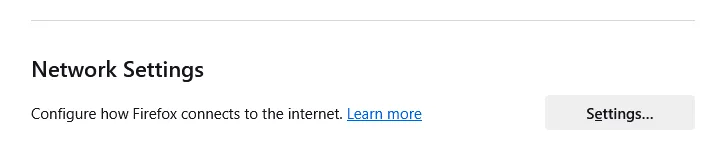
A proxy entry left behind in Firefox is just as common, and it keeps failing long after the software that created it is gone. To check it:
- Open Settings and stay in the General panel.
- Scroll to the bottom, find Network Settings, and click Settings.
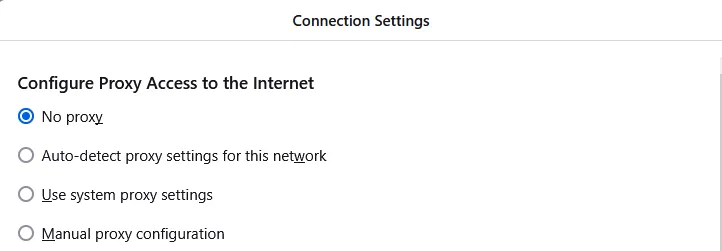
- Select No proxy, or Use system proxy settings if your organization requires one, then click OK.
- Restart Firefox and try the site again.

2. Turn off DNS over HTTPS
This is the setting most guides never mention, and it is one of the fixes that comes up most often in reports of this error on Mozilla’s support forum. The DoH resolver Firefox uses can be blocked on your network, unreachable, or returning addresses your network then refuses to reach.
- Open Settings and select Privacy & Security.
- Scroll to the DNS over HTTPS section at the bottom of the panel.
- Select Off to use your system resolver instead.
- Restart Firefox and reload the site.
If that fixes it, you have found the cause rather than the cure. Try switching to a different DoH provider under Max Protection or Increased Protection before leaving the feature off permanently, since DoH keeps your DNS lookups private from everyone on the network path.
3. Turn off HTTPS scanning in your security software
Antivirus suites that inspect encrypted traffic insert themselves into every handshake, and when that component misbehaves the connection dies exactly the way this error describes. Look in your security software for a setting named HTTPS scanning, SSL/TLS protection, encrypted traffic inspection, or secure connection scanning, and switch it off temporarily.
Restart Firefox and reload the site. If it works, the inspection engine was the cause.
What to do next matters. Leaving HTTPS inspection off forever gives up a layer of protection, so treat it as a temporary state and pick one of these instead:
- Update the security software first. Most vendors have shipped fixes for oversized post-quantum handshakes, so an out-of-date engine is often the whole story.
- Add an exclusion for the specific site rather than disabling inspection globally.
- Switch products if the vendor has no fix, rather than running indefinitely with the feature disabled.
One thing not to do: leave your firewall switched off. Some guides tell you to turn the Windows firewall off for all network types, which exposes the machine far beyond anything needed to test a single website. If you want to test whether the firewall is involved, disable it only for the network profile you are currently on, for the length of one page load, then switch it back on.
4. Test with post-quantum key exchange temporarily disabled
If the OpenSSL test in the previous section pointed at the size of the ClientHello, or you cannot run that test, you can check the same theory inside Firefox. This is a diagnostic, not a permanent setting.
1. Type this in the address bar and press Enter:
about:config2. Accept the warning, then search for:
security.tls.enable_kyber3. Double-click it to set it to false, then reload the failing site.
If the page loads, you have confirmed that something between Firefox and the server cannot cope with a ClientHello split across TCP segments. Report it to whoever runs that equipment, whether that is your IT department, your firewall vendor, or the site owner.
Set the value back to true once the underlying equipment is fixed. Post-quantum key exchange protects today’s traffic against being recorded now and decrypted later by a future quantum computer, so it is worth having on.
5. Check whether your TLS version settings were changed
Firefox picks TLS versions on its own, and a default installation needs no help. It is worth confirming that nobody, including an older tutorial, has changed these values on your machine.
Open the configuration editor again:
about:configThen search for these two preferences:
security.tls.version.min
security.tls.version.max
If either row is shown in bold, it has been modified. Right-click it and choose Reset to restore the default, then restart Firefox. Do not type values in by hand.
A warning about advice you may have read elsewhere. Several guides on this error tell you to set these two preferences to 2 and 3. That advice is wrong and it downgrades your security. The values map to protocol versions like this:
- 1 = TLS 1.0
- 2 = TLS 1.1
- 3 = TLS 1.2
- 4 = TLS 1.3
Current Firefox defaults are a minimum of 3 and a maximum of 4, meaning TLS 1.2 and TLS 1.3. Setting them to 2 and 3 re-enables deprecated TLS 1.1, which browsers disabled in 2020, and switches off TLS 1.3 entirely. That makes your browser less secure and slower, and it fixes nothing, because an end-of-file error is not a version negotiation failure in the first place.
6. Reset the certificate database, without distrusting root certificates
Firefox keeps the CA certificates and client certificates you or an administrator imported, along with stored security exceptions, in a file called cert9.db inside your profile. It does not keep the intermediate certificates Firefox preloads to repair incomplete chains: those live in a separate store in the same profile, and Firefox stopped saving intermediates it merely observed during a connection in version 130. If cert9.db is the suspect, reset the whole file. Do not delete individual certificates from the Authorities tab.
Here is why that matters. Some guides tell you to open View Certificates, go to Authorities, and remove anything that looks outdated or suspicious. Firefox’s built-in root certificates cannot actually be deleted: the button strips their trust bits instead, and the entry reappears after a restart with trust turned off. Every website whose certificate chains to that root then stops loading, and there is no button in the interface to undo it. Distrusting roots breaks browsing, and it has never fixed an end-of-file error.
The safe reset works on the file instead:
1. Type this in the address bar to locate your profile:
about:support2. Next to Profile Folder, click Open Folder on Windows, Show in Finder on macOS, or Open Directory on Linux.
3. Close Firefox completely before touching anything in that folder.
4. Rename cert9.db to cert9.db.old rather than deleting it, so you can undo the change.
5. Start Firefox again. It rebuilds the file from the built-in root list.
You will lose any security exceptions you had added and any certificates you imported yourself, so re-import those from your own copies. The preloaded intermediates are not affected, because they live in the separate store rather than in this file. If the error persists, put the original file back by restoring its name.
7. Create a new Firefox profile (back up your bookmarks first)
If nothing above helped and other browsers on the same machine work, a damaged profile is the remaining explanation. Export your bookmarks before you start.
Export your bookmarks
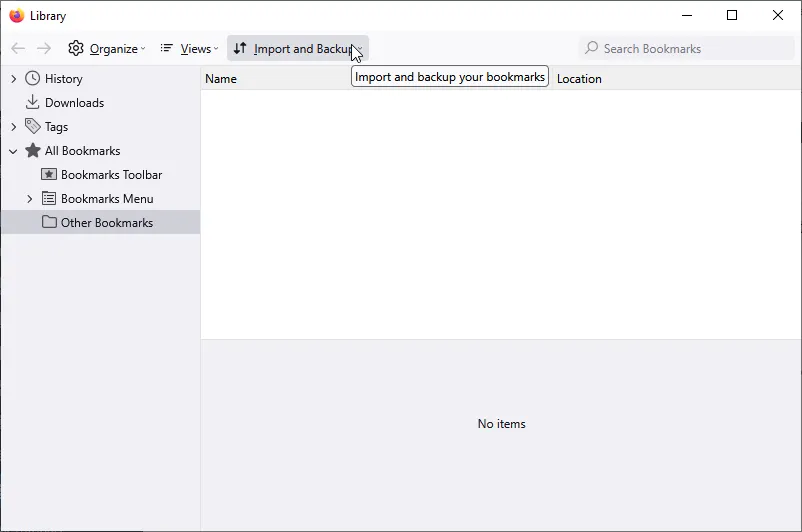
- Open the Bookmarks manager. The keyboard shortcut is Ctrl + Shift + O on Windows and Linux, or Command + Shift + O on macOS.
- Click Import and Backup, then Export Bookmarks to HTML.
- Save the file somewhere you will find it again, such as your Desktop.
Create the new profile
- Type this in the address bar and press Enter:
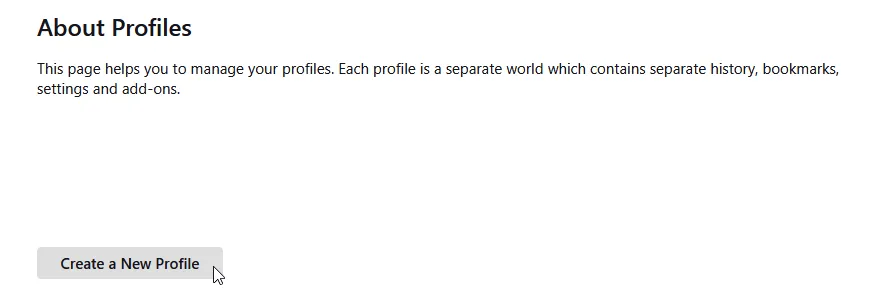
about:profiles- Click Create a New Profile and follow the wizard.
- Click Set as default profile on the new entry.
- Restart Firefox and test the site.
Leave the old profile in place until you are sure the new one works. To bring your bookmarks across, open Bookmarks, then Import and Backup, then Import Bookmarks from HTML, and choose the file you exported.
How to Fix the PR_END_OF_FILE_ERROR on Your Server
If visitors report this error on your site, or the OpenSSL test fails from several different networks, the connection is being closed on your side. None of the browser fixes above apply. Work through the following instead.
1. Confirm the failure from outside your network
Run the OpenSSL command from a machine outside your own infrastructure, ideally on a different provider, so you are testing the path visitors actually take:
openssl s_client -connect yourdomain.com:443 -servername yourdomain.comPair it with a scan from our SSL Checker. If the checker cannot complete a handshake either, the problem is reproducible and public, which rules out anything specific to one visitor.
2. Make sure your stack accepts a fragmented ClientHello
Browsers now send post-quantum key shares by default, so the first message no longer arrives in a single TCP segment. Any component that reads the ClientHello once and gives up if it looks incomplete will drop those connections, and the visitors affected will be the ones on the newest browsers. Most vendors shipped fixes during 2025, so this is worth ruling out early on a stack that has not been updated recently, and is unlikely to be the answer on one that has.
Compare the two OpenSSL calls from the diagnostics section against your own domain. If X25519MLKEM768 fails where X25519 succeeds, look at every device that terminates or inspects TLS in front of the application:
- Update the firmware or software on firewalls and inspection appliances. Fortinet, Sophos, and Cisco have all shipped fixes for this specific failure.
- Update the TLS library behind your load balancer or reverse proxy, and raise handshake buffer limits where they are configurable.
- If you route TCP by reading the hostname out of the ClientHello, confirm that the router reassembles messages that span segments rather than parsing the first packet only.
3. Check SNI and virtual host configuration
Server Name Indication lets one IP address host many certificates by having the client name the host it wants during the handshake. Run the same connection with and without SNI to see how your server responds when it cannot match a hostname:
openssl s_client -connect yourdomain.com:443 -noservernameopenssl s_client -connect yourdomain.com:443 -servername yourdomain.comThe -noservername flag is what makes the first command a real test. Since OpenSSL 1.1.1, s_client populates the SNI extension automatically from the hostname given to -connect, so without that flag both commands would send SNI and the comparison would tell you nothing. The flag is specific to OpenSSL: the openssl that ships with macOS is LibreSSL and answers unknown option -noservername, so run this comparison with an OpenSSL build installed through Homebrew. Verify with openssl version that you are reaching it, because /usr/bin precedes Homebrew on the default PATH, and use the full path /opt/homebrew/bin/openssl if you are not.
If the version with SNI works and the version without it closes the connection, your server has no default virtual host to fall back on. Define one so unmatched requests get a certificate and a clean error instead of a dropped connection.
4. Check whether the endpoint demands a client certificate
If the host is configured for mutual TLS, browsers that present no client certificate may have their connections closed rather than being told what is missing. Review the client certificate settings on the virtual host, the load balancer, and any API gateway in front of it. Where mutual TLS is intentional, keep it on a separate hostname so ordinary visitors never reach it.
5. Review the load balancer and reverse proxy
When TLS terminates on HAProxy, NGINX, F5, or a cloud load balancer, that device decides whether the handshake completes. Check the parts that close connections silently:
- Connection and rate limits that are being hit at peak times.
- Health checks marking backends down, leaving the front end with nowhere to send traffic.
- TLS version and cipher lists trimmed so aggressively that modern clients have nothing left to negotiate with.
- Certificate bindings pointing at a file that was moved, replaced, or left unreadable after a renewal.
6. Look for resource exhaustion when the error is intermittent
An error that appears under load and clears afterwards is usually the server accepting connections it cannot service. Check the error log for the failing period, along with open file descriptor limits, worker process and thread limits, and memory pressure. A TLS terminator that restarts under load produces exactly this pattern.
7. Verify the certificate itself is still valid
An expired or incomplete certificate normally produces a warning page rather than a dropped connection, so it is unlikely to be your cause here, but it is cheap to rule out while you are already looking at the certificate’s validity period.
How to Avoid the PR_END_OF_FILE_ERROR
- Keep Firefox updated. Handshake behavior changes with the browser, and running a build that is years old guarantees you meet problems that were already solved.
- Leave the TLS preferences alone. Firefox negotiates protocol versions and encryption algorithms correctly on its own. Hand-edited values in about:config are a common source of failures that look like server problems.
- Patch anything that inspects TLS. Firewalls, antivirus suites, and inspection appliances need updates specifically because handshakes keep changing. The post-quantum ClientHello broke a generation of these devices, and the fix in every case was a vendor update.
- Prefer exclusions over disabled protection. If security software conflicts with one site, exclude that site rather than switching HTTPS inspection off across the board.
- Monitor your own site from outside. If you run the server, test HTTPS from a network you do not control, so you find broken handshakes before your visitors do.
Frequently Asked Questions
It is NSPR error -5938, “Encountered end of file”. Firefox was reading the TLS handshake and the read returned zero bytes, which means the connection was closed before the handshake completed. The other end hung up without sending a TLS alert to explain why.
No. Only the error name is specific to Firefox, because it comes from the NSS library Firefox uses. The underlying condition, a connection closed during the handshake, happens in every browser. Chrome and Edge call it ERR_CONNECTION_CLOSED or ERR_SSL_PROTOCOL_ERROR. If another browser fails on the same address, the cause is your network or the server, not Firefox.
No. Those values mean TLS 1.1 and TLS 1.2, so following that advice re-enables a protocol that browsers deprecated in 2020 and switches off TLS 1.3. The current defaults are 3 and 4, which is TLS 1.2 through TLS 1.3. If someone has already changed them on your machine, right-click each preference in about:config and choose Reset rather than typing new values in.
No. Firefox’s built-in roots cannot be removed, so the button strips their trust bits instead and the entry returns after a restart with trust switched off. Every site whose certificate chains to that root then stops loading, and the interface offers no way to undo it. If you need to reset certificate storage, close Firefox and rename cert9.db in your profile folder instead.
Something changed in the path, not in the site. One candidate worth testing is post-quantum key exchange: Firefox has offered the hybrid X25519MLKEM768 group by default since version 132, which makes the first handshake message large enough to span more than one TCP segment, and firewalls, inspection appliances, and load balancers that assumed the whole message arrives at once reset the connection. That wave of breakage was mostly repaired by vendor updates during 2025, so it explains an unpatched appliance rather than a current one. Disabling security.tls.enable_kyber in about:config confirms or rules out the diagnosis in seconds and should not be left in place either way. If that is not it, the other common changes are a new VPN, proxy, or security suite on your machine, and a server or load balancer that was reconfigured.
Load the site over a phone hotspot. If it works on mobile data and fails on your usual connection, something on that network is cutting the handshake, typically a firewall, a filter, or an inspection appliance. If it fails on both, and other people report the same, the server or its load balancer is closing the connection and only the site owner can fix it.
Not usually. An expired or untrusted certificate produces a warning page you can read and click through, because the handshake got far enough for Firefox to examine the certificate. An end-of-file error means the connection died before that point. You can still confirm a site’s certificate status with our SSL Checker, and if you need to replace one, browse our SSL certificates.
For more SSL error troubleshooting, check our detailed tutorials about fixing different SSL errors.
Save 10% on SSL Certificates when ordering from SSL Dragon today!
Fast issuance, strong encryption, 99.99% browser trust, dedicated support, and 25-day money-back guarantee. Coupon code: SAVE10

