


Wait! Don't Leave Without Securing Your Site
Get enterprise - grade SSL certificates at a fraction of retail prices.
Save 10% on your first order, by entering coupon code SAVE10 during checkout.

The “SSL Certificate” stands for “Security Socket Layers Certificate”. This protocol was created to protect data travelling between two machines through data encryption.
All the information from the Internet is basically transferred from one location to another in the form of HTTP language (Hyper Text Transfer Protocol). But HTTP by itself is unprotected and susceptible to Internet tricksters and thieves. That’s why SSL Certificates were developed to protect the information traveling on the Internet.
You may know about the SSL Certificates by some common things you see in your browser: the padlock, the “HTTPS” on the browser tab (when HTTP is being protected by SSL it inherits the letter “S”).
These are all indications that the website you are using has SSL encryption and its information is secure against cyber attacks.
Copy Link
An SSL certificate warranty is insurance which covers any damage that you may incur as a result of a data breach or hack that was caused due to a flaw in the certificate. The SSL warranties range in value from $5,000 to $1,500,000. This means that the higher value certificates come with more extensive warranties.
Copy Link
In some cases, the CAs may require manual verification if your order fails any internal rules of Brand Validation. It takes around 24-48 hours to pass this manual check, and the CA will either issue or reject an order in such cases.
Here are the most common reasons why certificate authorities decide to do the brand validation for some orders:
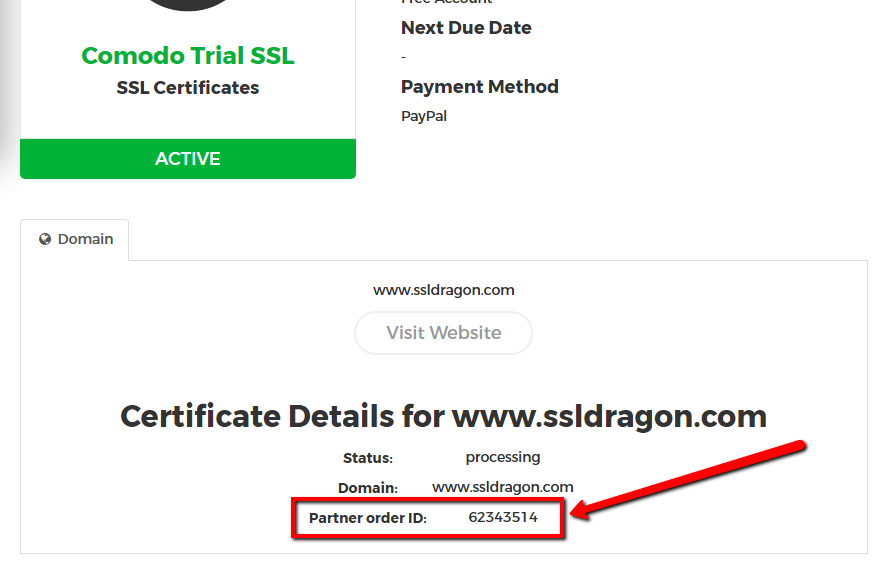
Please contact Sectigo and Thawte, RapidSSL, GeoTrust, DigiCert directly via live chat and discuss the situation with the CA’s representative.
Please mention your “Partner Order ID” in your message. You can find your “Partner Order ID” on the details page of your SSL Certificate inside your SSL Dragon account. See the screenshot on the right.
Copy Link
Copy Link
Yes, you can secure an IP address with an SSL Certificate. However, only some specific SSL Certificates will allow you to do that. Here are those SSL Certificates:
– Sectigo InstantSSL Premium
– GoGetSSL Public IP SAN
Please note that the Sectigo InstantSSL Premium is a Business Validation SSL Certificate, which means that you need to have a registered company in order to be issued this SSL certificate.
GeGetSSL Public IP SAN is a Domain Validation SSL Certificate which secures 2 IP addresses by default.
Copy Link
You have to purchase an SSL certificate if your website contains logins or web forms that require personal or credit card information from your customers. The SSL certificate will secure the personal data shared on your website and will make your clients feel safer while performing transactions, knowing that any information shared is within a secure environment and authenticated by a trusted Certificate Authority.
If you have an informative website, we still recommend you to purchase an SSL certificate. By having an HTTPS link, your website will be more trustworthy.
Copy Link
An SSL Certificate takes the information that your users provide and encrypts it, so that only a web server can decrypt it and understand it. So as the information on the web is transmitted via HTTP language, your data is not protected, as HTTP itself is not secure. The SSL Certificate takes your information, encrypts it, and passes it securely to the server where the website is hosted, or directly to the payment processor. On the merchant’s server, or on the payment processor’s side, the SSL certificate receives the encrypted HTTP information, decodes it, and safely performs the action you requested (logging you in, processing a payment, etc).
In this way, the SSL Certificate turns your “HTTP” connection into an “HTTPS” (secured HTTP) connection and protects your data. With an SSL Certificate, your information is protected and safe.
Copy Link
Currently, SSL certificates of any type CAN NOT be issued to individuals or business entities in the following countries, websites, or the following country-code-top-level domains (TLDs). The following jurisdictions are restricted by US Export restriction laws:
Source: Sectigo’s Knowledge Base
Copy Link
When dealing with SSL certificates, you’ll come across different certificate extensions. A file extension is a designation at the end of a file. For example, a certificate named “yourdomain.crt” has a certificate extension of “.crt” The”*” we put in front means that the name before the period could be anything. It’s only what is after the period that matters for identification of extension type.
Below is a list of certificate extensions:
*.CSR – Certificate Signing Request – a block of encoded text with your contact data you must generate and submit to the CA during the SSL ordering process.
*CER or *CRT – Base64-encoded X.509 Certificate – stores a single certificate. This format does not support the storage of private keys.
*.PFX or *.P12 – Personal Information Exchange Format – stores private and public keys and all certificates in the path. Used to export a certificate and retain full private key functionality.
*.DER – DER-encoded binary X.509 Certificate – stores a single certificate. This format does not support the storage of private keys.
*.P7B or *.P7R or *.SPC – Cryptographic Message Syntax Standard – storage of all certificates in the path and does not store private keys.
*PEM – Privacy-Enhanced Mail – concatenated (combined) certificate containers frequently used in certificate installations when multiple certificates that form a complete chain are being imported as a single file.
*.CRL – Certificate Revocation List – designates a certificate that has been revoked.
Learn more about certificate formats and conversion tools with our detailed guide.
Copy Link
What are Multi-Year SSL Subscription Plans?
Right now, certificates can run up to 200 days (since March 15, 2026). The SSL validity will change to 100 days from March 15, 2027, and then to just 47 days starting March 15, 2029.
However, in order to make your SSL Management process time-saving and cost-effective, the CAs and SSL Dragon are offering you the 2 Year and 3 Year SSL Subscription Plans.
This means that you can still buy a 2 or 3 year SSL Certificate and continue to benefit from multi-year discounting, while still remaining compliant with the CAB Forum SSL requirements.
How the Multi-Year SSL works?
Due to security reasons, your SSL certificate is initially issued with a maximum 200-day validity.
30 days before the expiration of your certificate, SSL Dragon, on behalf of the CA, will notify you and ask you to reissue your SSL, in order to get the additional (replacement) 1-year certificate, according to your Subscription Plan.
This FAQ explains to you how to reissue your SSL Certificate, step by step.
You will need to validate & install the replacement SSL:
a. If you have a Domain Validation SSL Certificate, a short verification of your domain name will be required via Email, HTTP, or DNS in order to issue the 1-yr replacement SSL.
b. If you have a Business or Extended SSL Certificate – an additional Business Validation/Extended Validation recheck and callback process will also be required.
You can still reissue your certificate at any time and as many times as you like during your Multi-Year SSL Subscription Plan.
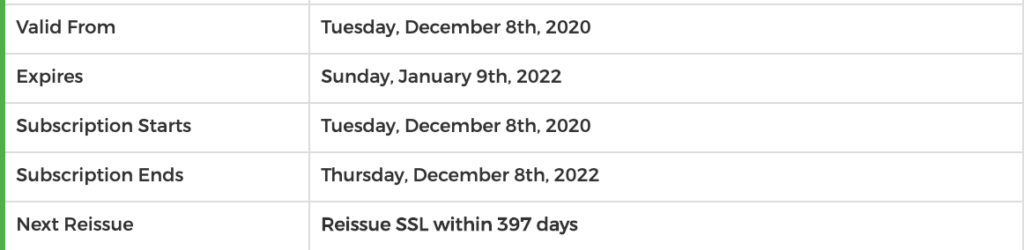
On your SSL Certificate’s page within the SSL Dragon account, you will find all the details regarding your Subscription Plan:
Copy Link