


Wait! Don't Leave Without Securing Your Site
Get enterprise - grade SSL certificates at a fraction of retail prices.
Save 10% on your first order, by entering coupon code SAVE10 during checkout.

All DigiCert SSL Certificates require customers to pass the Business Validation or Extended Validation process. On DigiCert SSL Certificates, these two validation processes are identical. As a part of the Business Validation or Extended Validation process, you need to provide information about your company and your company’s phone number.
DUNS number
You need to provide your DUNS number to DigiCert, and your DUNS profile needs to display your phone number. You can check your company’s DUNS number/profile on this website: https://www.dandb.com/. If you see that your DUNS listing does not contain a phone number, then you need to contact
Please note that after asking DNB (Dun & Bradstreet) to add your phone number to your DUNS listing, it will take them a few days to do this update. You should expect to
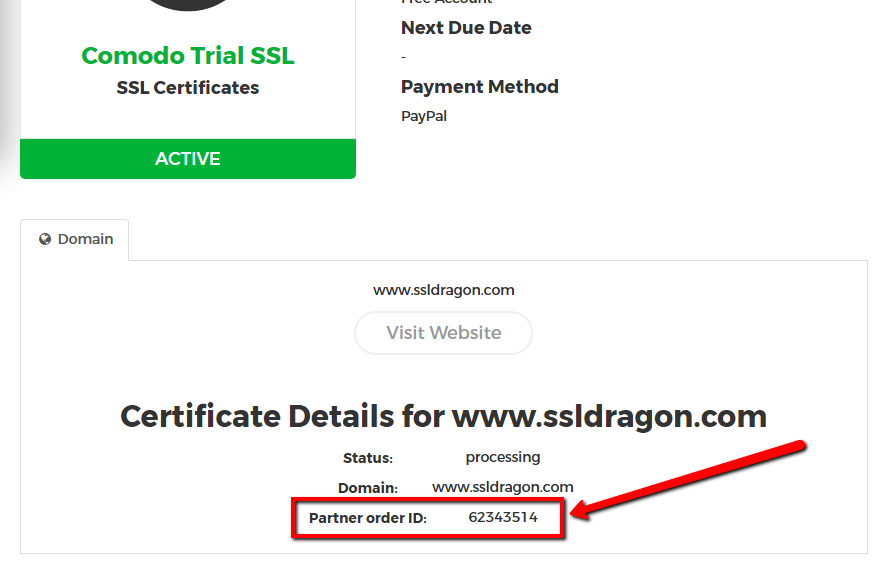 At that point, you should contact DigiCert at +1 (877) 438-8776 and provide them your DigiCert Order ID and your DUNS number. You can find your DigiCert Order ID on your SSL Certificate’s details page inside your SSL Dragon account. See the screenshot on the right.
DigiCert will proceed with the callback verification process to verify your phone number. Once that is completed, your DigiCert SSL Certificate will be issued to you.
Legal letter
If adding your phone number to your DUNS listing takes too long, you can ask DigiCert to tell you what alternatives you have for passing the Business Validation or Extended Validation. DigiCert can send you an email message with information about a legal letter which you can write, then take it to a notary for them to sign it, and then scan and send it back to DigiCert by email. The letter will have your company name, address, and phone number. Once DigiCert receives it, they will do the callback on the number which you provide in the legal letter and will issue your DigiCert SSL Certificate shortly after that. Other certificate authorities have this practice too, so providing a legal letter is a common method for passing the Business Validation and Extended Validation.
Copy Link
If you are still wondering what are the main benefits of each validation type (Domain Validation (DV), Business Validation (BV), and Extended Validation (EV)) and why you should choose one vs. another, then this is the right FAQ for you. Each of these SSL Certificate types was created having in mind a certain customer trust level:
Now that you know the main differences between Domain Validation (DV), Business Validation (BV), and Extended Validation (EV) SSL Certificates, it should be much easier for you choose the one that fits you the best.
Copy Link
The SSL renewal requires the purchase of a brand new certificate for your domain and company. To meet the rigorous industry standards, Certificate Authorities must code the expiration date into the certificate. That’s why when an SSL cert expires, it’s no longer valid and needs replacement. It’s impossible to extend the life of an SSL certificate beyond the timeframe set by the CA/Browser Forum.
The renewal cycle is speeding up. Certificates are capped at 200 days now (as of March 15, 2026), and that limit will shrink to 100 day in 2027 and then 47 days by March, 2029. Managing them manually doesn’t scale, especially across multiple domains.
The solution is ACME-based automation. It takes the entire certificate lifecycle off your hands. Instead of tracking expiration dates, generating CSRs, and reinstalling certificates every few months, everything runs automatically in the background.
Copy Link
To export your certificate from Internet Explorer follow the steps below:
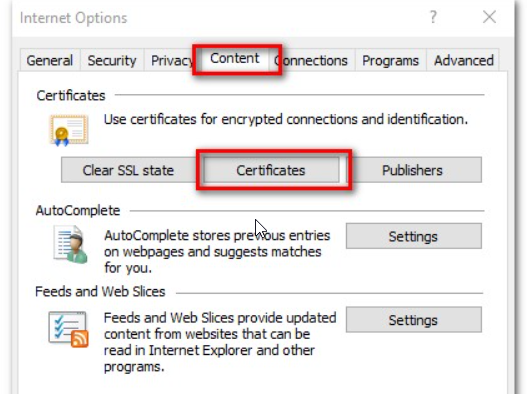
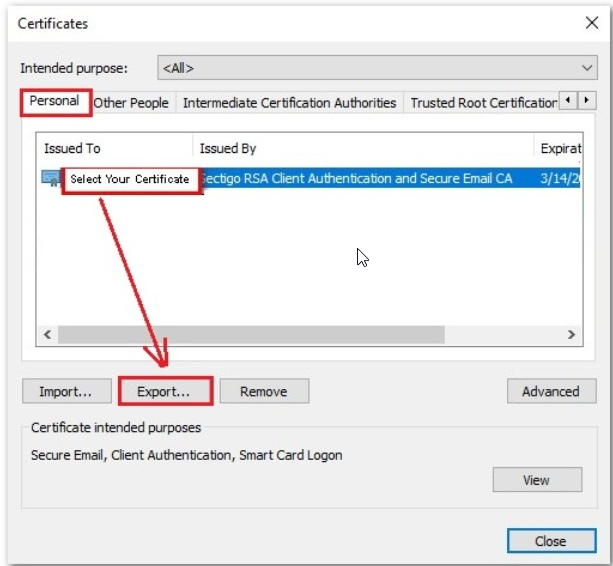
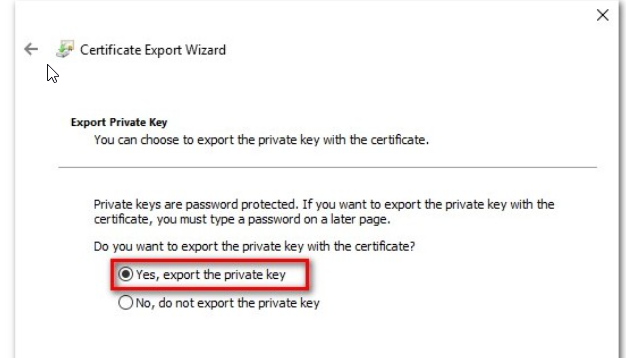
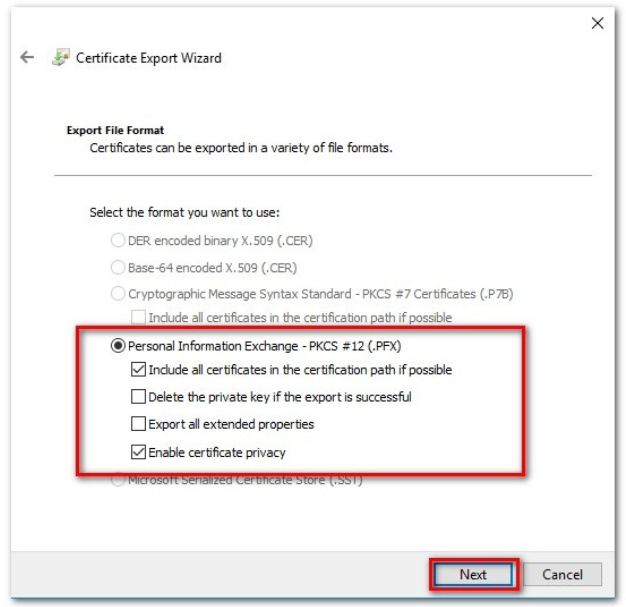
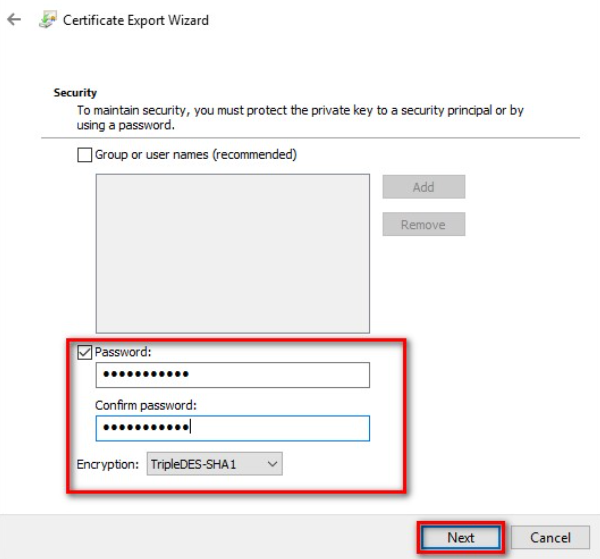
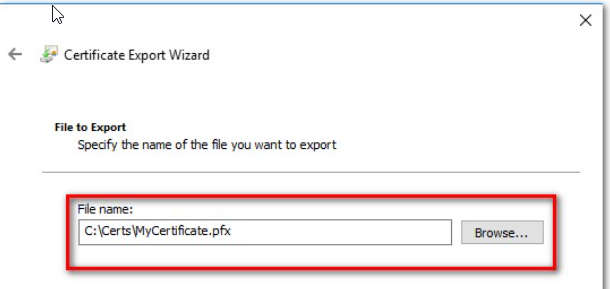
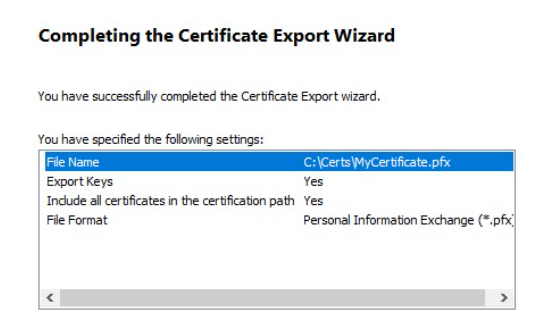
Source: Sectigo’s Knowledge Base
Copy Link
Sectigo Personal Authentication Certificates were designed for individuals and businesses who are looking at implementing the best web security practices, such as email & document encryption and user two-factor authentication. However, each CPAC SSL Certificate was designed to fit a particular need. Just like DV, BV, and EV SSL Certificates, CPAC SSL Certificates come with different validation requirements which enable certain certificate fields:
Based on your actual needs, you can now decide which Sectigo Personal Authentication Certificate is the best option for you, providing you an enhanced web security of your business activity.
For more info about validation requirements for each type of certificate, check this FAQ section.
Copy Link
You can order a Sectigo Personal Authentication Certificate (SPAC) for any valid email address. Below are the validation requirements for each type of Personal Authentication Certificate:
Validation requires a challenge-response from you, which is sent to the email address you provide. Once you have followed the instructions in the challenge email, the certificate is issued.
To obtain a SPAC Pro certificate, you need to complete the following steps:
After you complete the instructions in the challenge email, the certificate is issued.
Validation for an Enterprise requires the following:
Once the above steps are completed, the certificate is issued.
QIIS stands for Qualified Independent Information Source – an up-to-date public database that provides reliable and accurate information for which it is consulted. Examples of QIIS are local phone directories or third-party commercial credit services such as Dun and Brandsheet.
QTIS (Qualified Tax Information Source) is a governmental database that contains tax information relating to Private Organizations, Business Entities, or Individuals. Employer Identification Number (EIN) is considered a QTIS.
QGIS stands for Qualified Government Information Source – a database maintained by a Government Entity that contains legal business registration, corporate filing, trademarks, and patents.
Source: Sectigo’s Knowledge Base
Copy Link
We provide little to no support on how to install an SSL Certificate. There are countless combinations of “hosting providers X hosting panels X operating systems X web servers types X technologies X release versions” for us to be able to provide support for all of them.
Also, there are too many factors to take into consideration when installing an SSL Certificate for the setup to be correct and secure. These being said, we politely prefer to decline to offer any SSL installation instructions over the phone, email or ticketing system.
Here are three links where you can start the research on how to use your SSL Certificate with Outlook / Office 365:
– SSL Certificate Installation
– CPAC Certificate Installation
– SSL installation FAQ
There is a lot of information online on your particular server setup, so you may want to look into that as well. Alternatively, we recommend hiring a web developer or a system engineer who has installed SSL Certificates many times before.
Copy Link
The multi-domain certificate can be initially activated for the primary domain name.
If you wish to add more domains later, you need to reissue the certificate in your SSLDragon.com account, and add the SAN (additional domain) list in the SAN field, when reissuing.
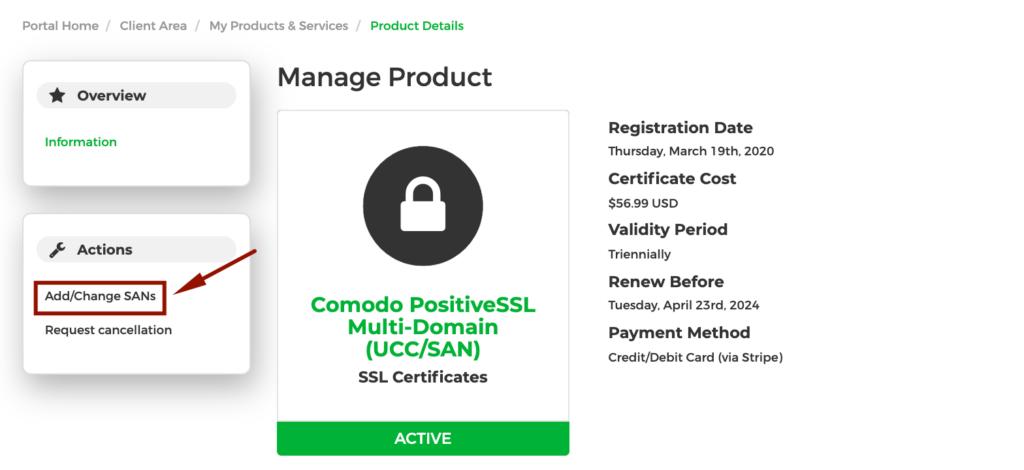
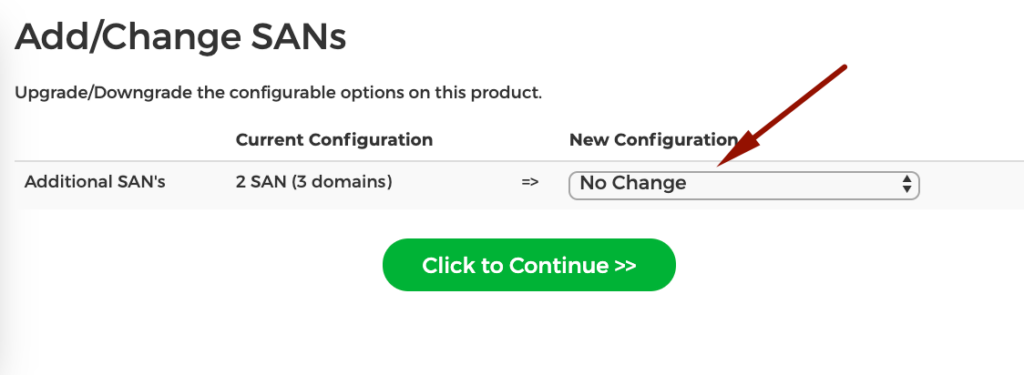
If you need to add more domains than included by default, then please choose the Add More SANs option in order to pay for and activate the additional SANs.
Copy Link
A data server provides a wide range of database services such as data storage, data manipulation, data analysis, and archiving. If your website offers Database-as-a-Service (DBaaS) solutions, you will need an SSL certificate to encrypt the sensitive information of your clients. Moreover, since Chrome and Firefox flag websites without SSL encryption as not secure, a valid SSL certificate will ensure that your site is accessible 24/7 from any browser.
Copy Link
All 5 reasons and any other can be revealed by checking how well was your SSL installed using these tools: SSL Server Test and Why No Padlock?
They will offer you a free report on your SSL Certificate installation along with detailed information on how to fix any vulnerabilities.
Also, we recommend you to read our article called: How to move your website from HTTP to HTTPS easily and with no pain. The article goes even further and comes with many more recommendations on what to check and do to have your website open from an HTTPS link correctly.
Copy Link