


Wait! Don't Leave Without Securing Your Site
Get enterprise - grade SSL certificates at a fraction of retail prices.
Save 10% on your first order, by entering coupon code SAVE10 during checkout.

When dealing with SSL certificates, you’ll come across different certificate extensions. A file extension is a designation at the end of a file. For example, a certificate named “yourdomain.crt” has a certificate extension of “.crt” The”*” we put in front means that the name before the period could be anything. It’s only what is after the period that matters for identification of extension type.
Below is a list of certificate extensions:
*.CSR – Certificate Signing Request – a block of encoded text with your contact data you must generate and submit to the CA during the SSL ordering process.
*CER or *CRT – Base64-encoded X.509 Certificate – stores a single certificate. This format does not support the storage of private keys.
*.PFX or *.P12 – Personal Information Exchange Format – stores private and public keys and all certificates in the path. Used to export a certificate and retain full private key functionality.
*.DER – DER-encoded binary X.509 Certificate – stores a single certificate. This format does not support the storage of private keys.
*.P7B or *.P7R or *.SPC – Cryptographic Message Syntax Standard – storage of all certificates in the path and does not store private keys.
*PEM – Privacy-Enhanced Mail – concatenated (combined) certificate containers frequently used in certificate installations when multiple certificates that form a complete chain are being imported as a single file.
*.CRL – Certificate Revocation List – designates a certificate that has been revoked.
Learn more about certificate formats and conversion tools with our detailed guide.
Copy Link
There are SSL Certificates of three validation types:
(1) Domain Validation SSL Certificates – are the least expensive SSL Certificates. They are the easiest to get, and are issued within 3-5 minutes.
(2) Business Validation SSL Certificates require you to have a registered company. When users click on the padlock icon for your certificate, they will see your company name. Also, Business Validation Certificates come with a dynamic site seal, similar to the Sectigo site seal that we have in the footer of our website. They are issued within 1-3 business days.
(3) Extended Validation SSL Certificates – just like the Business Validation certificates, the Extended Validation SSL Certificates require you to have a registered company, and when users click on the padlock icon for your certificate, they will see your company name. They also come with a dynamic site seal similar to the one from the footer of our website. They are issued within 1-5 business days.
Also, based on how many domains or sub-domains you want to secure, you can look at One Domain SSL Certificates which will secure only one single domain name or sub-domain, Multi-Domain (SAN) SSL Certificates which secure several domains and/or sub-domains at a time, and the Wildcard SSL Certificates which secure one domain and all its sub-domains under one certificate. Finally, don’t forget about the Code Signing SSL Certificates which will sign, secure and protect your software from being infected with malware and then distributed online.
Please note that all these SSL Certificates types come with the same exact security level and encryption strength.
Copy Link
You can find detailed documentation about the SSL Certificates’ best installation practices at SSL Labs.
Copy Link
What are Multi-Year SSL Subscription Plans?
Right now, certificates can run up to 200 days (since March 15, 2026). The SSL validity will change to 100 days from March 15, 2027, and then to just 47 days starting March 15, 2029.
However, in order to make your SSL Management process time-saving and cost-effective, the CAs and SSL Dragon are offering you the 2 Year and 3 Year SSL Subscription Plans.
This means that you can still buy a 2 or 3 year SSL Certificate and continue to benefit from multi-year discounting, while still remaining compliant with the CAB Forum SSL requirements.
How the Multi-Year SSL works?
Due to security reasons, your SSL certificate is initially issued with a maximum 200-day validity.
30 days before the expiration of your certificate, SSL Dragon, on behalf of the CA, will notify you and ask you to reissue your SSL, in order to get the additional (replacement) 1-year certificate, according to your Subscription Plan.
This FAQ explains to you how to reissue your SSL Certificate, step by step.
You will need to validate & install the replacement SSL:
a. If you have a Domain Validation SSL Certificate, a short verification of your domain name will be required via Email, HTTP, or DNS in order to issue the 1-yr replacement SSL.
b. If you have a Business or Extended SSL Certificate – an additional Business Validation/Extended Validation recheck and callback process will also be required.
You can still reissue your certificate at any time and as many times as you like during your Multi-Year SSL Subscription Plan.
On your SSL Certificate’s page within the SSL Dragon account, you will find all the details regarding your Subscription Plan:
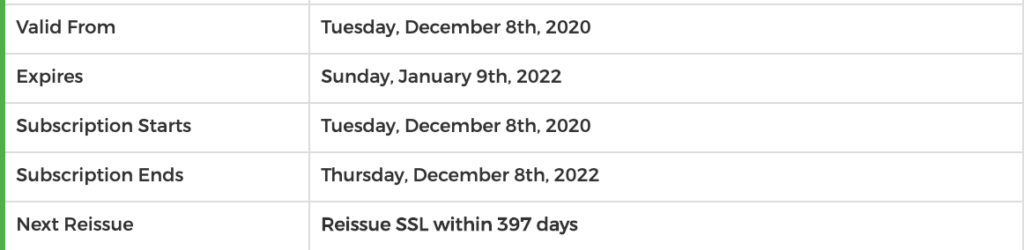
Copy Link
In order to buy a Domain Validated certificate, you do not need to provide any documentation. You will have to confirm the domain ownership through a simple email, DNS record, or file-based authentication (except wildcard SSL certificates). Following completion of one of these elements, the DV certificate will be signed and released to you.
Copy Link
If you generated your CSR code on the CSR Generator on our website, then the CSR and the Private Key were both shown to you when you generated your CSR. They were also sent to your email address that you included in the CSR form that you filled in on our website. The message that was sent to your email address came from [email protected] and it had the following subject: “Your CSR code and your Private Key”.
If you generated your CSR on your server, then your CSR code and your Private Key were both provided to you by your server. You had to copy both on your computer or email, and store them in a safe place. In some cases, some servers may show the CSR code and the Private Key, and at the same time store both these pieces of code for you on the server. In other cases, the server only provides you the CSR code and keeps the Private Key hidden on the server.
Also, your CSR code will be displayed to you again when your SSL Certificate is issued. Once the SSL Certificate is issued and shown in your SSL Dragon account, it will also show you the CSR code that you used to configure your SSL Certificate.
Copy Link
The Business Validation (BV), also called Organization Validation (OV), SSL certificate is recommended if you have an e-commerce website that is a registered business. Besides the domain validation performed through e-mail, you will have to provide company documentation to receive business authentication. During this authentication process, the Certificate Authority (CA) will verify if your business is carried out by a legitimate, good faith company operating at the provided location. Since the validation is done manually and involves paperwork, you will receive your Business Validation SSL certificate within 1-3 business days.
After receiving Business Validation, the “https” and padlock icon will be displayed on your website’s address bar. These signs will make customers more willing to entrust you with their personal and financial information. Yet, if your website’s purpose is to perform large sales, offer specific products/services or execute financial transactions, you should consider buying our Extended Validation (EV) certificate.
Copy Link
A Code Signing Certificate is a digital file that verifies the authenticity and integrity of software by digitally signing it, ensuring it has not been tampered with and comes from a trusted source. Here’s how a code signing certificate works.
Copy Link
CSR stands for “Certificate Signing Request”. The CSR code represents an encrypted text message which a person or a company sends to the Certificate Authority as a part of applying for an SSL Certificate. The CSR code contains information about you and your company, which will be included in the SSL Certificate that will be issued to you.
Copy Link
The Domain Validation (DV) SSL certificate is the most affordable choice for increasing the security of your blog, personal or small business website. Since there is no required paperwork, the process of acquiring the Domain Validation certificate is very quick and easy: you will have to prove that you are the domain owner just by responding to an automatic e-mail message. After a couple of minutes, you will receive the issued SSL certificate which can be installed immediately. Sites with Domain Validation certification can be identified by the padlock that is displayed by most web browsers.
This type of SSL certificates is recommended to be used if you need to prove that your site is secured, by having a secured connection. The Domain Validation certificates don’t display the legal entity, as the identity of the website owner is not checked while issuing them. So, if you have an e-commerce website or a site that collects users’ personal data, you should consider buying our Business Validation (BV) or Extended Validation (EV) certificates, which will make your site more trustworthy.
Copy Link