


Wait! Don't Leave Without Securing Your Site
Get enterprise - grade SSL certificates at a fraction of retail prices.
Save 10% on your first order, by entering coupon code SAVE10 during checkout.

To export a S/MIME certificate from firefox follow the instructions below:
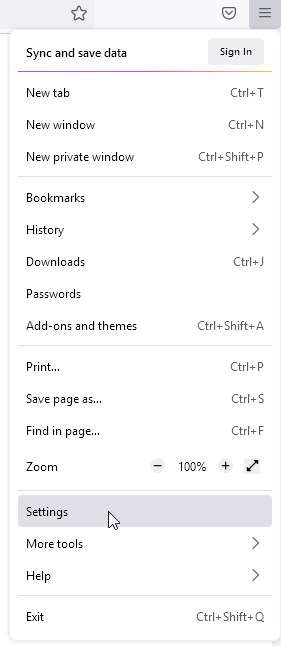
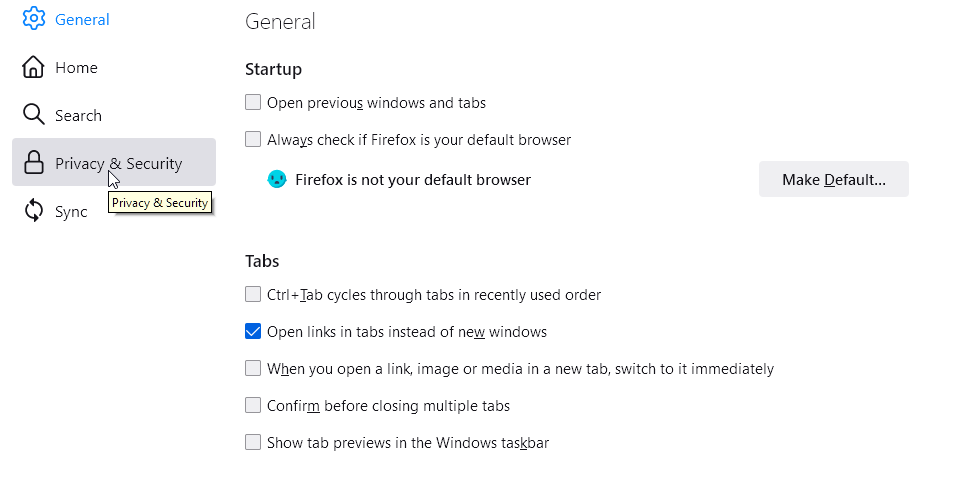
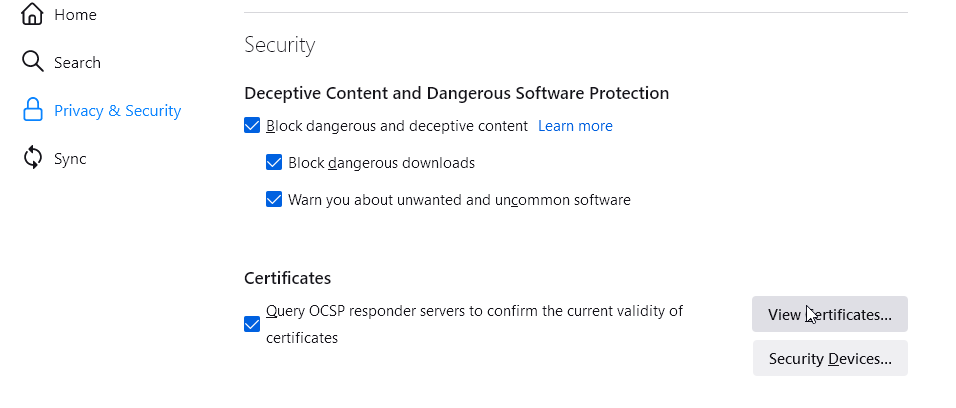
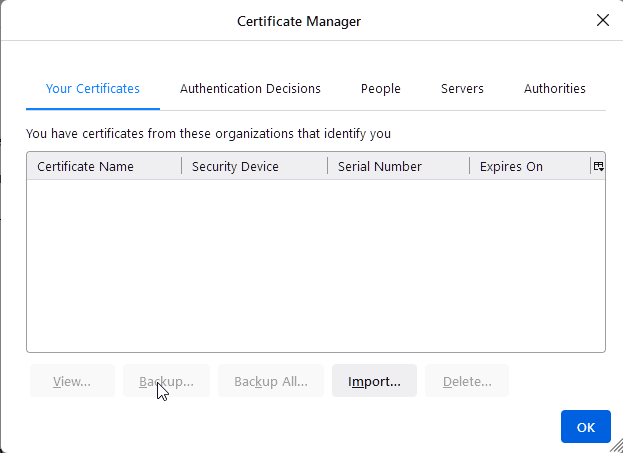
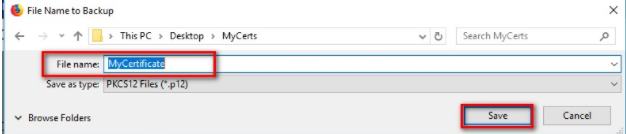
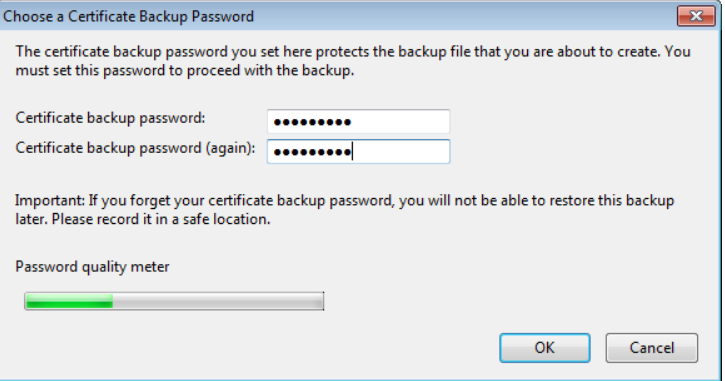
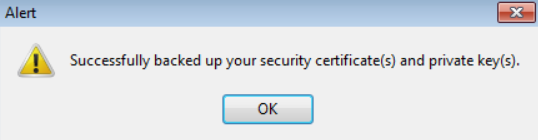
Source: Sectigo’s Knowledge Base
Copy Link
Follow the steps below to export your CPAC (which was already installed on Keychain into a PKCS12 file).
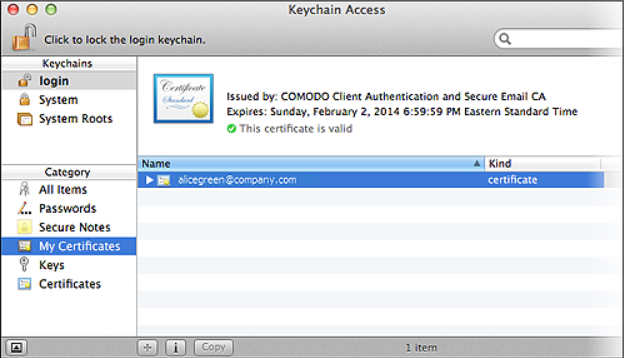
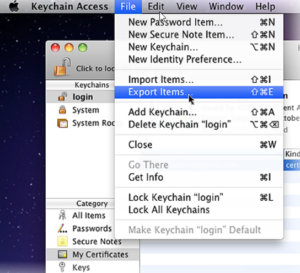
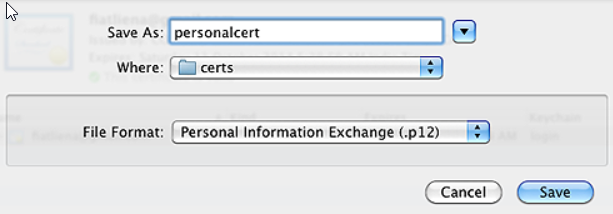
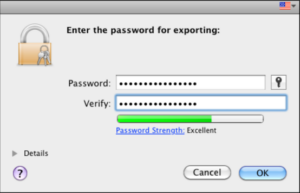
Once you’ve exported the Email;/Personal Authentication certificate into P12 format, you can import it into a MAC OC using Keychain Access. To complete the process, follow the steps below:
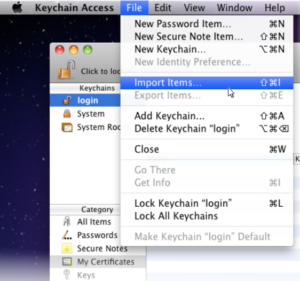
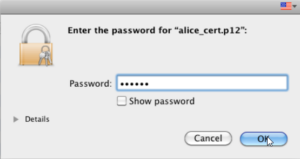
Note: If prompted to trust certificates issued by your CA automatically, select the Always Trust option to trust and install your certificate.
Source: Sectigo’s Knowledge Base
Copy Link
You can install your Sectigo CPAC Certificate as soon as it has been issued to you.
Here are installation instructions for different browsers, email clients, and mobile devices provided by Sectigo:
Copy Link
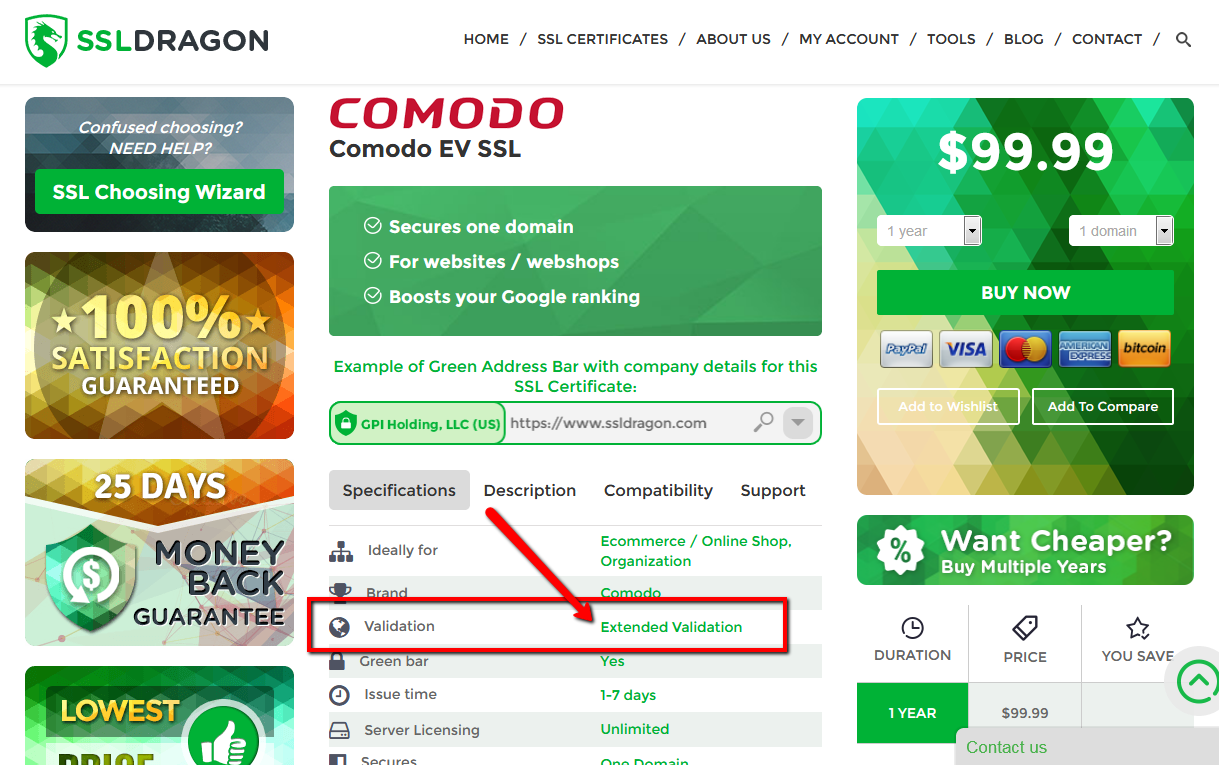
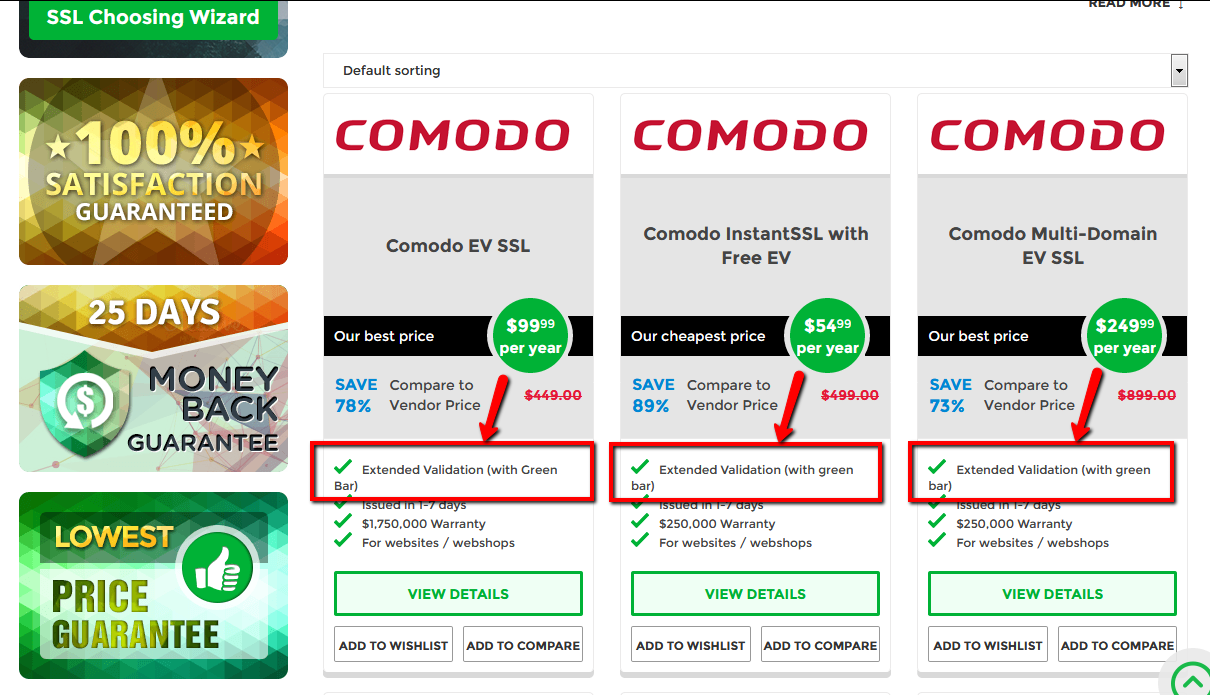 You can check if you have an Extended Validation SSL Certificate by looking at the attributes of your SSL Certificate. Please open the two screenshots on the right in order to see where you can find the information about the validation type of your SSL Certificate.
Different SSL Certificate brands have different Extended Validation procedures. Please read the section that applies to your SSL Certificate brand below.
DigiCert (including Thawte & GeoTrust)
The validation team would send you an agreement by email, during the verification process. Then the certificate authority will work on validating the legal existence of your company via local public databases, as a part of the Extended Validation process. This may take between 1-3 working days. Please wait until one of the certificate authority representatives contacts you about any additional information that they may need you to provide them.
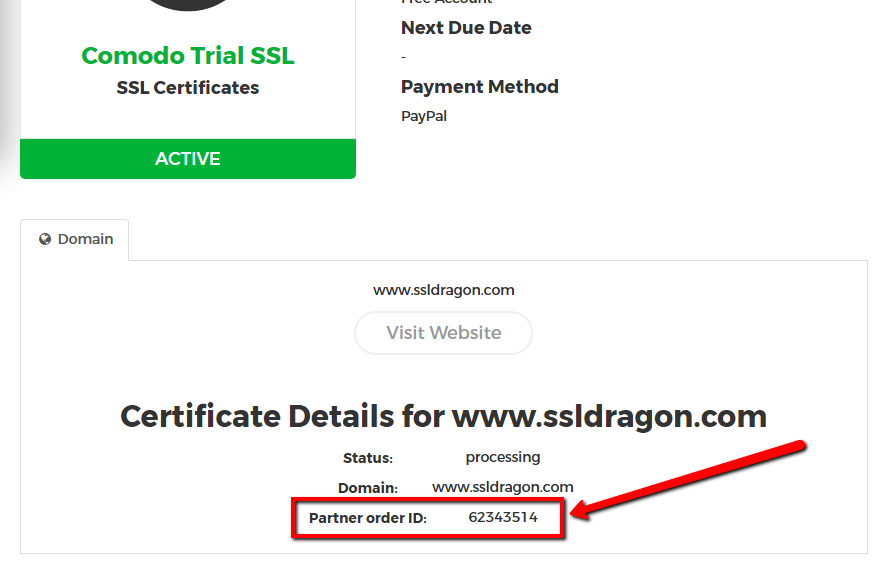 If you do not hear from the Certificate Authority representatives in the 5-7 days, then please call +1 (877) 438-8776 to check the status of your SSL Certificate with the Certificate Authority. Please note that Thawte, GeoTrust, DigiCert are all owned by DigiCert, and they all have the same phone number provided above. When you talk to them, you will need to provide the “Partner Order ID”, which you can find on the details page of your SSL Certificate inside your SSL Dragon account. See the screenshot on the right.
Sectigo/GoGetSSL
Please send the necessary forms described below to Sectigo by opening a ticket with Sectigo Validation Center at https://sectigo.com/support. Click on “Submit a ticket”, select Validation Department, and submit your request. Please mention your “Partner Order ID” in your message.
You can find your “Partner Order ID” on the details page of your SSL Certificate inside your SSL Dragon account. See the screenshot on the right.
I. New Orders
STEP 1: Agreement signing
In a few hours after the order is placed, you will receive an email from Sectigo with a click-through link called the “Validation Manager link“.
Please use this click-through link to access the Validation form and sign the agreement using a digital signature and upload it directly to Sectigo.
If you didn’t receive the email with the link and/or can’t sign the agreement digitally, please fill these 2 forms – Certificate Request Form and EV SSL Subscriber Agreement – and send them to Sectigo (see above instructions).
You can also download the Sectigo EV forms from their knowledge-base.
STEP 2: Business Validation
To pass Business validation, you may have to provide an official registration document, such as Business License, Article of Incorporation, and or Registration application.
Here are the BV options:
A. No paperwork. Your company’s legal existence will be checked via public government database using your company name and your unique Registration/Identification number OR via verified public 3rd party databases, such as GLEIF, Duns & Bradstreet, Hoovers, Companies House GOV.UK.
B. Paperwork. Your company will be verified using:
STEP 3: Callback process
The last step is a callback process called Phone Validation. Sectigo will call you and asks to confirm your name and order to validate the official company’s phone number.
Below are the 4 callback options. You don’t have to do all four things from below. Doing just one of them will be enough.
A. Yellow Pages Databases. Sectigo verifies your phone number via public Yellow pages Databases.
B. DUNS. The second way is to provide your DUNS number to Sectigo. You can get your company’s DUNS number from this website: https://www.dandb.com/. If Sectigo gets back to you and says that your DUNS listing does not contain a phone number, then you need to contact Dun & Bradstreet (at https://www.dandb.com/) and ask them to “add your company’s phone number to their business directory and on the report”.
C. Local phone database. If you don’t have a DUNS number, then the other thing you can do is to provide your company’s registration number for Sectigo to check your company with your country’s governmental directories (e.g.: Corporation Division, Companies House, Department of State, etc). Please note that Sectigo will be looking to see your company’s phone number listed there as well. Not all governmental directories have the companies’ phone numbers. If the governmental directory allows you to call them, email them, or use their website to add your phone number, then please go ahead and do that.
D. Legal Opinion. If the above two options (2.1 and 2.2) don’t work for you, then the third and last option to validate your phone number is to ask a CPA (Certified Public Accountant), or a Latin Notary, or an Attorney (Lawyer) to write, sign and send a letter to Sectigo where they confirm your company name, address and phone number. You can find the sample letters below:
– Sample Accountant Letter
– Sample Legal Opinion Letter
II. Renewal/Reissue Orders
For reissues and renewal order, instead of Step 1 and 2, you must contact Sectigo Validation Center at https://sectigo.com/support. Click on “Submit a ticket”, or choose Live Chat, select Validation Department and submit the following request (please replace [] fields with the corresponding info):
Reason for the ticket: Validation
Order number: [Your Partner Order ID]
Subject: Extended Validation
Dear Sectigo!
Please validate order [Partner Order ID] using the company name [Your Company Name], with [Registration/ID number] and [DUNS number].
Sectigo will then contact you for Step 3 or any updates of Step 1 or 2 described above.
Copy Link
Here are the steps that you need to do in order to pass OV (Organization Validation) for your S/MIME Class 2 email SSL Certificate:
Open a ticket with us and let us know the following info:
A. Your Company Info:
B. Your Company Contact Info:
C. The Email address, First Name, and Last Name the SSL will be issued for.
Copy Link
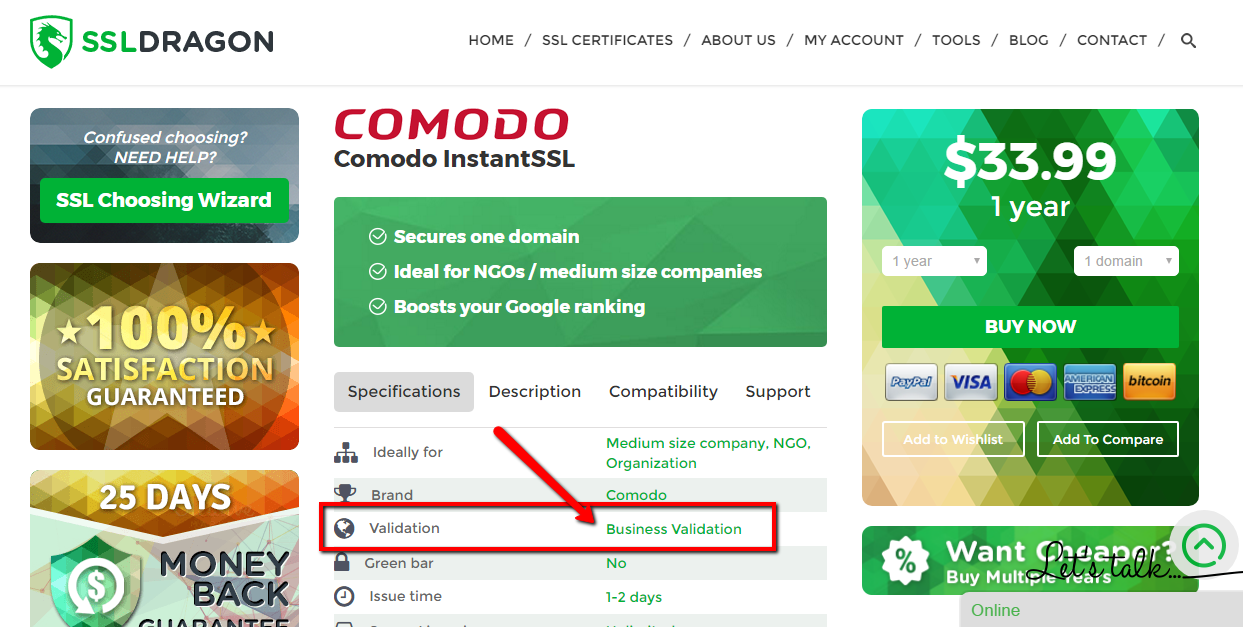
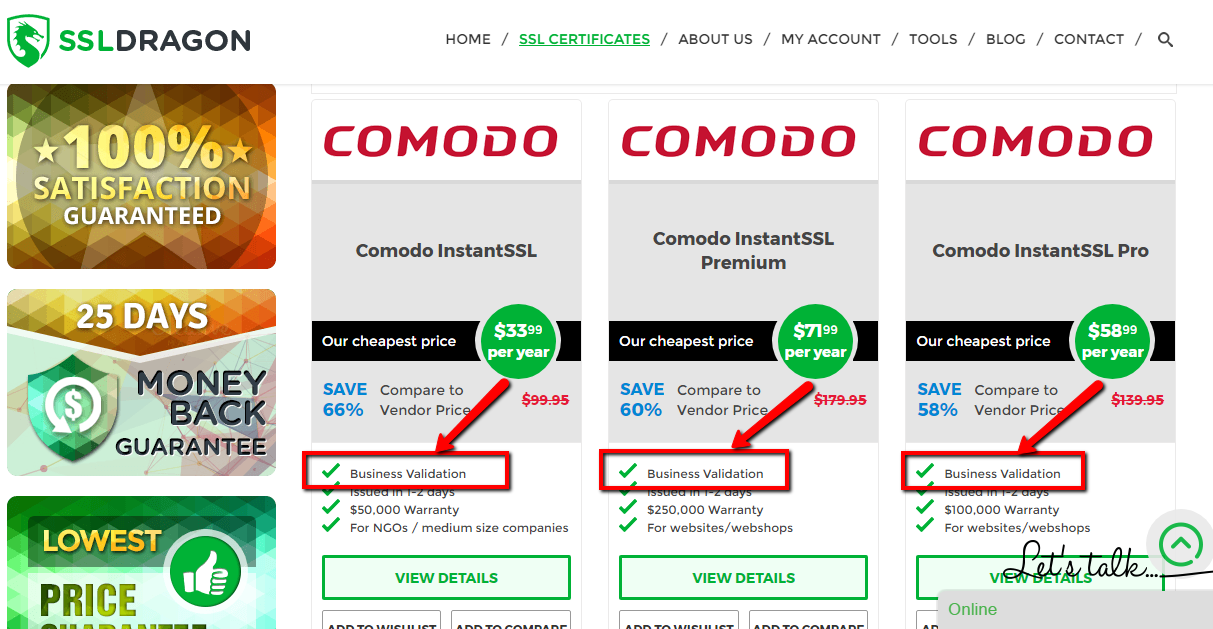 You can check if you have a Business Validation SSL Certificate by looking at the attributes of your SSL Certificate. Please open the two screenshots on the right in order to see where you can find the information about the validation type of your SSL Certificate.
Different SSL Certificate brands have different Business Validation procedures. Please read the section that applies to your SSL Certificate brand below.
DigiCert (including Thawte & GeoTrust)
If you bought a Business Validation SSL Certificate with Thawte, GeoTrust, DigiCert, then the certificate authority will work on validating the legal existence of your organization via local public databases, as a part of the Business Validation process. This may take between 1-3 working days. Please wait until one of the certificate authority representatives contacts you about any additional information that they may need you to provide them.
If you do not hear from the Certificate Authority representatives in the next 5-7 days, then please call +1 (877) 438-8776 to check the status of your SSL Certificate with the Certificate Authority. Please note that Thawte, GeoTrust, DigiCert are all owned by DigiCert, and they all have the same phone number provided above. When you talk to them, you will need to provide the “Partner Order ID”, which you can find on the details page of your SSL Certificate inside your SSL Dragon account. See the screenshot on the right.
Sectigo/GoGetSSL
Please send the necessary forms described below to Sectigo by opening a ticket with Sectigo Validation Center at https://sectigo.com/support. Click on “Submit a ticket”, select Validation Department, and submit your request. Please mention your “Partner Order ID” in your message.
You can find your “Partner Order ID” on the details page of your SSL Certificate inside your SSL Dragon account. See the screenshot on the right.
I. New Orders
STEP 1: Business Validation
To pass Business validation, you may have to provide an official registration document, such as Business License, Article of Incorporation, and or Registration application.
Here are the BV options:
A. No paperwork. Your company’s legal existence will be checked via public government database using your company name and your unique Registration/Identification number OR via verified public 3rd party databases, such as GLEIF, Duns & Bradstreet, Hoovers, Companies House GOV.UK.
B. Paperwork. Your company will be verified using:
STEP 2: Callback process
The last step is a callback process called Phone Validation. Sectigo will call you and asks to confirm your name and order to validate the official company’s phone number.
Below are the 4 callback options. You don’t have to do all four things from below. Doing just one of them will be enough.
A. Yellow Pages Databases. Sectigo verifies your phone number via public Yellow pages Databases.
B. DUNS. The second way is to provide your DUNS number to Sectigo. You can get your company’s DUNS number from this website: https://www.dandb.com/. If Sectigo gets back to you and says that your DUNS listing does not contain a phone number, then you need to contact Dun & Bradstreet (at https://www.dandb.com/) and ask them to “add your company’s phone number to their business directory and on the report”.
C. Local phone database. If you don’t have a DUNS number, then the other thing you can do is to provide your company’s registration number for Sectigo to check your company with your country’s governmental directories (e.g.: Corporation Division, Companies House, Department of State, etc). Please note that Sectigo will be looking to see your company’s phone number listed there as well. Not all governmental directories have the companies’ phone numbers. If the governmental directory allows you to call them, email them, or use their website to add your phone number, then please go ahead and do that.
D. Legal Opinion. If the above two options (2.1 and 2.2) don’t work for you, then the third and last option to validate your phone number is to ask a CPA (Certified Public Accountant), or a Latin Notary, or an Attorney (Lawyer) to write, sign and send a letter to Sectigo where they confirm your company name, address, and phone number. You can find the sample letters below:
– Sample Accountant Letter
– Sample Legal Opinion Letter
II. Renewal/Reissue Orders
For reissues and renewal order, instead of Step 1 and 2, you must contact Sectigo Validation Center at https://sectigo.com/support. Click on “Submit a ticket”, or choose Live Chat, select Validation Department and submit the following request (please replace [] fields with the corresponding info):
Reason for the ticket: Validation
Order number: [Your Partner Order ID]
Subject: Business Validation
Dear Sectigo!
Please validate order [Partner Order ID] using the company name [Your Company Name], with [Registration/ID number] and [DUNS number].
Sectigo will then contact you for Step 2 or any necessary updates to the Step 1.
Copy Link
Here are the steps that you need to do in order to reissue your Sectigo CPAC Certificate:
1) Login at https://secure.trust-provider.com/products/frontpage?area=ssl using the username and password that you used when you configured your Sectigo CPAC initially;
2) Once you are logged in, find the “Replace” button and click on it;
3) You will start the reissue process for your Sectigo CPAC SSL.
4) Follow the steps and instructions that come next, until you complete the Sectigo CPAC Certificate reissue.
Copy Link
If your router has a public IP address, you can still validate that IP address.
HTTP/HTTPS validation is the only method available for IP address validation. The HTTP/HTTPS validation method consists of adding a TXT file on your IP address and having Sectigo scan that IP address and validate it. There is no way to upload a TXT file on your router. The solution to get the IP address validated is to reroute the IP address to a server, put the TXT file on that server, pass the IP validation, and then reroute the IP addresses back to the router.
You can read more information on what the TXT file should include and where to upload it in the following FAQ item: https://www.ssldragon.com/faq/pass-validation-public-ip-address-ssl-certificate/
Copy Link
This article will help you determine which multi-domain SSL Certificate you should get. We have categorized the multi-domain SSL Certificates in 4 groups, and we would recommend you to read about each group and then choose a multi-domain SSL Certificate from the group that meets your preferences best:
Copy Link
You have to pass the Business Validation when you buy a new or reissue/renew a BV SSL Certificate.
At the same time, the process of completing the Business Validation is easier the following years, so as the Certificate Authority has more information about your company in their system, based on your previous BV SSL Certificates requests.
Please check the Renew/Reissue BV instructions.
Copy Link