


Wait! Don't Leave Without Securing Your Site
Get enterprise - grade SSL certificates at a fraction of retail prices.
Save 10% on your first order, by entering coupon code SAVE10 during checkout.

You have to purchase an SSL certificate if your website contains logins or web forms that require personal or credit card information from your customers. The SSL certificate will secure the personal data shared on your website and will make your clients feel safer while performing transactions, knowing that any information shared is within a secure environment and authenticated by a trusted Certificate Authority.
If you have an informative website, we still recommend you to purchase an SSL certificate. By having an HTTPS link, your website will be more trustworthy.
Copy Link
When you buy a multi-domain SSL Certificate and you include several domain names and/or sub-domains in it, the Certificate Authorities require you to pass the domain validation for each and every domain name and/or sub-domain that you included in your multi-domain SSL Certificate, and only after that, the multi-domain SSL Certificate will be issued to you.
POSSIBLE PROBLEM: Sometimes the email addresses, or your HTTP options, or the DNS records that you choose for your multi-domain certificate do not get set correctly when they reach the Certificate Authority. You will know that when you see that you only got one single domain validation message to your email address instead of getting several domain validation messages, or your multi-domain SSL Certificate’s status still shows as “Awaiting Validation (Full)” even though you passed the domain validation for one of the domains.
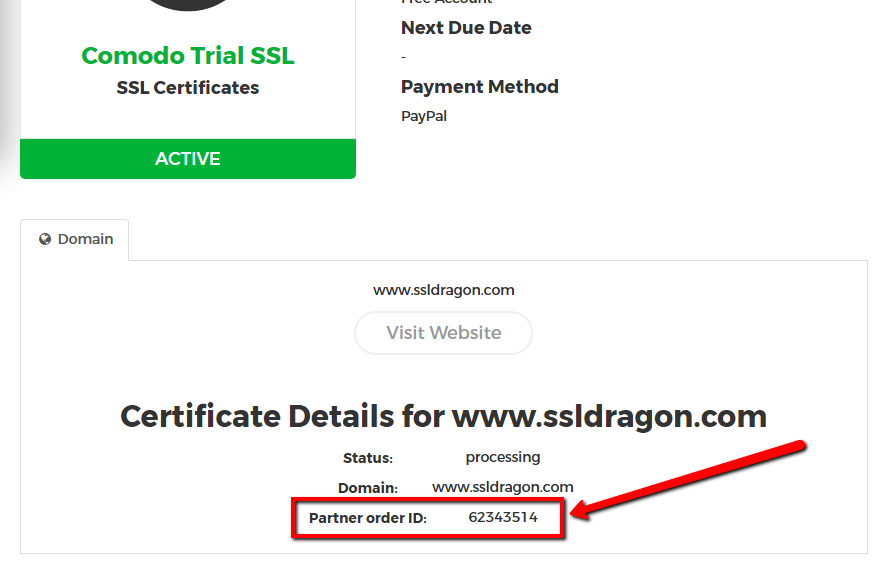 HOW TO FIX: There is an easy way to fix that, and that requires getting in contact with the Certificate Authority’s Validation Department. When you contact them, please provide them your “Partner Order ID” (see screenshot on the right), and then tell them about the domain validation method that you chose to go with: HTTP, DNS, or Email. If you chose to pass the domains validation by email, then double-check with the Validation Department representatives what email addresses are set in their system, and ask them to send you the domain validation messages to your desired email addresses.
Sectigo/GoGetSSL
Please call Sectigo Validation Department at +1 (888) 266-6361 or https://sectigo.com/support for the above-stated reasons. When you talk to them, you will need to provide them your “Partner Order ID”.
Thawte, GeoTrust, DigiCert
Please call Thawte, GeoTrust, DigiCert Validation Department at +1 (877) 438-8776 for the above-stated reasons. Please note that Thawte, GeoTrust, DigiCert are all owned by DigiCert, and they all have the same phone number provided above. When you talk to them, you will need to provide the “Partner Order ID”.
Copy Link
EV SSL Certificates issued by GeoTrust, Thawte, and DigiCert have a quicker and easier Extended Validation process compared to those issued by Sectigo.
With GeoTrust, Thawte, and DigiCert, the Certificate Authority does most of the company validation process all by itself, and in rare cases requires the customers to provide additional information and legal letters signed by a notary, certified public accountant, or an attorney.
On the other side, Sectigo relies a lot on the customer to provide all the information about his/her company, as well as updating the company’s DUNS listing (on the Dun & Bradstreet website) and providing legal letters signed by a notary, a certified public accountant, or an attorney.
You can read what the Extended Validation process with these different brands consists of at this link.
Copy Link
You need to go to your SSL Dragon account and check the “Expires” field for the SSL Certificates that you have with us. You can do that by following the next steps:
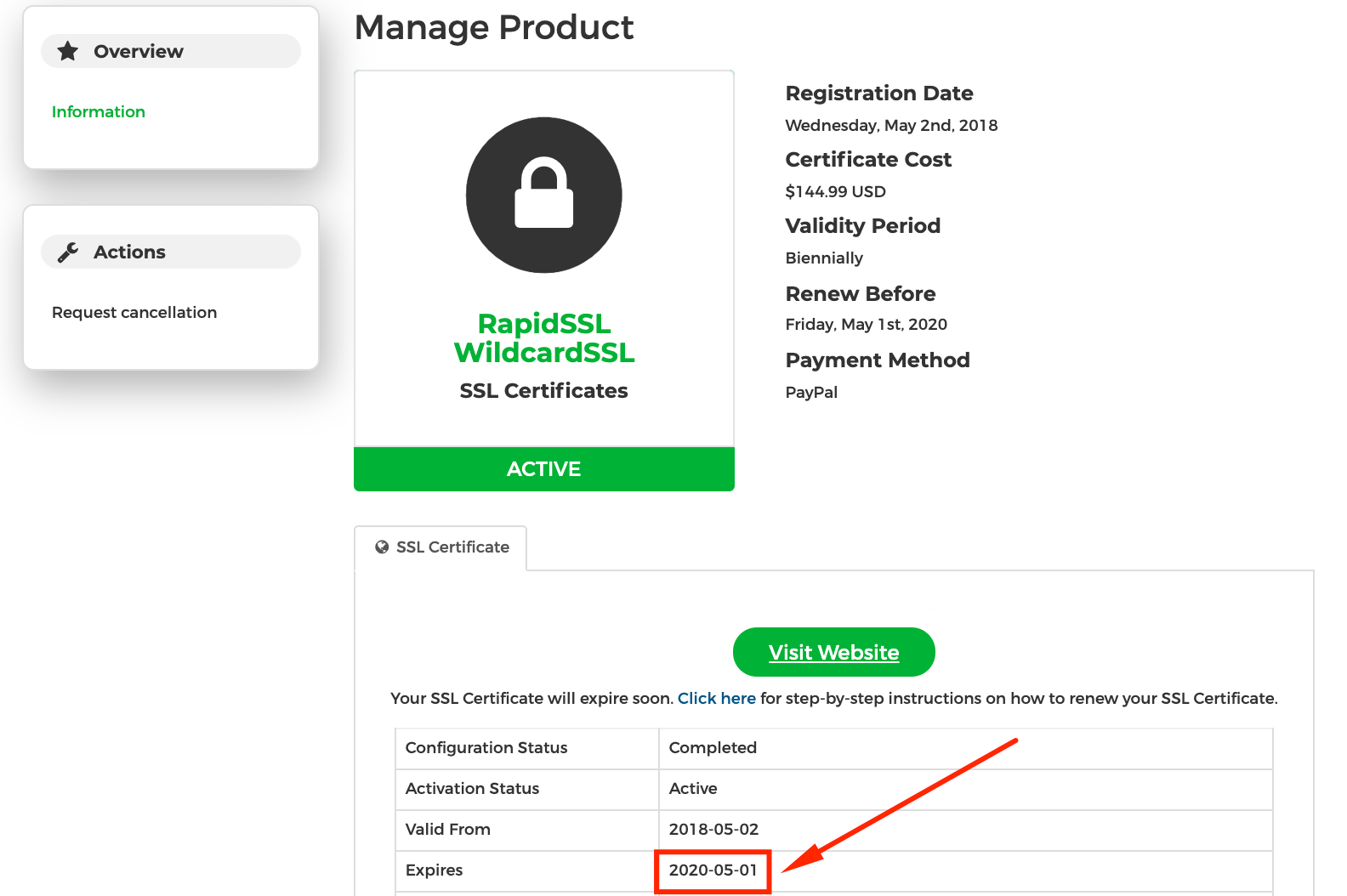 1) Log into your SSL Dragon account at: https://my.ssldragon.com/
2) Go to “SSL Certificates” -> “My SSL Certificates“;
3) You will see the list of SSL Certificates which you bought from us;
4) Click on the necessary SSL Certificate;
5) Find its “Expires” field on the SSL Certificate’s details page.
You may start the renewal process within 30 days before the “Expires” date by clicking on the “Renew” button.
Your new SSL Certificate will be connected with the old one. All remaining days from the previous SSL Certificate will be added to the new one.
Copy Link
Confirm it first with the Certificate Key Matcher: if the fingerprints differ, the files really are from different key pairs.
Sometimes, the SSL Certificate which was issued to you does not match the Private Key which you are trying to use when installing that SSL Certificate on your server. That is a common user generated error.
If the system says there is a mismatch, then you need to double check the CSR and Private Key which you generated, and which came together. You need to make sure that you used that specific CSR when you configured your SSL Certificate. When the SSL Certificate is issued, you need to use the Private Key that pairs with that specific CSR.
We see customers making the mistake where they generate one CSR and Private Key, then configure the SSL Certificate with a different CSR that is server generated. In that case the server generated CSR pairs with its own Private Key which you most probably don’t have.
The Private Key which you have works only with the CSR that it came with. Also, the Private Key which you have works only with the SSL Certificate that was configured using the CSR that pairs with that Private Key.
Solution
To solve this, you need to re-configure (re-issue) your SSL Certificate using a CSR code for which you have the Private Key that it pairs with. You may want to use a CSR code that your server provides, or generate a new CSR and Private Key.
Copy Link
An SSL Certificate takes the information that your users provide and encrypts it, so that only a web server can decrypt it and understand it. So as the information on the web is transmitted via HTTP language, your data is not protected, as HTTP itself is not secure. The SSL Certificate takes your information, encrypts it, and passes it securely to the server where the website is hosted, or directly to the payment processor. On the merchant’s server, or on the payment processor’s side, the SSL certificate receives the encrypted HTTP information, decodes it, and safely performs the action you requested (logging you in, processing a payment, etc).
In this way, the SSL Certificate turns your “HTTP” connection into an “HTTPS” (secured HTTP) connection and protects your data. With an SSL Certificate, your information is protected and safe.
Copy Link
The validation time of an SSL depends on the type of certificate you chose to buy.
Domain Validated certificates are issued within 3-5 minutes in 99% of the cases. Only when an SSL Certificate is requested for a domain name that contains a trademark or a brand name, then those SSL Certificates may pass brand validation, and can take up to a business day to be issued.
Business Validated certificates are usually issued within 1-3 business days.
Extended Validated certificates can take between 1-7 business days to be issued. The Certificate Authority does its part of the work very quickly. If all the information is provided to the Certificate Authority quickly and correctly, then the Certificate Authority can issue the EV certificate within 1 business day. We’ve seen situations when the EV Certificate was issued within a few hours. The 1-7 days period depends on how quickly the customer provides the required information to the Certificate Authority, and how quickly the customer responds to the Certificate Authority’s potential requests for additional information.
By doing the Validation process, the Certificate Authority’s is trying to confirm that you are the owner of the domain, and that the company that you are requesting a Business Validation or Extended Validation certificate for is active. That is why it is important that you keep your company’s records (address and phone number) up to date and you promptly respond to the Certificate Authority’s requests.
Copy Link
Here are the requirements for obtaining an Extended Validation (EV) code signing certificate from Sectigo/Comodo:
For an in-depth explanation of each step, consult our guide on Extended Validation for Sectigo/Comodo certificates.
Copy Link
A CSR is generated immediately. It will be generated to you as soon as you fill in the CSR Generator form.
Copy Link
Yes, you can look what information your CSR includes, by doing a process which is opposite to encrypting it. You can use our CSR Decoder tool in order to see what information is included in your CSR. You can do that our CSR Decoder page.
Copy Link